Showing posts fromDomino
200.000 New Lotus Notes users in Brazil
- 02 Jan, 2011
Mario Costa tweet about this http://twitter.com/mariocosta/statuses/20978463695437824
200.000 New Lotus Notes users in BrazilRead More32-Bit Domino Running Poor on Windows 64-Bit
- 26 Oct, 2009
The text bellow is from TN 1391477(http://www-01.ibm.com/support/docview.wss?rs=463&context=SSKTMJ&context=SSPQ69&context=SSKTWP&context=SSRNU3&context=SSRNUY&q1=1391477&uid=swg21391477&loc=enUS&cs=utf-8&lang=en) When running a Lotus Domino 32-Bit server on Microsoft Windows 64-Bit, you notice a high memory allocation. This results in poor system performance and the server being low on physical memory. This is a result of a change Microsoft has made to their API SetSystemFilecache()..... Quando instalar Domino 32 Bits em um servidor MS 64 Bits melhor dar uma olhada no TechNote para não ter surpresas de performance.
32-Bit Domino Running Poor on Windows 64-BitRead MoreRemove encryption from Domino documents
- 22 Dec, 2020
When you create mail journaling you can encrypt all documents using the Administrator ID. Last week a customer ask to add access for another user (developer). The Admin remove the database encryption but lots off documents remain encrypted . The solution was to remove the document encryption using the following steps: To remove encryption from documents: 1. First, create a view named "Encrypted". The view selection formula you use will vary depending on the type of database with which you are working. - If working in a mail file, then use the following: - SELECT (Encrypt = "1" | EncryptionFlags = "2") If you are working in a non-mail file and want to remove encryption from documen
Remove encryption from Domino documentsRead MoreA checklist for implementing DAOS
- 13 Oct, 2010
From the TN 1415556
Completed / Choice?TaskReferenceAvoid known issues by upgrading to 8.5.1 FP3, 8.5.2 or later.
8.5.1 FP3(http://www.ibm.com/support/docview.wss?rs=899&uid=swg24025721&ca=notesdominofaq)Disable shared mail / verify shared mail is not enabled on any database. To verify that none of the files in the mail subdirectory have shared mail enabled run the command: load object info -full
How to disable shared mail in Lotus Domino(http://www-01.ibm.com/support/docview.wss?rs=899&uid=swg21096686)
Run DAOS estimator to determine the approximate disk space savings and the number of .nlo files that will be generated for various sizes.
Note: The DAOS estimator results are not
A week within the Matrix
- 16 Sep, 2013
The past week has been very productive and exciting. I worked with two engineers from RedPill which are very famous in the community of ICS and IBM also Champions.
This week I was totally immersed in a process of modernization of Notes/Domino applications that really impressed everybody, as much as for the customer, which has one of the highest Notes/Domino installations in the world.
The numbers are impressive, both in number of users, servers and applications. In a week we have created 200+ Notes applications that are now available for mobile devices.
Take a look on what RedPill can do for modernizing Notes/Domino applications
Thank you Nathan Freeman and Peter Presnell for an a
Admin Boot Camp at Plansis Belo Horizonte Brazil
- 06 Feb, 2012
In a few weeks Plansis will host the Domino Admin Boot Camp. I will be the Instructor :-).
Admin Boot Camp at Plansis Belo Horizonte BrazilRead MoreAdministration differences between the SmartCloud Notes service and on-premises Domino
- 30 Dec, 2015
Today i receive an mail with this article(https://www-10.lotus.com/ldd/bhwiki.nsf/dx/AdministrationdifferencesbetweentheLotusLiveNotesserviceandon-premisesDomino). Some administration features that are available in an on-premises Lotus Domino environment are unavailable, are implemented differently, or have limitations within the SmartCloud Notes service. It is very important to know this differences.
Administration differences between the SmartCloud Notes service and on-premises DominoRead MoreAfter an Apple OS upgrade, why does Traveler not sync?
- 25 Mar, 2013
After upgrading an Apple device, the Lotus Traveler account may no longer connect to the server with the error "Cannot Get Mail: the connection to the server failed". The user may also see a prompt immediately after the upgrade with the error "Password Incorrect: Enter the password for the Exchange account". On the Apple device, the Exchange account password (used by Traveler) is not always retained after the iOS upgrade. Currently there is no resolution to prevent the user from having to reenter their password (as detailed in the solution listed below). However, the following IBM Feature Request has been opened for further investigation: RSSN-8K2GWU In most of these cases, the problem
After an Apple OS upgrade, why does Traveler not sync?Read MoreAfter upgrading to Lotus Notes 8.5.1 Client and Template, users’ mail files appear as an Archive
- 26 Oct, 2010
After further investigation, it was determined that the existence of the "ArchiveDatabase" field, stored in the "Archive Database Profile" was the cause of the issue. By default, the "ArchiveDatabase" field does not exist in a mail file's "Archive Database Profile", but it does exist in an Archive database.
Once this field was removed, the mail file no longer appeared as an archive. The following LotusScript button code can be used to delete this field:
Sub Click(Source As Button)
Dim s As New NotesSession
Dim db As Notesdatabase
Dim doc As NotesDocument
Set db = s.CurrentDatabase
Set doc = db.GetProfileDocument("archive database profile
Agent Manager Tell commands
- 06 Nov, 2012
This table describes additional Tell commands you can use with Agent Manager. CommandResultTell Amgr Cancel Cancels the scheduled agent that is currently running. Note Tell Amgr Cancel does not cancel agents executed by other processes, such as HTTP or router; however, you can use the remote debugger to cancel agents executed by any process. If a third-party application hangs and does not return control back to IBM® Lotus® Notes®, the agent cannot be canceled. Specify the agent to be canceled by entering these arguments: "db name" 'agent name' Example: Tell Amgr Cancel "DatabaseName.nsf" 'AgentName' Note You can use the Tell Amgr Schedule command to determine which agents can be c
Agent Manager Tell commandsRead MoreAgentes para facilitar a Administração
- 05 Oct, 2009
Neste blog mesmo já publiquei alguns agentes para resolver problemas de Administração.
A IBM colocou alguns neste endereço http://www-10.lotus.com/ldd/dominowiki.nsf/dx/10022009124512AMWEB7LC.htm
Sempre que ministro cursos de Administração Domino falo com os alunos que é sempre importante saber programar.
An issue has been identified that affects Notes Traveler calendar entries on some Apple devices that are upgraded to iOS 8.
- 19 Sep, 2014
In some cases, after an Apple device is upgraded to iOS 8, some or all of the Calendar entries in the Notes Traveler account no longer appear on the device. It is important to note that although the Calendar entries do not appear on the device, the entries are NOT permanently lost. The missing entries, in fact, still exist in the user's Domino mail file, and they can be resynced to the device via this workaround(http://www-01.ibm.com/support/docview.wss?uid=swg21684863&myns=swglotus&mynp=OCSSYRPW&mync=E)
An issue has been identified that affects Notes Traveler calendar entries on some Apple devices that are upgraded to iOS 8.Read MoreAnother bug in Notes 8.5.1 FP3
- 10 Aug, 2010
You archive or delete one or more documents in a mail file, and afterwards the document remains in the mail file.SPR LMAN82ZS2Y
Fixed in
See this TN(http://www-01.ibm.com/support/docview.wss?uid=swg21440461&myns=swglotus&mynp=OCSSKTWP&mync=R) for details.
Attachment Size limitation for Traveler User
- 23 Apr, 2013
This setup must be done to avoid problems
Change the Default request and PORT size limitations in the Domino http server to a value appropriate for your installation. These changes can be made using the Domino Admin client to change the
following fields in the server document to a value more appropriate for your installation:
First setting:
Server document for the Traveler server-->Internet Protocols Tab-->HTTP Tab-->Http Protocol Limits section-->'Maximum Size of Request' field (defaults to 10,000 Kilobytes)
Second Setting:
Server Document for the Traveler server-->Internet Protocols Tab-->Domino Web Engine Tab-->POST Data section-->'Maximum POST Data (in kilobytes) field (de
Atualização applets do Domino
- 06 May, 2009
Ontem a IBM publicou um TN informando que os Applets do Domino também vão necessitar de um "upgrade" da assinatura.
Este alerta já havia sido publicado para o Sametime. A aplicação é simples, veja o TN aqui(http://www-01.ibm.com/support/docview.wss?rs=899&uid=swg24022981)
Auditing document deletion
- 18 Nov, 2009
Domino does not have a code to notify administrators when users are deleted from names.nsf i need to know who deleted the user.
To solve this problem i wrote an agent to do the job.
Just put the code on database script inside the QueryDocumentDelete.
Sub Querydocumentdelete(Source As Notesuidatabase, Continue As Variant)
Dim docMemo As NotesDocument
Dim docsDelete As NotesDocumentCollection
Dim ses As New NotesSession
Dim db As NotesDatabase
Set db = ses.currentdatabase
Set docMemo = New NotesDocument(db)
Set docsDelete = Source.Documents ' Selected documents
For x = 1 To docsDelete.count
Aviso de Recebimento
- 02 Jun, 2008
Uma demanda que surgiu de um amigo meu, e depois de outro e outro, foi fazer com que o Notes avise que alguém
requisitou o "Aviso de Recebimento" ao abrir uma mensagem do Notes. Achei o código em um fórum e ai vai a
receita:
Abrir a caixa postal no designer
Abrir o formulário Memo
Substituir o código no envento QueryOpen pelo código abaixo
Sub Queryopen(Source As Notesuidocument, Mode As Integer, Isnewdoc As Variant, Continue As Variant)
If source.InPreviewPane Then Exit Sub
'codigo para retirar o return receipt
Dim doc As NotesDocument
Dim res%
If Not(Source.IsNewDoc) Then
Set doc=Source.Document
Basic LDAP Filter Syntax and Operators
- 28 May, 2013
LDAP filters consist of one or more criteria. If one than more criterion exist in one filter definition, they can be concatenated by logical AND or OR operators.
AND Operation:
(& (...K1...) (...K2...)) or with more than two criteria:(&(...K1...)(...K2...)(...K3...)(...K4...))
OR Operation:
(| (...K1...)(...K2...)) or with more than two criteria:(|(...K1...)(...K2...)(...K3...)(...K4...))
Nested Operation:
Every AND/OR operation can also be understood as a single criterion:
(|(& (...K1...)(...K2...))(&(...K3...)(...K4...))) means:(K1 AND K2) OR (K3 AND K4)
The search criteria consist of a requirement for an LDAP attribute, e.g. (givenName=Sandra). Following rules should be con
Basic Steps to Install Lotus Notes 8.5.1 (or later) Multi-User on Citrix XenApp
- 22 Oct, 2011
Thetechnote 1447614(https://www-304.ibm.com/support/docview.wss?uid=swg21447614) outlines the steps to install Multi-user 8.5.1 or later releases, on Citrix XenApp with a customized data directory for new and existing Notes Installs. These instructions do not include steps to store the data directory on a remote file share, because this configuration is not supported.
Basic Steps to Install Lotus Notes 8.5.1 (or later) Multi-User on Citrix XenAppRead MoreBES Express for Lotus Domino will be launched on November in Brazil
- 09 Oct, 2010
BES Express for Lotus Domino is going to be launched in Brazil on November 2nd . BES express será lançado no dia 02 de Novembro no Brasil Link http://www.itweb.com.br/newsletter/out\10/Convite\Webinar\Blackberry/index.htm(http://www.itweb.com.br/newsletter/out10/ConviteWebinarBlackberry/index.htm)
BES Express for Lotus Domino will be launched on November in BrazilRead MoreBest Practices to manage and maintain Domino Attachment and Object Service (DAOS)
- 03 Sep, 2014
Below are some basic points that one should remember as best practices to manage and maintain DAOS feature in IBM Notes Domino environment.
1. Domino server must be 8.5.x and onwards. All database ODS must be 48 and onwards.
1. Transaction Logging must be enabled on server and it is recommended to keep transaction log directory outside of domino/data folder, in a separate drive.
1. DAOS Directory path should be kept out of Domino/Data directory, in a separate drive.
1. Make sure DAOS Catalog Status always remain in SYNCHRONIZED status. You can monitor DAOS Catalog status using command 'Tell DAOSmgr Status'. As far as DAOS Catalog remains in SYNCHRONIZED status, DAOS functionality will wo
Best Practices & Troubleshooting SMTP Mail Routing
- 12 Aug, 2012
Found it today. This is a presentation from an Open Mic Best Practices & Troubleshooting Domino SMTP Mail Routing - 25 April 2012.pdf(http://platao.plansis.com.br/blogkenio.nsf/dx/Best%20Practices%20&%20Troubleshooting%20Domino%20SMTP%20Mail%20Routing%20-%2025%20April%202012.pdf/$file/Best%20Practices%20&%20Troubleshooting%20Domino%20SMTP%20Mail%20Routing%20-%2025%20April%202012.pdf "Best Practices & Troubleshooting Domino SMTP Mail Routing - 25 April 2012.pdf")
Best Practices & Troubleshooting SMTP Mail RoutingRead MoreBetter way to remove people from type-ahead/recent contacts
- 01 Feb, 2012
From Notes Tips
We've had plenty of tips surrounding Recent Contacts(http://www-10.lotus.com/ldd/notestipsblog.nsf/dx/recent-contacts), and it's a highly talked-about area. In Notes 8.5.3, we've continued to improve how you can control Recent Contacts/type-ahead.
In the past, we made it easier to remove "incorrect" contacts from type-ahead, by letting you delete a contact from the right-click menu:
!Image:Notes 8.5.3: Better way to remove people from type-ahead/recent contacts(http://platao.plansis.com.br/blogkenio.nsf/dx/01022012214917KCAVXD.htm/content/M2?OpenElement)
But one problem with this method is that if you delete a contact from type-ahead in this way, they could be added bac
Can the size of attachments for a particular group be restricted?
- 11 Feb, 2011
When Domino will have this feature?
Can the size of attachments for a particular group be restricted?Read MoreCan the time in which a changed Internet password is cached ever be modified
- 30 Nov, 2011
When AdminP processes a password change in Lotus Notes/Lotus Domino, the old password is cached by the server for two days. What if this cache period is too long or too short ? Can the cache period ever be modified?
Yes, the cache period can be modified by setting the following parameter in the server's notes.ini file:
HTTPPwdChangeCacheHours.
Use the following format:
HTTPPwdChangeCacheHours=x
(where x is the number of hours of caching time for the old password)
During the cache period, both old and new passwords are valid, assuming the change has replicated to the server being accessed.
In addition, the Security Settings Document --> Password Management --> "Allow users to chang
Can’t send a message to somedomain.com. It’s a domino fault! It’s your fault!
- 29 Mar, 2011
Yesterday the users complaim about this and conclude that it's a domino fault and my fault.
For several years I received this type of complaint. Every time I researched the problem I found problems with DNS. Lack of PTR record, MX record in error and ultimately a lack of SPF record. . It's not Domino fault! It's not my fault!
The fault is always (or almost 99%) the network administrators or DNS administrators.
I use the following in my own DNS to avoid problems:
1 - Use the A record pointing to your Domino Server
2 - Create a PTR record for your Domino Server
3- Create a MX record and setup it pointing to the A record of your Domino Server.
4 - Create a SPF record(http://www.mic
Caveats with "After new mail has arrived" triggered agents on Domino servers
- 24 Oct, 2011
Today i an agent stop to working . The cause was the wrong signature but in this case was not access rights The TN 1099178 explain the problem: In order for "After new mail has arrived" triggered agents to run on Notes/Domino Servers, the following must be true: 1. The signer of the agent (the last person to save or enable the agent) must have their mail file located on the same server as where the agent will run. The server determines this by taking the name of the last person to save the agent, performing a person lookup into the Domino Directory and retrieving the Mail Server from that user's Person document. If the Mail Server in the Person document is different than the cu
Caveats with "After new mail has arrived" triggered agents on Domino serversRead MoreChecking groups usin LotusScript
- 21 Oct, 2010
Often occurs with the removal of a user and her name stay in groups.
I created a simple agent to list groups with this kind of member.
The abent above is simple and can be improved.
Sub Initialize
Dim db As NotesDatabase
Dim doc As NotesDocument
Dim docUser As NotesDocument
Dim viewGroup As NotesView
Dim viewPeople As Notesview
Dim ses As New NotesSession
Dim members As NotesItem
Dim UserName As NotesName
Dim fileNum As Integer
Dim fileName As String
Set db = ses.currentdatabase
Set viewGroup = db.getview( "$VIMGroups")
Set viewPeople = db.getview( "$VIMPeople")
Set doc = viewGroup.getfirstdocument
fileNum% = FreeFile()
fil
Choosing a suffix
- 11 Jun, 2010
Reading something about LDAP and i found this redbook: http://www.redbooks.ibm.com/redbooks/SG244986/wwhelp/wwhimpl/java/html/wwhelp.htm And this definition: When deciding on suffixes, where a suffix is the root DN of a directory tree, it is a good idea to use the same naming structure for LDAP as is used for X.500. Using the X.500 methodology would lead to choosing a suffix like o=ibm,c=us or ou=raleigh,o=ibm. This method will set the root of the directory tree to a specific organization in a specific country or to a specific organization and organizational unit. However, it is not necessary to do this, unless there are plans to participate in an X.500 directory service, since LDAP do
Choosing a suffixRead MoreCluster and Soft Deletions
- 10 Dec, 2009
I was "synchronizing" two clustered Domino Servers. I opened a PMR about the trash folder is different on two replicas. The answer: When you create a new replica with soft deletions enabled, the soft deletions are not being carried over to the new replica. Notes and Domino are working as designed. An enhancement request to include this functionality has been submitted to Quality Engineering; however, there are no current plans to implement this functionality. Workaround used in one case to synchronize the trash folder. Once that the new replica is being created, if new documents are deleted and sent to the trash folder, these new document do correctly replicate between the replicas and
Cluster and Soft DeletionsRead MoreComandos Linux
- 29 Jun, 2009
Atualmente venho instalando mais Domino em servidores com Linux do que servidores com Windows 2003/2008.
Já que o Linux é inevitável seguem alguns comandos que podem ajudar a verificar problemas de performance como uso de cpu, memória.
O comando abaixo mostra a utlização de CPU, user CPU, system CPU e mais alguns CPU's
mpstat
Mostra 5 relatórios de estatÃsticas para todos os processadores de 2 em 2 segundos
\ mpstat -P ALL 2 5
Lista processos pelo % de uso da CPU
ps -e -o pcpu,cpu,nice,state,cputime,args
Lista processos pelo uso de memória
ps -e -orss=,args= | sort -b -k1,1n | pr -TW$COLUMNS
Mostra o quanto de memória ainda resta (em MB)
free -m
Compactando caixas postais
- 15 Sep, 2009
Até a versão 6 do Domino o usuário podia compactar a caixa postal usando as propriedades da caixa postal.
!Image:Compactando caixas postais(http://platao.plansis.com.br/blogkenio.nsf/dx/compactandocaixas.htm/content/M2?OpenElement)
Nas versões 7 e 8 este tipo de compactação mudou um pouco. Se a compactação é solicitada pelo usuário a compactação vai para uma fila e é feita pela task update e não compact o que pode causar uma longa espera pela compactação.
Para voltar ao cenário das versões 5 e 6, onde a caixa é compactada pela task compact, basta colocar o parâmetro DEBUG\COMPACT\IMMEDIATELY=1 no notes.ini do servidor.
A desvantagem do modo como a versão 6 compa
Comparando Domino 8 com Exchange 2007
- 04 Jun, 2009
Achei hoje um artigo interessante, e bem objetivo, comparando o Domino 8 com o Exchange 2007. O que foi mais engraçado que o upgrade do Domino é chamado de "Install & Forget" ou seja instale e esqueça. O artigo não é da IBM.
Para quem quiser ver o artigo siga o link(http://www.itcomparison.com/Mail/Exchange2k7vslotus8/Exchange2k7vslotus8.htm)
Comparision of Traveler function on Apple Devices and Android Devices
- 03 Aug, 2011
Apple IOS
Android
LookUp
at the 1st Look up Result
Only First Name and
Last Name
Include other information,
like team or job
Share Contacts with others
Possible
Impossible
Save contacts in local contacts
Impossible
Possible
Mail
Mark as Unread for already read mails
Impossible
Possible
Mail Print
With the Air-Print Connection
Possible
Impossible
Support Rich Text Function(ex.Section)
Impossible
Impossible
Sync Drafts folder with the server
Impossible
Possible
Create personal folders
Impossible
Possible
Calendar
Support To-Do-List in Notes Client
Impossible
Impossible
Compose New Meeting
COMPRESS_LZ1_CREATE parameter no longer works on Domino 9.0
- 11 Oct, 2013
As an administrator you want to enable LZ1 compression on databases by default. In previous versions of Domino you used the parameter COMPRESS\LZ1\CREATE=1. Since upgrading your servers this parameter no longer works This parameter was implemented for initial testing and not designed or ever intended for general release. Development deliberately removed the parameter in 8.5.2 . There is an enhancement request SPR DPBE8TVN2F requesting that this functionality be implemented again in a future release From TN1652077
COMPRESS_LZ1_CREATE parameter no longer works on Domino 9.0Read MoreControl over Return Receipt generation iNotes 9.0 o/
- 15 Mar, 2013
Return receipt generation control
You can set a server notes.ini file parameter to show or suppress a prompt for iNotes client users that appears by default. The prompt lets the user choose
whether to acknowledge a request for a return receipt on an incoming message. If you do not set the notes.ini file parameter, the prompt always
appears when the user receives such a request.
- iNotes\WA\SendReturnReceipt=2 Displays a prompt giving the iNotes user the choice whether to acknowledge a request for a return receipt.
- iNotes\WA\SendReturnReceipt=1 Always sends a return receipt; does not notify the user.
- iNotes\WA\SendReturnReceipt=0 Never sends a return receipt; does not notify
Copiando documentos e pastas para outro arquivamento
- 11 Aug, 2009
Uma vez tive de "consolidar" o arquivamento de um usuário (que tinha três arquivamentos) em um único arquivamento. Um designer fez o agente que fez todo o trabalho.
O código foi perdido pois procurei em todo lugar. Ontem a IBM publicou o mesmo tipo de agente em um TN(http://www-01.ibm.com/support/docview.wss?rs=899&uid=swg21110903).
É uma boa "carta na manga" pois se precisar criar uma nova caixa postal ou arquivamento por qualquer motivo recriar um monte de pastas manualmente é cansativo.
CPU spikes to 100% on Domino LDAP task when there are many nested groups
- 25 Aug, 2014
This issue is fixed in 9.0.1 Fix Pack 2 via the new INI parameter described below. Fix Details: SPR MJON9GQHLL - Fixes potential performance degradation in LDAP search when there are many nested groups. This fix introduces the new ini: LDAP\COMPLEX\FILTER. - When this ini is set to 1, the code path for the fix for SPR CAHT959LQG is enabled and the performance degradation could result. - Setting this ini to 0, disables the code path and no performance degradation will be seen.
CPU spikes to 100% on Domino LDAP task when there are many nested groupsRead MoreCrash in LotusScript on 64-bit Domino platforms
- 11 Feb, 2010
Ontem iniciamos a instalação de um ambiente Lotus Domino 64bits utilizando Windows 2008 64bits. A instalação é tranquila e não foge do normal.
A versão que estamos utilizando é 8.5.1 FP1 pois são servidores novos e fazem parte de um projeto de migração Domino 7 -> 8.5.1.
Ontem foi publicado um TN(http://www-01.ibm.com/support/docview.wss?uid=swg21420351&myns=swglotus&mynp=OCSSKTMJ&mync=R) sobre crashes que acontecem no HTPP justamente com este ambiente.
Yesterday i started a setup of an environment Lotus Domino 64bits over Windows 2008 64bits.
The setup is quiet and not run away from normal Domino setup
IBM published a TN(http://www-01.ibm.com/support/docview.wss?uid=s
Creating an empty NotesDocumentCollection can crash Domino
- 27 May, 2011
Using NotesDatabase.CreateDocumentCollection on an unopened database is known to cause a crash. This issue was reported to Quality Engineering as SPR AGUD7LPRDW. For safety, use NotesDatabase.IsOpen to test before calling this method.
Dim coll As NotesDocumentCollection
if db.IsOpen Then
Set coll = db.CreateDocumentCollection
...
Other methods for creating empty collections, described in the Domino Designer wiki(http://www.lotus.com/ldd/ddwiki.nsf/dx/11262008093158AMWEBK34.htm), are useful in earlier versions, but NotesDatabase.CreateDocumentCollection is faster.
Curso gratuito para iniciantes (Domino Designer)
- 19 Feb, 2010
Achei este link ontem no PlanetLotus. O curso é da TLCC.
Já peguei o arquivo e o curso é introdutório mesmo, para iniciantes, mas não deixa de ser bom.
Vale a pena
Link(https://greenhouse.lotus.com/blogs/lotustechinfo/entry/newfreeintroductiontodominodesignercourse?lang=en&utmsource=feedburner&utmmedium=feed&utmcampaign=Feed%3A+LotusTechInfo+%28Lotus+Technical+Information+and+Education+Community+Blog%29)
Custom renderer for Combobox in read mode
- 15 May, 2014
The document in read mode opens like this bellow (I am using an Xpage to show the document content). In this Xpage i have one editbox and one combobox.
!Image:Custom renderer for Combobox in read mode(http://platao.plansis.com.br/blogkenio.nsf/dx/combobox.htm/content/M2?OpenElement)
If you open in edit mode you get this
!Image:Custom renderer for Combobox in read mode(http://platao.plansis.com.br/blogkenio.nsf/dx/combobox.htm/content/M3?OpenElement)
Se examinar o fonte da página veremos que o campo combobox foi renderizado como um texto e tabelas
Looking on the source of the page (document in read mode) the combobox field was rendered like a string with a table
!Image:Custom re
DAOS, Antivirus & "File is in use by another program"
- 08 Mar, 2010
From TN1381280 After DAOS has been enabled on a Domino server, if the virus scanner has not been configured properly to avoid .NLO files, "File is in use" errors may occur. The virus scanner should be configured to prevent processing the. NLO files in the DAOS repository. This can be accomplished either by specifying that the scanner skip files with an .NLO suffix, or by specifying that the DAOS base directory (and all subdirectories) should be skipped by the scans. Instead of scanning the .NLO files directly, the attachments should be scanned via the Domino server by an application, such as an add-in program, that works through the Domino API.
DAOS, Antivirus & "File is in use by another program"Read MoreDAOS Backup and Restore
- 26 Jun, 2012
This article(http://www-10.lotus.com/ldd/dominowiki.nsf/dx/daos-backup-and-restore) describes how to refine your backup and restore procedures when using the popular Domino Attachment and Object Service (DAOS) feature, also known as "attachment consolidation."
DAOS Backup and RestoreRead MoreDAOS Backup and Restore
- 13 Feb, 2012
From the TN 1358548(http://www-01.ibm.com/support/docview.wss?uid=swg21358548). Before implementing DAOS take care of your backup strategy In a standard Notes® database (NSF), the attachments are stored inside the NSF file itself, and the database is self-contained. In order to back up a standard Notes database, only the NSF file itself needs to be backed up. After you introduce DAOS, the NSF files that participate in DAOS contain only references to the NLO files where the attachment content is stored. As a result, backing up the NSF alone is no longer enough. The NLO data needs to be backed up as well.
DAOS Backup and RestoreRead MoreDAOS Best Pratices
- 25 Feb, 2010
From the domino wiki(http://www-10.lotus.com/ldd/dominowiki.nsf/dx/daos-best-practices) When it comes to configuring the Domino Attachment and Object Service (DAOS), you may be asking yourself - and us in turn - what's the right way to set it up? For example, is there an optimum “Minimum Size� setting? Should the repository go under the data directory or on its own drive? What's the best “Deferred Deletion Interval� in relation to my backup and restore schedule? This guide, and the documents it references, attempts to answer these questions of individual, site-specific configuration in general terms with guidelines for adapting and modifying them based on measurements made against y
DAOS Best PraticesRead MoreDelete particular mail from all mail files of the users selected from Domino Directory
- 19 Feb, 2014
Some users make the mistake of sending messages that should not go to some people and not save the sent message which complicates the use of the recall. I found this documentation in a TechNote that can help solve the problem Create one LotusScript agent in Domino Directory with all default properties such as it will run on event and target documents are all selected documents. Paste below code in the agent. Save the agent and open domino directory from Notes Client. Select the person documents for which users the mail has to be deleted from their mail file. And then select Tools--><>. Once successful, the confirmation message will be popped up. Please ensure that the id by which age
Delete particular mail from all mail files of the users selected from Domino DirectoryRead MoreDeleted documents are reappearing after replication
- 10 Nov, 2011
This kind of problem is old but you can use new tools to solve the problem.
Yesterday, in one of our applications a lot of old documents reappear like ghosts. According the TN 1098733 the problem is caused by:
1. The purge interval is more frequent than the replication schedule.
If a document is deleted and the deletion stub is purged before replication, the other replica copy does not have the information that the document has been deleted and replicates the document just like a new document.
2. A document was modified on one database replica after it was deleted on another replica copy.
If a document gets modified on one replica copy of the database after it was deleted f
Denied access Notes users are still able to access mails through IBM Notes Traveler
- 27 Aug, 2014
When people leaves the company i always put the user on a deny access group, remove the account and delete the mail database.
But if you do not delete the account...
Once the user added in Deny access group to Deny Traveler access you need to enable "Enforce server access setting" to Yes in the server document under Ports -> Internet Ports -> Web tab.
Follow the below steps to enable the 'Enforce server access setting' to Yes in Server document:
1) Open the Domino Administrator client.
2) Chose the Traveler Server document .
3) Go to Ports -> Internet Ports -> Web tab and set the value for the below field to "YES".
Enforce server access setting
4) Restart the HTTP task to take affec
Depois do feriado....
- 15 Jun, 2009
Agora que o feriado já passou vou iniciar mais um perÃodo de certificações. Tenho como objetivo renovar as certificações Domino Administrator, Domino Designer e também WebSpehre Portal Administrator. Vou repetir a estratégia de sempre.
A primeira que irei renovar será a Domino Administrator para versão 8. O ambiente que terei de preparar vai ser em uma VM pois meu Note já está com tudo instalado na versão 8.5 e como o objetivo é só a prova mesmo não vale a pena remover tudo.
Diagnostic (debug) NOTES.INI settings for dbdirman can cause DAOS to delete attachments prematurely
- 02 Nov, 2009
From TN 1385425: Certain diagnostic NOTES.INI settings related to dbdirman can cause an undercount of DAOS references during resync. Undercounting can lead to premature deletion of attachments from the DAOS repository during prune operations. DAOS resync scans all .NSF files on the Domino server and counts the number of references to each .NLO file in the DAOS repository. If any of the following NOTES.INI parameters are enabled, dbdirman can provide an incomplete list of .NSF files to the resync process. If an .NSF file containing DAOS references is not scanned, the reference count for the associated .NLO files will be too low, or zero. A subsequent prune operation will delete these .N
Diagnostic (debug) NOTES.INI settings for dbdirman can cause DAOS to delete attachments prematurelyRead MoreDisable ’Set default Letterhead’, but previous letterhead is still used
- 28 Jun, 2011
A customer would like to set "No Letterhead" and prevent changes for all users using policies but it not work.
I found a SPR LMAN6H6HB7 and the workaround is:
the "No letterhead" setting does go into effect correctly if it's changed to 'set value when modified' and changed back to 'set value and prevent changes.
1- go to the Policy Settings document and edit it
2- change from " Set Value and prevent changes" to "Set value whenever modified" , save & Close
3- Control&Shift&F9 to refresh the views
4- Go back to the Policy setting and edit the document, Set this time back to " Set Value and prevent changes"
5- Push the policy now to users, " tell adminp process mail"
6- Restart
Do not create a database with the file name roamingdata.nsf
- 28 Oct, 2009
The file name roamingdata.nsf is reserved, do not create a Notes database named roamingdata.nsf, according the TN 1403641
Do not create a database with the file name roamingdata.nsfRead MoreDomino 10 Beta 2 on Docker
- 20 Aug, 2018
Domino 10 beta 2 started last week. I download the files and wish to run it on docker. I follow Tim Clark's blog series(https://tc-soft.com/blog/docker-pt1) about Domino 9.0.1 on Docker. I change a few lines on dockerfile (just change the installation file name). Another difference was the line to start the container. I add the port 8585 to do a remote setup docker run -it -p 1352:1352 -p 8888:80 -p 8443:443 -p 8585:8585 --name Domino10Beta -v domino\data:/local/notesdata kenio:Domino10Beta2 !(http://www.mysphere.com.br/wp-content/uploads/2018/08/Screen-Shot-2018-08-19-at-21.47.40.png)
Domino 10 Beta 2 on DockerRead More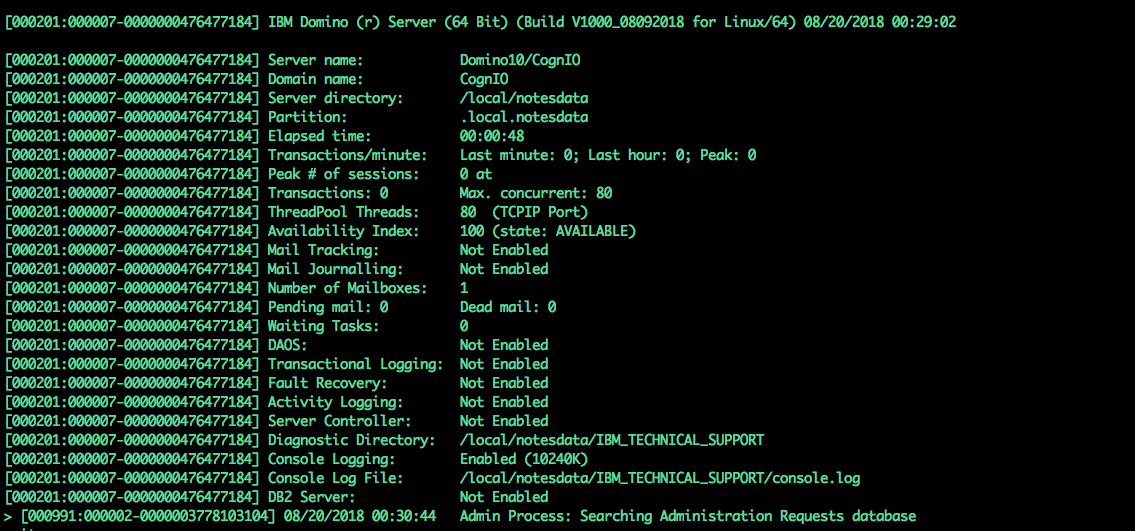
Domino 8.5 DAOS
- 04 Mar, 2009
Domino Attachment Object Service (DAOS) é uma nova funcionalidade do Domino.
Basicamente ela remove os anexos de uma aplicação Notes e os coloca no filesystem. Com isto ganhamos em I/O e o tamanho dos bancos de dados realmente caem muito. Sem o DAOS um anexo de 1 MB se enviado para 10 usuários se transforma em 10MB de armazenamento no servidor, com o DAOS somente 1MB e nos bancos de dados fica somente um "ponteiro" para o arquivo no DAOS.
Já consegui reduzir um banco de dados Notes de 1.3 GB para 228 MB usando o DAOS.
A IBM disponibilizou também uma ferramenta para estimar como o DAOS pode economizar espaço nos servidores Domino DAOS Estimator
O procedimento para confi
Domino 8.5 e SUSE SLES 10 SP2
- 22 Jun, 2009
Neste fim de semana fizemos um upagrade de um Domino 7.0.2 para a versão 8.5. O Linux instalado antes era o SUSE SLES 9 SP3.
O Domino 8.5 não suporta o SUSE 9 então solicitamos o upgrade para versão SUSE SLES 10 SP1, pois já existem 03 servidores em produção com este Linux.
O upgrade do Linux foi realizado, mas a versão instalada foi o SUSE SLES 10 SP2. Aparentemente tudo ok pois os requesitos de sistema(http://www-01.ibm.com/support/docview.wss?uid=swg27013072Linux32bit) não informam nada sobre SP1 ou SP2 para o SUSE. A instalação terminou com um "warning" informado que o SUSE 10 não é suportado. Foi um warning mas devia ser um "fail" pois o Domino assim que foi iniciado
Domino and Security Person
- 06 Mar, 2010
Last week I had a meeting with security personnel from a client, the meeting was about the safety of Notes & Domino environment deployed in the company. For the photo below you can see that meetings with the security staff are always tense and full of questions.
Semana passada eu tive uma reunião com o pessoal de segurança de um cliente, a reunião era sobre a segurança do ambiente Domino & Notes implantado na empresa.
Pela foto abaixo pode-se ver que reuniões com o pessoal de segurança são sempre tensas e cheias de questionamentos.
!Image:Domino and Security Person(http://platao.plansis.com.br/blogkenio.nsf/dx/secutitybmb.htm/content/M2?OpenElement)
Domino Cluster and Replica Settings
- 09 Dec, 2009
Today i have a issue with thow clustered mail servers. Some databases are different and one server goes down. Some users complain about deletion documents still on their mail databases. I found the cause. I don't know why yet, but replica setings was not the default settings (like the figure bellow) and deletions doesn't replicate. Hoje eu tive um problema com dois servidores clusterizados de correio. Algumas bases estavam diferentes e um dos servidores caiu. Alguns usuários reclamaram que emails antigos ainda estavam nas suas bases. Achei a causa mas não sei porquê estava assim. As definições de replcia estavam marcadas para não replicar deleções. !Image:Domino Cluster and Replica
Domino Cluster and Replica SettingsRead MoreDomino console em Windows 2003
- 12 May, 2009
Administrar servidores remotamente é o cotidiano de todos os administradores que eu conheço. Uma configuração no RDC (Remote Desktop Client) que eu utilizei por muito tempo me permitia "ver" a console do Domino quando este está em servidores Windows iniciado como serviço. Fiz upgrade do meu Windows XP para SP3 e este recurso parou de funcionar.
A chave que eu utilizava antes era /console agora tem de ser /admin. Veja o TN1209819(http://www-01.ibm.com/support/docview.wss?rs=463&context=SSKTMJ&dcÛ520&dcÛ560&uid=swg21209819&loc=enUS&cs=UTF-8&lang=en&rss=ct463lotus) da IBM que explica isto.
Domino DNS MX BUG - Solved
- 19 Aug, 2009
Publiquei já fazem alguns dias o TN(http://www-01.ibm.com/support/docview.wss?rs=899&uid=swg21386420). informando sobre o bug do DNS. A IBM corrigiu para versões 7 e 8.0.
Para 8.5 abri um PMR para pegar o fix e até hoje não tive resposta.
Domino e DNS MX Bug
- 10 Aug, 2009
Semana passada um cliente reportou um problema curioso: Os usuários não conseguiam enviar email para um determinado domÃnio.
O servidor Domino estava informando que não conseguia se conectar a um servidor e realizando testes realmente não conseguiamos acesso a esta máquina. Ligamos para o administrador do servidor dominio.com e ele informou que havia trocado o mx do seu domÃnio devido a um problema mas que já havia retornado ao ip original. Só que o domino mantinha a tentativa de mandar para o ip antigo.
Pesquisando um pouco vimos que se reiniciar-mos o router o problema é resolvido, na verdade resolve mandar os correios pois o domino tem um bug que guarda em cache um endere
Domino e Notes 8.5.1
- 13 Oct, 2009
Ontem foi disponibilizada a última versão do Notes (8.5.1). Eu já estava utilizando a versão beta e hoje fiz o upgrade para versão gold.
A instalação foi sem problemas. Realmente vale a pena usar a nova versão pois ela faz com que as outras releases 8.x fiquem muito a desejar, especiamente na estabilidade e performance. Uma grande novidade é que o Domino Designer agora é free e já está disponÃvel no developerworks.
!Image:Domino e Notes 8.5.1(http://platao.plansis.com.br/blogkenio.nsf/dx/13102009135931KCAMXA.htm/content/M2?OpenElement)
Domino HTTP Active Thread recommendations
- 25 Sep, 2013
What is the recommended maximum number of active HTTP threads for a Lotus® Domino® server? You set this value in the "Number active threads" field on the Internet Protocols - HTTP tab of the Server document. This TN(http://www-01.ibm.com/support/docview.wss?uid=swg21173877) can answer your question
Domino HTTP Active Thread recommendationsRead MoreDomino HTTP Active Thread recommendations
- 23 Aug, 2012
How many HTTP threads can i setup on my Domino Server? The answer is always the same... Depends on :-) On this link(http://www-01.ibm.com/support/docview.wss?uid=swg21173877) you can learn how to setup the number of HTTP Threads
Domino HTTP Active Thread recommendationsRead MoreDomino License Tracking
- 17 Dec, 2009
This funcionality is good and some Administrators do not implement it. From the Domnino Administrator Help
License Tracking allows you to monitor the number of active Notes users within an IBM® Lotus® Domino™ domain. You can use License Tracking to determine how many client licenses you have, whether you need to purchase additional licenses, and when you need to purchase them.
Note License Tracking is not supported in a hosted environment.
How license tracking works
When License Tracking is turned on, client usage is tracked on each server and the data is temporarily stored in the file LICENSE.NCF. When a user authenticates with a server using the IBM® Lotus® Notes® client, HT
Domino & Linux + fragmentação de disco
- 28 Jul, 2009
Hoje novamente o desafio é descobrir porquê dois servidores Domino 8.5 estão corrompendo bancos de dados. Os servidores estão em cluster e aleatóriamente estão corrompendo bancos de dados. Abrimos um suporte na IBM para ajudar a investigar o caso. Algumas hipóteses foram levantadas pelo suporte e uma delas foi sobre fragmentação de disco.
Em servidores Windows isto sempre foi problema devido ao sistema de arquivos NSF e uma desfragmentação de vez em quando é sempre boa.
Mas no ambiente Linux/Unix acho que não é um grande problema, visto que não achei uma ferramenta de defrag para Linux. Procurando no Google achei este artigo(http://geekblog.oneandoneis2.org/index.php/2
Domino on Linux runing almost 180 days without problems
- 09 Apr, 2010
One of my Domino servers is running for almost 180 days without problems. We are now planning to upgrade to version 8.5.1 FP2
Meu servidor está executando por quase 180 dias sem problemas. Estamos planejando agora o upgrade para versão 8.5.1 FP2
Lotus Domino (r) Server (Release 8.0.2FP1 for UNIX) 08/04/2010 21:40:12
Server name: Pullo/PlansisNet/Plansis
Domain name: PLANSIS
Server directory: /local/notesdata
Partition: .local.notesdata
Elapsed time: 172 days 11:02:03
Transactions/minute: Last minute: 13; Last hour: 26; Peak: 1171
Peak of sessions: 116 at 27/01/2010 13:42:49
Domino on Unix/Linux Start Script
- 17 Apr, 2013
I use it for years, since my first Domino setup on Linux. Thanks Daniel Nashed . The script is here(http://www.nashcom.de/nshweb/pages/startscript.htm)
Domino on Unix/Linux Start ScriptRead MoreDomino Panics with ’Unexpected internal error returned to logger: 0x20762010’ during Backup of Transactional Logs
- 14 Feb, 2012
This issue is documented in APAR IC60787 where DATA PROTECTION FOR DOMINO BACKUP FAILS WHEN DATABASE IS BUSY BY DOMINO SERVER.
The fix for this problem is contained in the latest 5.5.3 release of the TDP Domino:
ftp://service.boulder.ibm.com/storage/tivoli-storage-management/maintenance/tivoli-data-protection/domino/Windows/x86\x64/v553/(http://platao.plansis.com.br/blogkenio.nsf/dx/ftp://service.boulder.ibm.com/storage/tivoli-storage-management/maintenance/tivoli-data-protection/domino/Windows/x86x64/v553/)
Relative Technote:
http://www-01.ibm.com/support/docview.wss?rs=669&uid=swg21219345
TDP Domino 5.5.3 also addresses another key issue where TDP Domino may crash on files with l
Domino Replication Fundamentals and Troubleshooting
- 18 Feb, 2016
I found this(http://www-01.ibm.com/support/docview.wss?uid=swg21693949) article today. It covers the fundamentals of Domino Replication and options for troubleshooting common issues. 1. Introduction 2. Elements of Replication 3. Creating and Deleting Replicas 4. Running Replication 5. Replication Configurations 6. Other Areas of Replication 7. Logging and Debug options. 8. Troubleshooting
Domino Replication Fundamentals and TroubleshootingRead MoreDomino Router
- 16 Sep, 2009
Alguns comandos do router para facilitar a vida.
Tell router c > In place compaction of the mail.boxes.
Tell router d > Shows message detail (sizes, times, and hop).
Tell router e > Exits the router (same as q).
Tell router l > Lists the messages in queue and the routing state.
Tell router m > Shows memory usage by the router.
Tell router o > Lists the out of office details.
Tell router p > Pauses the router.
Tell router q > Quits the router (same as e).
Tell router r > Resumes the router from a pause state.
Tell router s > Shows the router queue state (delivery , transfer, dispatch and sweep threads).
Tell router update config > Updates the routing
Domino Router DNS BUG
- 19 May, 2010
Router does not failover properly to secondary DNS server when primary server is down When issuing the "Tell Router Show" command at the server console, several destinations will show a message such as "Server Not Responding". Other destinations might show the message "Waiting for DNS". See this TN(http://www-01.ibm.com/support/docview.wss?uid=swg21423917)
Domino Router DNS BUGRead MoreDomino Server Performance Troubleshooting Cookbook
- 19 May, 2011
This TN(https://www-304.ibm.com/support/docview.wss?uid=swg21234550) have useful information for troubleshooting general Lotus Domino server performance issues.
Domino Server Performance Troubleshooting CookbookRead MoreDomino SSO with SharePoint using SPNEGO
- 25 Mar, 2015
This week i setup Domino SSO with Windows. The customer will launch a SharePoint portal server and need a SSO with Domino Web Applications.
I follow this tutorial(http://www-10.lotus.com/ldd/dominowiki.nsf/dx/HowtoconfiguretheWindowssinglesign-on(SSO)forWebclients(SPNEGO)inanexistingDominoenvironment(Tutorial)), the setup is very simple but some problems arrive.
The Domino server have the FQDN domino.mydomain.com.br and the windows server server.mydomain.com.br. The SSO doesn't work.
I read the message Attempt by HTTP client to authenticate using Windows NTLM security is not supported on Domino console.
After the AD administrator setup the user dominostart, he issued the command SE
Domino V12 and Verse 2.1 How to add a Photo URL
- 08 Jun, 2021
Today i setup a Domino V12 server just for test some new features. A customer ask to use photos on Verse hosting photos on Domino. Domino V12 comes with Verse 2.0. I just download the version 2.1 of Verse and follow the installation instructions. After the setup i just put a URL of a PNG image on the person document, field photoURL and add the entry VOP\GK\FEATURE\230=1 to the notes.ini of the server. Works Great !(http://www.mysphere.com.br/wp-content/uploads/2021/06/verse.png)
Domino V12 and Verse 2.1 How to add a Photo URLRead More
Domino Web Administrator & Java applets will not work in browsers that remove NPAPI support
- 12 Sep, 2016
"Domino applications that are created from system templates that make use of Java applets, such as the Domino Directory (names.nsf), Document Library, Domino Web Server Configuration database and Widget Catalog database, will be impacted by the removal of NPAPI functionality. The Teamroom and Discussion databases created from older (pre-8.5.3) templates will be impacted as well. Additionally, custom Notes applications that are using Java applets also may not work correctly in web browsers due to these changes. It is recommended that you either (1) redesign the portions of the applications that use Java applets to use HTML, or (2) redesign the entire application to leverage XPages design elem
Domino Web Administrator & Java applets will not work in browsers that remove NPAPI supportRead MoreDomino Web Server Locale and Date Format
- 15 Sep, 2011
This week we move some large Domino Applications from one server to another. We got problems about Date Format on the Web Browser. Pay attention in this configuration : !Image:Domino Web Server Locale and Date Format(http://platao.plansis.com.br/blogkenio.nsf/dx/dateformathttp.htm/content/M2?OpenElement) You can choose from Browser Client and Server locale. From the TN 1144507 If you want the server's operating system settings to apply, you must specify "Server locale" for the "Default regional locale:" value in the Web User Preferences section of the Domino Web Engine tab. Otherwise, the default is to use the Web browser's preference settings. For more information on the Web prefe
Domino Web Server Locale and Date FormatRead MoreDomino Windows Domino Linux
- 21 Feb, 2009
Mais um cliente estará mudando de plataforma, ou seja, em um ambiente com servidores Domino/Windows será instalado o primeiro servidor Domino/Linux.
Pela nossa experiência Domino em Linux apresenta uma melhoria de performance considerável. Estaremos instalando o Domino 8.0.2 em um servidor com Red Hat Enterprise. A expectativa do cliente é muito grande pois durante o piloto os ganhos foram consideráveis. Um bom material sobre o Domino rodando em Linux é o Redbook Domino 6 for Linux(http://platao.plansis.com.br/blogkenio.nsf/dx/http://www.redbooks.ibm.com/abstracts/sg246835.html?Open "http://www.redbooks.ibm.com/abstracts/sg246835.html?Open"). O Redbook é sobre a versão 6 mas q
Download LotusNotes853.itw for Windows 8.5.3 Notes Standard client
- 10 Oct, 2011
The InstallShield Tuner for Lotus Notes configuration file (LotusNotes853.itw) was inadvertently excluded from the 8.5.3 Notes Standard client, All Client (Notes, Admin, Designer) webkits and ISO images. The absence of this file will affect Administrators using the InstallShield Tuner for Lotus Notes to generate a transform file for customized installations on Windows. The missing file can be downloaded directly from Fix Central (Fix ID = Notes\853\ITWFile(http://www.ibm.com/eserver/support/fixes/fixcentral/swg/quickorder?brandid=2&productid=Lotus%20Notes&fixes=Notes853ITWFile)).
Download LotusNotes853.itw for Windows 8.5.3 Notes Standard clientRead MoreDownload the Domino Attachment and Object Service Estimator Tool version 1.5
- 06 Nov, 2009
The new version of the tool has improvements in performance and the time to gather information
Go to this link(http://www-01.ibm.com/support/docview.wss?rs=463&uid=swg24021920) to see more information and download de new version.
DST in Brazil
- 08 Oct, 2013
Every year we have problems with DST. Scheduling, messages. It´s common here in Brazil administrators setup the OS (windows or linux) to not observe DST but some companies observe DST. On the Notes Client "The "Use the Operating System's Timezone Settings" should always be set to Yes for all Notes client versions Setting this parameter to "No" may cause unpredictable results in currently supported versions of Notes software. This setting is considered obsolete and is not recommended in any current version of IBM Notes software. Notes is designed to use the time and time zone settings provided by the client operating system (including the installed JRE), regardless of which operating
DST in BrazilRead MoreDWA message disclaimer is added on emails sent to Notes users
- 18 Jul, 2014
A costumer yesterday ask the exact question i found on this link http://www-01.ibm.com/support/docview.wss?uid=swg1LO43023(http://www-01.ibm.com/support/docview.wss?uid=swg1LO43023)
If a DWA message disclaimer is set and a DWA user sends an email where the recipient is an internal user - i.e. address is Notes mail format not internet format, the Notes user receives the message disclaimer.
This is a known behavior in Notes/Domino and reported to Quality engineering in SPR KBRT67FN7B as an Enhancement request and currently there are no plans to address it in R8 and R8.5
End of Google Cloud Messaging Support impact for IBM Verse Android clients
- 21 Mar, 2019
As of April 10, 2018, Google has deprecated Google Cloud Messaging (GCM). The GCM server and client APIs are deprecated and will be removed as soon as April 11, 2019. IBM Traveler uses GCM for push notifications with IBM Verse for Android clients. Firebase Cloud Messaging (FCM) is the new supported notification infrastructure. This flash details what actions should be taken for IBM Traveler and the IBM Verse for Android clients to support the FCM notification infrastructure. More information on this link(https://www-01.ibm.com/support/docview.wss?uid=ibm10876622&myns=swglotus&mynp=OCSSYRPW&mync=E&cmsp=swglotus--OCSSYRPW--E)
End of Google Cloud Messaging Support impact for IBM Verse Android clientsRead MoreErrors occur if Domino Designer is launched before Notes
- 23 Oct, 2010
After installing 8.5.1 Fix Pack 5 for Windows, Domino Designer will not function properly unless Notes is launched first.
Specifically, when you launch Domino Designer and then attempt to open an application from the Open Application dialog, a java.lang.UnsatisfiedLinkError will appear:
!Image:Errors occur if Domino Designer is launched before Notes (http://platao.plansis.com.br/blogkenio.nsf/dx/23102010143721KCANNX.htm/content/M2?OpenElement)
Additionally, attempts to create a new application could cause Domino Designer to hang.
This information is from TN 1450357
Exceptional Web Experience 2013 - Video Series
- 13 Jun, 2013
Experience the collective expertise shared at the 2013 Conference through this complimentary series of video(http://www-10.lotus.com/ldd/portalwiki.nsf/xpViewCategories.xsp?lookupName=Exceptional%20Web%20Experience%202013%20-%20Video%20Series) recordings. Let these informative recordings be your educational starting point to help you deliver the promise of an exceptional web experience.
Exceptional Web Experience 2013 - Video SeriesRead MoreExplanation of "Use the Operating System’s Timezone Settings" option in Lotus Notes Location document
- 22 Mar, 2013
Some people may find the wording of this field's title to be confusing. In fact, Notes is functioning as designed. The purpose of 'Use the Operating System's Timezone Settings' field is as follows. - If set to "Yes", you can make time zone setting changes only through the OS. Notes will adhere to whatever time zone the OS is set to, and you will not have the option to make changes through Notes. - If set to "No", you can make time zone changes through either Notes or the OS; fields become available in the Location document so that you have the option to change the settings through Notes. The time zone settings will remain synchronized between Notes and the OS regardless of whethe
Explanation of "Use the Operating System’s Timezone Settings" option in Lotus Notes Location documentRead MoreFalha na instalação Domino 8.5
- 27 May, 2009
Ontem estávamos fazendo um upgrade de um servidor Domino 7.0.3IF1 Linux para a versão 8.5. Um erro estranho aconteceu nesta máquina. Já haviamos realizado 4 instalações da mesma forma. A diferença é que este servidor era um dos mais antigos. O instalador do Domino no Linux simplesmente abortava sem mensagem de erro o TN 1295755(http://www-01.ibm.com/support/docview.wss?rs=463&context=SSKTMJ&dcÛ520&dcÛ560&uid=swg21295755&loc=enUS&cs=UTF-8&lang=en&rss=ct463lotus) resolveu o problema.
Falha na instalação Domino 8.5Read MoreFirefox 4 support availability for Lotus iNotes
- 14 Apr, 2011
Support for Firefox 4 is introduced in Interim Fix 401.8HF6 for iNotes 8.5.2 Fix Pack 2, which is now available for download from Fix Central. iNotes 8.5.2 Fix Pack 3 will also provide Firefox 4 support. This interim fix can be applied on a Domino server running 8.5.2 Fix Pack 2 or a Domino server running 8.5.2 Fix Pack 2 with a Domino hotfix. If you are running 8.5.2 Fix Pack 2 with an iNotes hotfix, please contact IBM Support to request a new iNotes hotfix that combines iNotes IF 401.8HF6 with your existing iNotes hotfix. The information above is fron TN 147006(https://www-304.ibm.com/support/docview.wss?uid=swg21474006)
Firefox 4 support availability for Lotus iNotesRead MoreFireFox support for Domino 8.5.3 FP1/FP2/FP3
- 07 Dec, 2012
iNotes
Firefox
9
Firefox
10 ESR
Firefox
16
8.5.3 FP3
Yes
Yes
Yes
8.5.3 FP2
Yes
Yes
no
8.5.3 FP1
Yes
no
no
Due to the increased rate at which vendors are now releasing new versions of their browsers, support for Firefox browser updates will only be maintained for the most recent shipping release of iNotes. iNotes product testing on new Firefox browser versions will continue at periodic intervals which may or may not align with the browser vendor's release schedule. Lotus iNotes 8.5.3 FP3 was tested and certified against Firefox 16. Should a problem be found when using a browser update with the most recent release of iNotes, we will make every effort to resolve t
Five years since the first IBM Champions Class
- 22 Jun, 2016
Five years ago IBM announced the first class of Champions. I was on that list. This year I am on the IBM Champions for Middleware list for the first time. Congratulations to all IBM Champions. The first fifty list : Adam Brown Bill Malchisky Bruce Elgort Carlos Casas CC Liew Chris Miller Chris Toohey Daniel Recio David Leedy David StephensDeclan Lynch Eileen Fitzgerald Eric Mack Femke Goedhart Francie Tanner Gabriella Davis Giuseppe Grasso Handly Cameron John Head Julian RobichauxKenio Carvalho Lidia Vikulova Lisa Duke Marie Scott Mark Leusink Mathew Newman Matt White Mikkel Heisterberg Mitch Cohen Mitsuru KatoNathan T Freeman Paul Mooney Paul Withers Rob Bontekoe Rob Novak Sanjaya Kumar
Five years since the first IBM Champions ClassRead MoreFix Available for SMTP regression issue in Domino 9.0.1 FP9
- 15 Sep, 2017
An issue was introduced in Domino 9.0.1 FP9 that could result in SMTP mail headers with random characters inserted into From, Sendto, and Copyto fields. This could then result in non-delivery of mail to/from Internet email addresses when using the Domino notes.ini parameter SMTPVerifyAuthenticatedSender =1. Symptoms of the issue include receiving messages containing garbled sender names. Opening the message and replying results in a number of embedded garbled characters in the header. You can observe this by viewing the page source or by simply examining the content when opening an email. Another method is to capture the SMTP outbound message and examine the header. Fix Available: This iss
Fix Available for SMTP regression issue in Domino 9.0.1 FP9Read MoreForgot root password
- 04 Feb, 2011
I have 3 Domino Servers installed on top of Linux.
Eight months without logon as a root. After 15 days of vacation and then i forgot the password :-)
This link(http://www.cyberciti.biz/faq/linux-reset-forgotten-root-password/) show how to reset the root password
Formula Debugger
- 01 Aug, 2010
This article is old, very old. If you are new with Domino Designer @Functions this tip can help you. http://www.ibm.com/developerworks/lotus/library/ls-Create\Formula\Debugger/index.html and this link http://www.ibm.com/developerworks/dwbooks/notesdevtoolbox.html is very usefull too.
Formula DebuggerRead MoreFundamentals of IBM Lotus Domino 8.5.x Application Development - New Class next week
- 31 May, 2013
Next week, I will be the instructor for a class of new Domino Designers. They will start from the basics
Fundamentals of IBM Lotus Domino 8.5.x Application Development - New Class next weekRead MoreGenerate txt file for iNotes migration
- 01 Oct, 2009
The agent bellow will be used to make a txt file with the mail files for migration. We select a group of users and then export the mail files path to a txt file.
The txt file will be used with load convert -f .
Just put the agent on the Names.nsf.
Sub Initialize
Dim ses As New NotesSession
Dim db As NotesDatabase
Dim doc As NotesDocument
Dim docPerson As NotesDocument
Dim dc As NotesDocumentCollection
Dim item As NotesItem
Dim valores As Variant
Dim vis As NotesView
'variáveis para serem trocadas caso a caso
nomedoarquivo$= "c:file.txt"
Set db = ses.CurrentDatabase
Set vis = db.GetView( "($Users)")
'colocar o nome do g
Good Technology Does the Job
- 31 Aug, 2019
I'm working on projects that involve many technologies and frameworks. Particularly in one of our projects the IceGuard(http://www.iceguard.com.br) many things have been used such as Flutter for mobile application, Node-Red for integrations, IBM Cloud and IBM Watson IoT services. We have reached a point where an asset management application such as sensors and gateways is required. The application has the requirements: 1 - Run OffLine and Web 2 - Data replication 3 - Authentication and Data security 4 - Integration with other applications. 5 - Implement a simple flow of approval. Another detail is that we needed it to be developed rapidly. Much is said that the Lotus IBM HCL Not
Good Technology Does the JobRead MoreHigh CPU usage when Disk Queue is very high. (Domino + Windows)
- 15 Jul, 2015
A customer has one Domino cluster with 2 members on a virtualized environment (VMWare). it is not a big environment (1600 users) but after 3 months working well some thing happened and the system does not work well. During a period of 4 hours (9 am to 13 pm) the CPU of one cluster member goes to 100% and the cluster does not send users to the another member. I check everything possible (this server has 800 GB of mailboxes) and run some administrative commands. I raise a PMR and sent NSD's. IBM told me that the windows kernel is consuming a lot of CPU and Domino was not the cause, but this machine only run Domino. We talk a lot about the problem an after some verification at the windows
High CPU usage when Disk Queue is very high. (Domino + Windows)Read MoreHighlighting important information related to File Server Roaming in Notes and Domino 8.5
- 21 Aug, 2013
1. What is File Server roaming?
2. How does File server roaming differ from Domino server roaming?
3. How does an administrator configure ("upgrade") a user to roam using a file server?
4. How does an administrator "downgrade" a user from file server roaming?
Each question is answered below:
1. What is File Server roaming?
File server roaming is the ability to house a roaming user's files on a standard file server instead of a Domino server. This functionality has been requested by customers who have users who roam between multiple workstations but in a location without a "local" Domino server.
2. How does File server roaming differ from Domino server roaming?
From
Hora de renovar certificações
- 10 Aug, 2008
Esta semana estaou iniciando a renovação de algumas certificações. Volto agora a dar um pouco mais de atenção para o "mundo" do Lotus Notes & Domino. Tenho como objetivo renovar as certificações para o produto até a versão 8. A medida que for levantando material vou publicar aqui.
A estratégia vai ser a que sempre usei:
1 - Instalar o Servidor e o Cliente nas últimas versões disponÃveis
2 - Uma boa olhada no help principalmente na parte: What is New
3 - Adquirir o simulado para a prova
Pretendo renovar cada certificação gastando no máximo 20 horas de estudo para cada prova, tenho de fazer 4 para renovar até Domino & Notes 8
Horário de verão no Brasil
- 19 Oct, 2009
Se alguém estiver tendo problemas com o Domino/Notes. O TN 1321009(http://www-01.ibm.com/support/docview.wss?uid=swg21321009) pode ajudar a resolver o problema.
Horário de verão no BrasilRead MoreHow can I reset the routing state of dead and held messages in mail.box?
- 08 Nov, 2012
Create a simple agent in the mail.box to reset the RoutingState field to "" (null) for selected messages. When the RoutingState field is reset, the router will attempt to dispatch the messages.
How can I reset the routing state of dead and held messages in mail.box?Read MoreHow does the notes.ini file parameter ’server_session_timeout’ affect server performance
- 05 Jan, 2010
The parameter, server\session\timeout, defines how the server will manage idle client sessions. Client sessions represent memory consumption on a Domino server and Domino has a finite amount of memory available for session management. See this TN(http://www-01.ibm.com/support/docview.wss?uid=swg21293213) for more information
How does the notes.ini file parameter ’server_session_timeout’ affect server performanceRead MoreHow to prevent Group Modifiers to modify some groups on Domino?
- 12 Jun, 2017
Last week a customer ask for a change in his Domino mail group management. Some people with the right to change groups (with the role GroupModifier) made a change on several groups and a big problem arrives with mail routing to this groups. The question was: How prevent Group Modifiers to modify some groups on Domino? O only found one solution : Change the permission on the group document. I created a simple agent and modify the group field "DocumentAccess" and put the Role ServerModifier. (Only admins has this role on Domino Directory) and also change the Group Owner to the group Administrators. The simple agent is bellow. FIELD DocumentAccess := "\ServerModifier"; SELECT @All
How to prevent Group Modifiers to modify some groups on Domino?Read MoreHow to add Firefox and Chrome for preview in Designer
- 28 Apr, 2011
Go to File -> Preferences -> General -> Web Browser !Image:How to add Firefox and Chrome for preview in Designer(http://platao.plansis.com.br/blogkenio.nsf/dx/firefoxChrome.htm/content/M2?OpenElement) Click in New and fill the form. !Image:How to add Firefox and Chrome for preview in Designer(http://platao.plansis.com.br/blogkenio.nsf/dx/firefoxChrome.htm/content/M3?OpenElement) Repeat the process for Google Crome and restart the Designer !Image:How to add Firefox and Chrome for preview in Designer(http://platao.plansis.com.br/blogkenio.nsf/dx/firefoxChrome.htm/content/M4?OpenElement)
How to add Firefox and Chrome for preview in DesignerRead MoreHow to allow the user to delete the iNotes profile in iNotes
- 06 Dec, 2012
Steps:
1. Create a database on the server (with any name e.g. BagOTrix)
2. Create an agent (using the following LotusScript) that is scheduled to Run "Never" with a target of None
Sub Initialize()
On Error GoTo ErrorLand
Dim session As New NotesSession
Dim thisDB As NotesDatabase
Dim targetDB As NotesDatabase
Dim targetServer As String
Dim targetDBStr As String
Dim docContext As NotesDocument
Dim prof As NotesDocument
Dim errorStr As String
errorStr = ""
Set docContext = session.Docum
How to avoid performance issues related to mass email delivery in Lotus Domino
- 16 Aug, 2011
From TN 1271709
Do not send mass mail from a production mail server.
Avoid sending mass email. If mass email must be sent, do not send those mass mail messages from a production mail server but an administration server or another dedicated Domino server which is not directly servicing end users. Distributing this workload will prevent end users from experiencing performance issues related to address expansion during phase one of the message delivery process.
This dedicated Domino server should be configured to hold messages for transfer outside of peak system usage.
Reduce the number of threads for transfer and delivery in the Domino router
If you must sent mass mailings, reducin
How to Change Cache.ndk File Size Limit
- 10 Aug, 2010
There are two ways to change the Cache.ndk file size limit. One is through the Workspace and the other is through the use of a Notes.ini parameter.
!Image:How to Change Cache.ndk File Size Limit(http://platao.plansis.com.br/blogkenio.nsf/dx/cachendk.htm/content/M2?OpenElement)
If you right click on the Workspace and select Workspace Properties it will bring up the property box as seen above.
Select the beanie tab and you can change the Cache Size in MB.
This also correlates to a Notes.ini parameter:
UserSetCacheQuota=1
UserCacheQuotaSize=153600 (value of 150 MB as shown above)
This allows for a larger cache.ndk file size which can reduce issues seen if the default 30MB limit
How to change the language of the Domino Administrator
- 31 May, 2011
Domino Administrator is not available in Brazilian Portuguese. Some Domino Administrators want to use Notes e Administrator in native language.
To change the Administrator (English version) to Brazilian Portuguese:
- Copy the MUIpt-BR from an Notes installed in Brazilian Portuguese to the same folder in your Notes/Administrator
- Put this 3 lines in your notes.ini:
AltNameLanguage=pt
ContentLanguage=pt-BR
UserInterface=pt-BR
How to check if the Domino is 32 or 64 bits?
- 27 Apr, 2011
At the server console type sh stat server. There is a server statistic called "Server.Version.Architecture" that indicates if Domino is 64-bit or not. The server console will display Server name: Lotus Domino Server (64-bit) at the top of its window
How to check if the Domino is 32 or 64 bits?Read MoreHow to check Notes Traveler Performance when hosted on a VM
- 13 Nov, 2012
In the case of a Traveler server being hosted on a VM, there are instances where performance problems or symptoms may arise, but the cause may be due to the VM environment/configuration. How can the VM environment be checked to confirm this? See this(http://www-01.ibm.com/support/docview.wss?uid=swg21615973) TechNote
How to check Notes Traveler Performance when hosted on a VMRead MoreHow to check the version of Java in Notes
- 29 Aug, 2013
There are three options:
OPTION 1:
About IBM Lotus Notes
-- In Notes, select Help -> About IBM Lotus Notes
-- Click the "Configuration Details" button and look for the following line
java.runtime.version=pwi3260sr12ifx-20121108\01 (SR12)
OPTION 2:
Issue "java -version" command
-- In Command Prompt, navigate to jvmbin
-- Issue the command java -version
-- The output should appear as follows:
java version "1.6.0"
Java(TM) SE Runtime Environment (build pwi3260sr12ifix-20121108\01(SR12+IV31417))
IBM J9 VM (build 2.4, JRE 1.6.0 IBM J9 2.4 Windows 7 x86-32 jvmwi3260sr12-20121024\126067 (JIT enabled, AOT enabled)
J9VM - 20121024\126067
JIT - r9\2012
How to copy all documents and folders from one mail database to another using LotusScript
- 28 Jan, 2010
If you want to merge 2 mail dabases you can use this TN(http://www-01.ibm.com/support/docview.wss?uid=swg21110903)
How to copy all documents and folders from one mail database to another using LotusScriptRead MoreHow to enable Domino network communication on RHEL 7.0
- 10 Sep, 2014
The new userland interface in RHEL7, Firewalld, when enabled, will block network communication of Notes and Domino.
The TN 1683423 show how to enable communications using firewall or disabling the firewall.
To disable:
Disable the firewall with the command: "systemctl stop firewalld" and "systemctl disable firewalld".
To query the firewall status, issue the command: "systemctl status firewalld"
How to find which process is using a TCP Port in Windows
- 20 Nov, 2013
Today i started my Domino server and the HTTP task doesn´t loaded. The console showed a message indicating the port 80 is in use. I shutdown the server and search for a process listening on port 80 but how? Use netstat -ano on the command pronpt. !Image:How to find which process is using a TCP Port in Windows(http://platao.plansis.com.br/blogkenio.nsf/dx/20112013190142KCASNN.htm/content/M2?OpenElement) You will see thad the PID 7152 is using the TCP port 80. Go to taskmanager and add a column to view the pid . I discover that skype was using the port 80. So i start skype after Domino starts. !Image:How to find which process is using a TCP Port in Windows(http://platao.plansis.com.br/b
How to find which process is using a TCP Port in WindowsRead MoreHow to generate fake names using ldap
- 07 Apr, 2016
This week i am working with TDI to sync MS AD and Domino. There are several ways to sync this two ldap servers. Searching on the web on how can i generate hundreds user accounts on the MS AD test server, i found LDIF Generator.(http://ldapwiki.willeke.com/wiki/LDIF%20Generator) This little java code generate a LDIF file and you can import using, for example, the Apache Directory Studio.
How to generate fake names using ldapRead MoreHow to get the version of iNotes and the build
- 16 Feb, 2011
Go to the link on the top and click !Image:How to get the version of iNotes and the build(http://platao.plansis.com.br/blogkenio.nsf/dx/16022011162443KCAQRZ.htm/content/M2?OpenElement) You will see a window like this !Image:How to get the version of iNotes and the build(http://platao.plansis.com.br/blogkenio.nsf/dx/16022011162443KCAQRZ.htm/content/M3?OpenElement)
How to get the version of iNotes and the buildRead MoreHow to hide the option of "Change Internet Password� for few iNotes users and keep it un-hidden for rest of the iNotes users.
- 30 Oct, 2012
We can hide the option "Change Internet Password" only for certain users by applying a policy.
Steps need to be performed are:
1) In Domino Administrator->goto->People &groups->Settings->Add
setting->Security setting
2) Give name to this setting
3) In Password Management tab->Password Management Basics-> "Allow users
to change Internet password over HTTP" ->Select "NO".
4) Save and close.
5) Goto->Policies->Add Policy->Explicit policy
How to increase the number of worker threads for different internet protocols?
- 08 Oct, 2012
The maximum number of worker thread for each Internet protocols is by default 40. Using notes.ini you can modify the worker threads for each protocol
LDAPMaxWorkerThreads=
SMTPMaxWorkerThreads=
IMAPMaxWorkerThreads=
POPMaxWorkerTreads=
DIIOPMaxWorkerThreads=
HTTPMaxWorkerThreads=
Note: that HTTP is currently the only protocol where worker threads can be set in the server document.
How to install IBM Notes 9.0.1 FP7 on Ubuntu 16.04 LTS 64 bits
- 13 Nov, 2016
Prepare the packages for installation 1 - Download the image CIQ7TEN from Passport Advantage this is the Debian install for IBM Notes 9.0.1 and also the FP7 from fix central 2 - Expand the downloaded file using tar -xvf command 3 - Open the package bm-notes-9.0.1.i586.deb to be edited using the commands bellow dpkg-deb -x ibm-notes-9.0.1.i586.deb common dpkg-deb --control ibm-notes-9.0.1.i586.deb 4 - Edit the control file, inside of the folder DEBIAN and change the Pre-depends section : Pre-Depends: gdb:i386 | gdb:amd64, coreutils:i386 | coreutils:amd64, unzip:i386 | unzip:amd64, bash:i386 | bash:amd64, procps:i386 | procps:amd64, grep:i386 | grep:amd64, sed:i386 | sed:amd64, libart-2.
How to install IBM Notes 9.0.1 FP7 on Ubuntu 16.04 LTS 64 bitsRead MoreHow to manually configure Notes as an Internet Email client
- 22 Nov, 2012
This technote(http://www-01.ibm.com/support/docview.wss?uid=swg27002933) show how to setup Notes as an Internet Mail Client.
How to manually configure Notes as an Internet Email clientRead MoreHow to Pinn Lotus Notes on Windows 7 task bar
- 19 Aug, 2010
My friend Gustavo(http://gstechspot.blogspot.com//) send a message about How to Pin Lotus Notes 8.5.1
1 - Close your Notes and change the name of the notes.exe to notes.exe.exe
!Image:How to Pinn Lotus Notes on Windows 7 task bar(http://platao.plansis.com.br/blogkenio.nsf/dx/pinnotes.htm/content/M2?OpenElement)
2 - Click on it and Pin the file
!Image:How to Pinn Lotus Notes on Windows 7 task bar(http://platao.plansis.com.br/blogkenio.nsf/dx/pinnotes.htm/content/M3?OpenElement)
3 - Rename back to notes.exe
Gustavo um amigo meu enviou esta dica de como fazer o Pin do Lotus Notes 8.5.1
1- abrir o diretorio do notes e localizar o "notes.exe"
2- renomear o "notes.exe" para "notes.exe
How to print mail with Page number
- 19 Nov, 2010
1) Open user mail database. 2) Go to File->Application->Properties. 3) Click on 3rdTab , Printing 4) Under Header/Footer Text ,First Click on Insert Tab and Then Insert Page as shown below !Image:How to print mail with Page number(http://platao.plansis.com.br/blogkenio.nsf/dx/printmailpage.htm/content/M2?OpenElement) !Image:How to print mail with Page number(http://platao.plansis.com.br/blogkenio.nsf/dx/printmailpage.htm/content/M3?OpenElement) This information is from TN 1448509
How to print mail with Page numberRead MoreHow to programmatically delete a particular email in all mail files
- 09 Apr, 2016
This can be done using an agent that is run by an ID that has access and delete rights to all the mail files on the server. The email will have the same Universal ID(UNID) in all of the mail files. This will allow you to get a handle on that particular email. The example code below gets a handle to the People view of the server's name and address book. From the person document, it obtains the mail file for the user and then opens the mail file, locates the email and removes it. The first step is to locate the UNID. This can be found by bringing up the document properties for the email you want to remove and looking at the beanie tab: !(http://www-01.ibm.com/support/docview.wss?uid=swg219808
How to programmatically delete a particular email in all mail filesRead MoreHow to reduce the number of .nlo files in the DAOS directory
- 04 Oct, 2012
Option 1: Increase the minimum attachment size for DAOS and remove the small .nlo files \ In order to have a better understanding of how to choose an attachment size, you should download and run the DAOS estimator(http://www.ibm.com/support/docview.wss?rs=463&uid=swg24021920). 1. Increase the "Minimum size of object before Domino will store in DAOS" setting to the newly desired value in the server document. Note: Do not use special characters such as commas or periods when entering the minimum size. 1. Restart the Domino server to enable the new minimum size. 1. Run a copy style compact (compact -c) on all databases that currently have DAOS enabled to allow the server to bring the sma
How to reduce the number of .nlo files in the DAOS directoryRead MoreHow to reduce the number of .nlo files in the DAOS directory
- 25 Jan, 2011
From TN 1449358 1. Increase the "Minimum size of object before Domino will store in DAOS" setting to the newly desired value in the server document. Note: Do not use special characters such as commas or periods when entering the minimum size. 1. Restart the Domino server to enable the new minimum size. 1. Run a copy style compact (compact -c) on all databases that currently have DAOS enabled to allow the server to bring the small attachments back into the mail file. 1. Wait for the "object deletion" interval to pass for prune to remove the small .nlo files. If you have taken a recent backup and would like to delete the small files more immediately you can run the following command: tel
How to reduce the number of .nlo files in the DAOS directoryRead MoreHow to remove unwanted Domino Server name from Open Application dialog
- 06 Nov, 2014
I never bothered with the names of servers that appeared in Open Application Dialog Application until now.
A customer ask how to remove the server names but without loose the desktop.dsk.
After a search on the subject i found a solution.
1 - Download the desktool(http://www-01.ibm.com/support/docview.wss?uid=swg24004260) utility from IBM and put the file on the Notes program directory
2 - Shutdown the Notes client.
3 - Create a script to delete the files. It is a txt file with the following :
Delete ServerName/Organization
If you want to delete several servers create several lines with the server names.
4 - Run the command dsktool \filename \ -I -R
How to replace a corrupt database replica in a clustered Lotus Domino environment
- 28 Oct, 2011
From TN 1228354. This is the last option
1. Ensure that the corrupt replica is not in use by any user or server.
On the Domino server hosting the corrupted database, enter the following command: "dbcache flush" (command may require entering two or three time to release the database).
1. Using operating system commands, delete the corrupt replica file.
1. Using the Lotus Notes client, open the "good" replica located on the other clustered server.
1. Create a new replica on the server where the "bad" replica was deleted.
Select File -> Replication -> New Replica.
1. Complete the replication.
1. Stop the Cluster Directory task on the server where the new replica was created by running t
How to reset the seqNum for SmartCloud Integration Server
- 03 Aug, 2016
Today i am working on a customer (after migrating 5000 users from Exchange), and i try to submit another file to integration server. Integration Server is an option to modify users on SmartCloud using text files. The file name must be \PRV\seqNum.csv I created several TDI Assembly lines and i am using UNIX epoch time as seqNum. When submit a file i got an error "This sequence number must be greater than xxx." I found that the customer submit a file using another kind of sequence, so i need to reset the seqNum. How i do that? Just send a file with \PRV\9223372036854775807.csv. After the number 9223372036854775807 the integration server reset the counter and the epoch as a sequence number
How to reset the seqNum for SmartCloud Integration ServerRead MoreHow to resolve synchronization issues after upgrading to IBM Traveler 9.0.1.18 (or higher)
- 08 Sep, 2017
IBM Traveler 9.0.1.18 enabled by default a feature that allows Traveler to "Run as a User" instead of as a server. This feature resolves several long standing issues with accessing the user's data as the server ID. The last point above may cause sync issues for mobile users. If the access controls are inadvertently set to values that restrict individual users, but do not restrict the Traveler server, then users that could sync when running as the Traveler server ID might not be able to sync when running as their user ID. Note that the Traveler administrator can disable the Run as User feature by setting the notes.ini value NTS\USER\SESSION=false on all Traveler servers and restarting the s
How to resolve synchronization issues after upgrading to IBM Traveler 9.0.1.18 (or higher)Read MoreHow to run ’Load Convert’ command to replace the design of mail database via Lotus Script Agent?
- 29 Jan, 2012
1. Launch IBM Lotus Domino Designer
1. Create an agent
1. Specify the trigger set as: Action Menu Selection
1. Specify the Target as: None
1. Copy and paste the following script into the Script Area:
Dim session As New NotesSession
Dim serverName, consoleCommand, consoleReturn as string
serverName = "xxxxxxxxxx/xxxxx"
consoleCommand = ("Load Convert -u mailxxxxx.nsf \ xxxxxx.ntf")
consoleReturn = session.SendConsoleCommand(serverName, consoleCommand)
Print consoleReturn,, consoleCommand
The information above is from TN 1577402
How to run multiple agents in the same database using a Program document
- 28 Feb, 2014
The Lotus Domino server is designed to execute agents that exist in the same database sequentially, with only one agent running at a time. The Agent Manager task has a built-in scheduler that, for optimization reasons, runs only scheduled agents that exist in the same database with the same agent start time as sequential. You need to run multiple agents at the same time or outside of the frequency of the Agent Manager's schedule. Create a Program document, and fill out the following fields on the form as shown: Program Name: nserver (or server if not Windows platform) Command Line: -c "tell amgr run ' database.nsf' ' agent'" Substitute your database name and agent name. The corre
How to run multiple agents in the same database using a Program documentRead MoreHow to secure a web service hosted on a Domino server
- 04 Jan, 2010
First post of the year!
Domino 7 and 8 releases do not currently support authentication using credentials included within the SOAP packet.
See this TN(http://www-01.ibm.com/support/docview.wss?rs=899&uid=swg21295968) about an work around
How to set up a Domino server to prompt users to change their passwords
- 23 Mar, 2011
This TN(https://www-304.ibm.com/support/docview.wss?uid=swg21096591) show how to setup password checking and prompt users to change the passwords
How to set up a Domino server to prompt users to change their passwordsRead MoreHow to set up a Notes client without user intervention using a scriptable setup
- 11 May, 2012
The scriptable setup option uses a setting in the notes.ini file to provide information to the client setup wizard. During installation, the wizard displays only the panels that users need to set up the Notes client. See more information on this TechNote(http://www-01.ibm.com/support/docview.wss?uid=swg21112835)
How to set up a Notes client without user intervention using a scriptable setupRead MoreHow to set up message size restriction on a Domino server
- 15 Oct, 2012
There are two different ways you can setup the size restriction of message on Domino server 1) you can create a mail server rule on the Domino server, it's in the Domino configuration document -> Router/SMTP tab -> Restrictions and Controls tab -> Rules tab Create a mail server rule for Size (in bytes) is less than or is greater than any size you want, and you have options to journal this messages, move to database, don't accept message, don't deliver message, change routing state or stop processing. 2) you can also restrict the message size using a setting in the Domino configuration document -> Router/SMTP tab -> Restrictions and controls tab -> Restrictions tab -> "Maximum message size
How to set up message size restriction on a Domino serverRead MoreHow to stop compact task
- 23 May, 2011
The compat task does not accept tell commands according to the Domino Administration Help.
But if you want to stop compact task through a program you can use the command TELL COMPACT QUIT.
https://www-304.ibm.com/support/docview.wss?uid=swg21099361
How to stop Daos when it is stuck on a very large attachment
- 09 Mar, 2012
Found it today on TN 1487071 but IBM doen´t tell the size of the very large attachment. I think to avoid this problem on the mail servers is to setup the max message size.
Problem
If serveral very large attachments are sent to DAOS enabled databases the daosfication process can use so much server resources as to be a risk to server function. The only way to stop it is to restart the server.
Content
Since the Daos process is event driven stopping the event in process will be sufficent, it will not attempt to daosify the attachment again. However there is no task that can be brought down to stop DAOS, the server must be brought down. If the server is clustered this can be done one c
HTML signature on iNotes
- 04 Dec, 2015
Today i found a solution for a customer migrating from Exchange to Domino/SmartCloud. He want to add signature using html on iNotes
You can use HTML within a iNotes signature by encapsulating all HTML tags within brackets \ \ to mark the text as pass-thru HTML.
If you use an image, the file must exist on a Web server that the iNotes client can access. For example, you can store the image within the domino/html directory of the Domino server and reference the image using the Web address such as http:// /
What follows is an example of HTML code to display a signature with a corporate logo:
\ John DoeExample Corp, [email protected]
(Please note: There should be no spaces after the open
I am a IBM Champion :-)
- 23 Jun, 2011
I am honored to have been chosen as one of 50 World Champions of IBM Collaboration Solutions Thanks to IBM for recognition and congratulations to all nominated. The list is here http://www.ibm.com/developerworks/lotus/champions/(http://www.ibm.com/developerworks/lotus/champions/)
I am a IBM Champion :-)Read MoreI like the IBM Knowledge Base
- 02 Jun, 2015
On April IBM stop the updates for IBM Knowledge Base (lotuskb.nsf). I use this database on a daily basis. But now the beloved database was not updated anymore.
The new way to work is Google or IBM Support Portal
I like the database.
I need offline access, some customers doesn't allow aliens laptops on their networks.
I build a java project to update the legacy lotuskb.nsf.
1 - I get the URLs of the support feeds
2 - Read the feeds and extract the URL's to technotes
3 - Parse the html of the technotes and store them into the lotuskb.nsf.
I use several packages like JSOUP and JERICHO to parse and render the html. It is not perfect but i got the documents again on the lotu
IBM Collaboration Solutions webinars on-demand
- 01 Feb, 2019
I miss some webinars about Domino V10 . Here is the link(https://www.ibm.com/collaboration/webinars) to Collaboration Solutions Webinars records
IBM Collaboration Solutions webinars on-demandRead MoreIBM Directory Change Analyzer
- 17 Apr, 2014
Learn how to configure and use the IBM Directory Change analyzer, which scans the Server Document and Configuration document in a Domino Directory, and reports what had changed, and who made the change, with timestamps. More information here(http://www-10.lotus.com/ldd/dominowiki.nsf/dx/IBMDirectoryChangeAnalyzer)
IBM Directory Change AnalyzerRead MoreIBM Domino 901FP10 IF1 alert
- 14 Feb, 2018
I received an e-mail from HCL Support (IBM) about a problem with the interin fix. The e-mail and later a call from the support told me to download the fix again and if in case i was installed the fix how to remove and install the good one. The problem was with the fix files from last week. The files was updated with the ones above. "I would like to notify you because we found a problem with this Interim Fix. The problem discovered and that the fix can't be uninstalled properly, which can cause problems later when a new hotfix or interim fix is applied on him." 1- Download the new IF1 files W64 901FP10HF66\W64.exe http://www.ibm.com/support/fixcentral/quickorder?product=ib
IBM Domino 901FP10 IF1 alertRead MoreIBM® Domino® Community Server available today.
- 12 Sep, 2017
> IBM® Domino® Community Server for Non-Production will be a nonwarranted license option that enables your organization to test applications in a non-production environment. This offering will provide students, developers, and vendors with the capability to test their custom IBM Domino applications. > > Announcement letter here(http://www-01.ibm.com/common/ssi/ShowDoc.wss?docURL=/common/ssi/repca/2/877/ENUSZP17-0552/index.html&lang=en&requestlocale=enanncount)
IBM® Domino® Community Server available today.Read MoreIBM Domino Web Server Cross-site Scripting Vulnerability
- 18 Jun, 2015
IBM Domino Web server configured for Webmail is vulnerable to cross-site scripting, caused by improper validation of user-supplied input. A remote attacker could exploit this vulnerability using a specially-crafted URL to execute script in a victim's Web browser within the security context of the hosting Web site, once the URL is clicked. An attacker could use this vulnerability to steal the victim's cookie-based authentication credentials. Note that Domino servers configured for iNotes are not vulnerable to this attack. See this link(http://www-01.ibm.com/support/docview.wss?uid=swg21959908&myns=swglotus&mynp=OCSSKTMJ&mync=E&cmsp=swglotus--OCSSKTMJ--E) for details and how to fix it
IBM Domino Web Server Cross-site Scripting VulnerabilityRead MoreIBM fixes for Dominino to prevent POODLE attack
- 04 Nov, 2014
IBM Domino Interim Fixes to support TLS 1.0(http://www-10.lotus.com/ldd/dominowiki.nsf/dx/IBMDominoTLS1.0) which can be used to prevent the POODLE attack
IBM fixes for Dominino to prevent POODLE attackRead MoreIBM Lotus Notes 8 Recent Contacts and Type-ahead features: FAQs
- 27 Mar, 2012
If you want to know more about the recent contacts http://www-10.lotus.com/ldd/dominowiki.nsf/dx/ibm-lotus-notes-8-recent-contacts-and-type-ahead-features-faqs
IBM Lotus Notes 8 Recent Contacts and Type-ahead features: FAQsRead MoreIBM Lotus Notes Client v8 for Beginners
- 30 Mar, 2012
Very interesting articles(http://www-10.lotus.com/ldd/dominowiki.nsf/xpViewCategories.xsp?lookupName=IBM+Lotus+Notes+Client+v8+for+Beginners&fbsource=message) of two friends who work at IBM support
IBM Lotus Notes Client v8 for BeginnersRead MoreIBM Lotus Notes & Domino affected by vulnerabilities in IBM JRE
- 14 Nov, 2012
BM Lotus Notes and IBM Lotus Domino are vulnerable to four Java exploits where malicious agents, applets, or XPages applications can escalate privileges. These vulnerabilities are in the IBM Java SDK. See this TN(http://www-01.ibm.com/support/docview.wss?uid=swg21616652&myns=swglotus&mynp=OCSSKTWP&mynp=OCSSKTMJ&mync=E)
IBM Lotus Notes & Domino affected by vulnerabilities in IBM JRERead MoreIBM Lotus Quickr Best Practices in Numbers
- 18 Oct, 2012
What are IBM Lotus Quickr Limits?
Below are the known best practices for IBM Lotus Quickr server in numbers:
- Files limit size to upload?
Theoretically there is no limit but we recommend not uploading files greater than 1GB. Unlimited upload size is set by setting Maximum size of request content to 0 in the HTTP tab of the Server document.
- Room limit size?
This is dictated by the maximum database size in Domino, which is 64GB. However, we don't recommend DBS greater than 15 GB as this is when corruption or other errors begin to occur.
- Folder limit size?
Again, this must remain with the 64 GB limit of the database.
- How many level of sub-folder can we use?
If creat
IBM Notes 9.0.1 will support macOS Sierra?
- 15 Sep, 2016
MacOS Sierra will be available on 20 September for the general public. I search yesterday and today on the system requirements for Notes on MAC and i not found any information. Anyone knows if the current version of Notes for MAC will run on Sierra?
IBM Notes 9.0.1 will support macOS Sierra?Read MoreIBM Notes and Domino 9 Social Edition demonstration
- 14 Mar, 2013
IBM Notes and Domino 9 Social Edition demonstration http://youtu.be/blOs46wkP9o(http://youtu.be/blOs46wkP9o)
IBM Notes and Domino 9 Social Edition demonstrationRead MoreIBM Notes and Domino - Multiple vulnerabilities in IBM Java
- 20 Oct, 2014
IBM Notes and Domino 9.0.1 Fix Pack 2 as well as 8.5.3 Fix Pack 5/Fix Pack 6 fixes are available for the Java issues disclosed in the Oracle July 2014 Critical Patch Update. Read more details in this TN(http://www-01.ibm.com/support/docview.wss?uid=swg21686824&myns=swglotus&mynp=OCSSKTMJ&mync=E)
IBM Notes and Domino - Multiple vulnerabilities in IBM JavaRead MoreIBM Notes and macOS Sierra (OS X 10.12.x)
- 01 Oct, 2016
I upgrade from El Capitain and Notes 9.0.1 IF4 works fine for me. Yesterday IBM launch the FIX5 for Notes on MAC and will support macOS Sierra Some information from the TN(http://www-01.ibm.com/support/docview.wss?uid=swg21991680&myns=swglotus&mynp=OCSSKTWP&mync=R&cmsp=swglotus--OCSSKTWP--R) about the fix 5: IBM Notes 9.0.1 64-bit running 9.0.1 Interim Fix 5 or above supports macOS Sierra and OS X 10.11. IBM clients can open Service Requests running this release. Full certification of macOS Sierra will be completed by end of October 2016 or approximately 30 days after the general release of macOS Sierra. IBM Client Application Access (ICAA) 1.0.0.1 Feature Pack 1 due out in November 2016
IBM Notes and macOS Sierra (OS X 10.12.x)Read MoreIBM Notes & Domino are not vulnerable to OpenSSL "Heartbleed" bug (CVE-2014-0160) (2014.04.09)
- 09 Apr, 2014
Information is circulating describing a method called "Heartbleed," which exploits a vulnerability caused by a design error in OpenSSL. This technote provides confirmation that IBM Notes and Domino are not susceptible to the Heartbleed attack For more information see this TN(http://www-01.ibm.com/support/docview.wss?uid=swg21669782&myns=swglotus&mynp=OCSSYRPW&mynp=OCSSKTWP&mynp=OCSSKTMJ&mync=E) from IBM
IBM Notes & Domino are not vulnerable to OpenSSL "Heartbleed" bug (CVE-2014-0160) (2014.04.09)Read MoreIBM Notes Traveler Administration must read docs
- 18 May, 2016
I found today two documents (presentations) from IBM that contain: Daily Administration and Monitoring activities of Notes Traveler Server Quick Information about different kinds of Notes Traveler logs Understanding Notes Traveler logs (SystemDump & UserDump) Demonstration on log analysis to resolve Traveler issues References Links : http://www-01.ibm.com/support/docview.wss?uid=swg21969304&aid=1(http://www-01.ibm.com/support/docview.wss?uid=swg21969304&aid=1) http://www-01.ibm.com/support/docview.wss?uid=swg21971556&aid=1(http://www-01.ibm.com/support/docview.wss?uid=swg21971556&aid=1)
IBM Notes Traveler Administration must read docsRead MoreIBM Notes Traveler for Android client explicit warning against use of HTTP (CVE-2014-6130)
- 31 Oct, 2014
The IBM Notes Traveler client for Android devices allows the end user to connect to their Traveler server over HTTPS (using SSL) or the open HTTP standard. At present, the client application does not explicitly warn the end user if the Traveler administrator has chosen the insecure HTTP variant as the transport medium. See the complete information on this IBM TechNote(http://www-01.ibm.com/support/docview.wss?uid=swg21688840&myns=swglotus&mynp=OCSSYRPW&mync=E)
IBM Notes Traveler for Android client explicit warning against use of HTTP (CVE-2014-6130)Read MoreIBM Presents the IBM Notes & Domino Roadmap
- 31 Oct, 2016
Barry and Uffe will review the latest updates on IBM Notes and Domino as well as IBM Verse On-premises and related Cloud solutions. They will discuss the future directions and support for IBM Notes and Domino and the deliverables over the next 12 to 18 months as IBM transitions to using Feature Packs for delivering future enhancements. Plus, Martin Donnelly will discuss IBM's plans for XPages enhancements. There will be time for questions and answers at the end of their presentation. November 3rd - 10:30 A.M. to 12:00 P.M. Eastern U.S. time. Register here(https://attendee.gotowebinar.com/register/8701765197883755778)
IBM Presents the IBM Notes & Domino RoadmapRead MoreIBM Verse, SmartCloud Notes web, and Microsoft Internet Explorer
- 24 Aug, 2016
From an IBM email received today: As we first advised in December of 2015, Microsoft has confirmed they no longer support(https://www.microsoft.com/en-us/WindowsForBusiness/End-of-IE-support) versions of Internet Explorer® older than the current version (Microsoft Internet Explorer® 11). We continue to allow access to our services for these non-supported versions, but effective September 24, 2016, an anticipated update to our Verse and SmartCloud Notes web applications will cause users accessing the service with un-supported browsers (versions previous to Internet Explorer® 11) to encounter issues such a missing controls (reply, forward, or other formatting tools) and other functional issue
IBM Verse, SmartCloud Notes web, and Microsoft Internet ExplorerRead MoreIBM XPages DatabaseName URL Parameter Whitelist
- 12 Aug, 2015
In IBM Notes/Domino 9.0.1 FixPack 4 and in releases containing the fix for SPRMKEE9TKDEM, you may see an error page with the following error message:
CLFAD0382E: The databaseName URL parameter value is not one of the allowed database names. The parameter is &databaseName=otherserver!!app.nsf.
The allowed names are configured in the option xsp.data.domino.param.databaseName.whitelist.
There has been a change in the XPages default behavior, that now requires that the allowable databaseNames be configured in a whitelist. The white list is an option that lists allowed databaseNames. Where the whitelist has not been configured, the error above will occur for remote applications (i.e., applic
ID Vault Security
- 25 Feb, 2010
An ID vault provides several layers of security. - Protection against the use of an unauthorized vault A user ID can be uploaded to a vault only if a parent certifier of the user ID has issued a Vault Trust Certificate to the vault. This prevents a rogue administrator from creating an unauthorized vault and uploading ID files into it. - Protection against unauthorized downloads of IDs ID downloads from a vault are password-protected. If ten incorrect consecutive passwords are specified during one day in an attempt to download an ID file from a vault to a client, downloads are disabled for that ID for the day. To download the ID that day, the password must be reset on it. For additional prot
ID Vault SecurityRead MoreIf iNotes redirect is redirecting to wrong mail file?
- 14 Mar, 2013
Today a costumer call me and told that the inotes redirec was redirecting some users to wrong mail file. I discovered that some users click on personalization options and write a name on the field "Alternative Mail File Display Name". I remove the name and everything works fine again !(cid:10A4A47040B517FF0005DC7EB83257B2E)
If iNotes redirect is redirecting to wrong mail file?Read MoreIf you are new to Domino Administration...
- 17 Feb, 2011
I found today this(http://www.waresource.com/kurchak/ka1.nsf/0/54BC53219AB76771852573680057A348/$file/DSAB8trial.pdf) paper and i think it can help new administrators or for someone start learning Domino admin. This pdf is a preview. If you want the full version go to this link(http://www.waresource.com/kurchak/ka1.nsf/viewforms/section-home?open)
If you are new to Domino Administration...Read MoreIf you don’t want Return Receipt
- 30 Dec, 2009
Notes does not have the feature to deny Return Receipt. If you don't like it you can disable it on the server In the Configuration Settings > MIME tab > Conversion Options tab > General tab, set "Return receipts" as Enabled or Disabled to affect how return receipts go to and from the Internet. For more information, refer to the Domino Administrator Information Center topic "Enabling Domino to process return receipts for SMTP messages."(http://publib.boulder.ibm.com/infocenter/domhelp/v8r0/topic/com.ibm.help.domino.admin85.doc/HCONFIGURINGINTERNETRETURNRECEIPTS8271OVER.html) If you want to send but control Return Receipt on the Notes Client put the code on the QueryOpen event of the memo
If you don’t want Return ReceiptRead MoreIf your Administrator leaves the company...
- 05 May, 2010
It is a common situation and when the account is removed from Domino Directory bad things cam appear, like this message: \27718:00265-4009925536\ 05/05/2010 11:39:10 AM Policies and settings documents signed by XYZ/Acme are no longer valid because this person does not have the required access level or roles to the Domino Directory. It is about Policies and you solve the problem with this: In the Policies (or Settings) view, check all policies you want to resign then choosed 'Actions -> Resign Policy'
If your Administrator leaves the company...Read MoreImportant Tips on Router & SMTP mail routing
- 03 Mar, 2016
This open mic(http://www-01.ibm.com/support/docview.wss?uid=swg21665387&aid=1) presentation has 40 tips on the mail routing subject. The tip 24 - How to make Domino relay server to route mail to mutiple SMTP hosts help me today. Within the Domino "Relay host" field, two list delimiters are allowed - comma( , ) and semicolon( ;). The delimiter will set the method Method 1:Load balancing mode : host1, host2 In this example, the router will take the group of hosts at the same preference level (host1 and host2) and try to connect to these hosts in a random order. Method 2:Fail over mode : host1; host2 Inthis example, the router will take preference of first host (host1) to route emails. If
Important Tips on Router & SMTP mail routingRead MoreIn Notes Client: How to prevent users from forwarding mail to external internet address
- 22 Sep, 2011
Workaround for restricting the Users to Forward Mail Using SendCopy To from the Mail Rule. Its from TN1516384
To avoid certain user from creating a rule to automatically forward messages to their external email address is by removing the 'send copy to|B' field from the action field in the mail template.
This can be done by editing the mail template in the designer client.
1. Make a copy of the mail template (mail85.ntf) and change the name as mail85\test.ntf
2. Open the mail template(mail85\test.ntf) in designer Client
3. Form folder >> Open the 'RulesDlg' form
4. Double click on action field
Increase the productivity of Notes users with good Spam protection
- 19 Dec, 2014
Email productivity is a hot topic and several companies will launch new products including IBM with IBM Verse. But do not forget: Good spam protection is a important piece. Several months ago, in our company, i setup Lotus Protector for Mail Security. Before the setup, on mornings, we have a lot of spam and undesired messages do deal with. We loose lots of hours / month just cleaning the inbox. Some important messages was deleted during this clean process. Using traveler on mornings was a nightmare. The life after Protector is very different, there is no inbox cleaning anymore and blocked messages is managed by the users using IBM Notes integrated with Protector !Image:Increase the
Increase the productivity of Notes users with good Spam protectionRead MoreiNotes_WA_SingleThreadSpellCheck=1 and Domino Crash
- 22 Mar, 2010
Today i opened an PMR about some crashes of my 02 Domino mail servers. The support team told me to put, on notes.ini of every mail server, the parameter
iNotes\WA\SingleThreadSpellCheck=1 if the users access the mail boxex with iNotes 8.5.x
iNotes and Windows 7
- 26 Apr, 2010
Windows 7 is a supported Operating System for iNotes starting with Domino 8.5.1 Fixpack 1 with iNotes Hotfix 304.2CHF1. Future maintenance releases and major releases will support Windows 7 and will not require an iNotes hotfix. iNotes cumulative hotfix 304.2CHF1 is available on Fixcentral(http://www.ibm.com/support/fixcentral/).
iNotes and Windows 7Read MoreiNotes and Windows 7
- 02 Mar, 2010
If you want iNotes working with Windows 7 you need the hotfix 304.2CHF1 available on FixCentral
(http://www-933.ibm.com/support/fixcentral/)
iNotes not working correctly with Firefox 15
- 19 Sep, 2012
Updates made to the Firefox browser in Firefox 15 and later, may result in iNotes no longer working as expected. For example, mail will not send when pressing the Send button after composing a mail message.
The use of signed scripts in Firefox by iNotes can be disabled at the server with a notes.ini setting.
After this is applied, aAttachments will use the older DHTML user interface, but will work. Mail, calendar events, and to do's will send and save, but URLs will not be automatically converted into URL hotlinks. (However, many mail clients convert URLs into hotlinks when mail is received, so the absence of this conversion by iNotes may not be noticeable.)
In order to disable
iNotes : "Prevent Copying" is enabled and it allowing copying of contents from the emails
- 19 Dec, 2012
1) User sends email with "Keep Private" to one recipient user. 2) In iNotes, Recipient user tries to reply and forward the same email but he could not do so. 3) Recipient user edits the emails and appends the text of the subject and body of the message and after that save and close the same email. 4) Recipient user again tried to forward, reply , reply to all but could not do so as per working of "prevent copying". But he is able to copy and paste the content of the email into new mail. Since iNotes runs in a browser, it cannot control global actions on messages - e.g. copy / paste. This is is a software limitation, with no viable workaround. Prevent Copying feature is not cons
iNotes : "Prevent Copying" is enabled and it allowing copying of contents from the emailsRead MoreInstalação do Notes 8.01 em um Linux Ubuntu 804
- 15 Aug, 2008
Já faz algum tempo que estou com uma máquina Ubuntu em casa pronta para o teste do Notes 8 em Linux. Um cliente então solicitou que um teste fosse feito em uma máquina com o Ubuntu 8, foi o que eu precisava para testar a instalação. Os passos são os seguintes para uma instalação sem problemas:
Abra um terminal no Ubuntu e execute os seguintes comandos
$ sudo apt-get install libstdc++5 (no meu caso estava conectado na internet)
adicione a linha export AWT\TOOLKIT=MToolkit no arquivo /etc/profile
$ sudo ln -sf bash /bin/sh
copie a imagem do Notes 8 para o seu diretório home (ex: /home/kenio/)
crie um diretório e navegue para ele
$ mkdir notes8install
$ cd notes8install
Instalando Notes no Windows Vista
- 17 Aug, 2009
O Windows Vista é realmente uma caixinha de surpresas e todo dia aparece um probleminha quando temos o Notes instalado neste sistema operacional.
Algumas coisas simples que estou fazendo para melhorar a estabilidade das estações que usam vista:
- Desabilitar o UAC. Não é suportado nas versões 7.0.x e 8.0.x. O Notes 8.5 é compatÃvel. Por via das dúvidas estou desabilitando. Veja aqui(http://www-01.ibm.com/support/docview.wss?rs=899&uid=swg21269041) como fazer.
- Instalar o Notes em C:Lotus ou outra pasta e não em Arquivos de Programas.
- Excluir da lista de arquivos a serem monitorados pelo antivirus o Lotusdata
- Instalar o Fix 1 do Notes 8.5 realmente melhora o cliente Not
Installing Domino in Microsoft Clustering
- 01 Apr, 2010
From TN 1382829(http://www-01.ibm.com/support/docview.wss?rs=463&context=SSKTMJ&dcÛ560&dcÛ520&uid=swg21382829&loc=enUS&cs=UTF-8&lang=en&rss=ct463lotus) Single partition in MS Cluster 1. Install a Domino server on the first node with the single partition residing on F:. For example, F:data. 1. Set up a Domino server and rename the host to the cluster hostname that is specified in "Customize". 1. Install a Domino server on the second node. 1. Copy the file, notes.ini, to the program directory from the first node to the second node. For single partitioned servers, the file notes.ini is located in the program directory. 1. Edit the service registry keys to be exactly the same on both nodes. 1
Installing Domino in Microsoft ClusteringRead MoreiOS 9.x native Calendar app may remove some repeating Domino calendar entries from device
- 16 Sep, 2015
IBM's internal testing on iOS 9.x devices has shown that the iOS 9.x native Calendar app may remove some repeating Domino calendar entries from the mobile device. See this technote(http://www-01.ibm.com/support/docview.wss?uid=swg21966731&myns=swglotus&mynp=OCSSYRPW&mync=E&cmsp=swglotus--OCSSYRPW--E)
iOS 9.x native Calendar app may remove some repeating Domino calendar entries from deviceRead MoreIs it possible to improve the battery life of a Windows Mobile device when using Traveler?
- 24 Jan, 2013
Here are some steps that will improve the battery life of your device while using Traveler.
Note: The actual path to the setting may be different on your device.
1. Reduce the level of backlight on your device: Start -> Settings -> System -> Backlight
1. Configure your device to go into Sleep mode sooner: Start -> Settings -> System -> Power -> Advanced
1. Remove Traveler popup on new emails to prevent the device's screen from turning on when you receive new emails: Start -> Settings -> Sounds & Notifications -> Notifications -> Event: Lotus Traveler: New data -> Uncheck Display message (Changing sound and vibrate settings in this same location can also help)
From TN1331045
It is not recommended to use Domino FAST RESTART on any platform with any version of Domino
- 10 Nov, 2010
It is not recommended to use Domino FAST RESTART on any platform with any version of Domino. This feature was originally written for 32-bit Domino for AIX and Solaris only, and was not supported on any other platform. The feature is planned to be removed in future versions of Domino and it is not recommended to be used at all.
Disabling FAST RESTART
Remove the following .ini parameters:
SERVER\FAST\RESTART=1
DEBUG\DISABLEOSFILELOCKS=1
SERVER\FAST\RESTART\INSTANCE=n
This information is from TN 1450877
JSONata
- 11 Oct, 2018
With the launch of Domino 10 knowledge of JavaScript and how to work with JSON Objects will be required for the new development model. As i am working on a IoT project i need to learn JSONata to manipulate lots of JSON objects. JSONata is underpinned by the semantics of the location path inspired by XPath, the ability to format the output into any JSON structure inspired by XQuery, and the functional programming model inspired by Scheme. The semantics of the location path inspired by XPath - Simple and intuitive syntax for selecting values within a structure. - Powerful predicate mechanism for complex queries and data joins. - Built-in functions and operators for manipulating and aggre
JSONataRead MoreJustificando o Upgrade para Notes/Domino 8.x
- 17 Apr, 2009
Palestra muito boa sobre como justificar o upgrade para versões 8.x do Notes e Domino.
Faça o download do pdf aqui(http://www.notesdesignblog.com/NotesDesignBlog/NDBlog.nsf/dx/JustifyUpgradeAdmin09PM.pdf/$file/JustifyUpgradeAdmin09PM.pdf)
Keyboard shortcut and file location differences for Lotus Notes for Macintosh
- 20 May, 2014
Just for me (beginner using Notes on MAC) this TN(https://www-304.ibm.com/support/docview.wss?uid=swg21415768) show basic things
Keyboard shortcut and file location differences for Lotus Notes for MacintoshRead MoreKeyboard shortcut (cmd + M) not working on Notes 9.0.1 64 for MAC
- 17 May, 2016
I use the cmd + M keyboard shortcut every time i need to create a new memo on my IBM Notes. Yesterday this keyboard stopped working. I looked at the status bar while pressing cmd +m and saw he message : "You must first add your mail file mail/kcarvalho.nsf to the workspace". !Screen Shot 2016-05-17 at 20.29.09(http://www.mysphere.com.br/wp-content/uploads/2016/05/Screen-Shot-2016-05-17-at-20.29.09.png) But my mail box icon was on the workspace. !Screen Shot 2016-05-17 at 20.30.41(http://www.mysphere.com.br/wp-content/uploads/2016/05/Screen-Shot-2016-05-17-at-20.30.41.png)The solu tion: Yesterday i moved my mail box from mail folder to mail2 folder and add the icon to the workspace, but
Keyboard shortcut (cmd + M) not working on Notes 9.0.1 64 for MACRead More
The)
Keyboard shortcut for sidebar access has been changed
- 01 Jul, 2010
Keyboard shortcut for sidebar access has been changed
In the Notes Help topic "General keyboard shortcuts", in the 'General shortcuts' table, the following shortcut should be changed as shown: ShortcutDescriptionCtrl+Alt+S Ctrl+F7Access the sidebar
Prior to Notes 8.5.2 Ctrl+Alt+S was supported, however there were keyboard conflicts with other languages, so this support has been removed; now use Ctrl+F7 to access the sidebar with the keyboard.
Incorrect keyboard command for Open List
In the help topic "Accessibility features for Notes", in the section 'Enable keyboard navigation of the bookmarks list', the following statement needs to be corrected as shown:
Press Ctrl+Alt+B Alt+B to d
Knowledge Collection: Upgrading to Lotus Notes/Domino 8.5.1
- 16 Oct, 2009
Knowledge Collection: Upgrading to Lotus Notes/Domino 8.5.1
Pessoal estou tentando uma forma de escrever em inglês para ajudar a mim mesmo (escrever melhor) e também para ajudar quem acessa este blog fora do Brasil.
Não achei ainda uma forma de publicar em dois idiomas no mesmo blog detectando o idioma do browser. Por enquanto vou misturando as coisas.
Knowledge Collection é um documento da IBM que concentra alguns documentos importantes sobre um dado problema ou produto. No link abaixo tem uma coleção sobre Upgrade do Domino
The purpose of this collection is to provide links to a select group of documents and resources that educate readers on the items and issues to take in
Limits of RunOnServer agent feature
- 27 Aug, 2012
From LotusKB. The LotusScript RunOnServer method allows an agent called from a Notes client to run on the Domino server rather than on the client. Running on the client is the default behavior when running an agent from the Notes client. Running on the client results in isolation of the agent. As each client has its own memory, the agent run by one user does not interact with the memory of any other user. If an agent were scheduled rather than invoked by the client, each agent run would have its own memory environment in the AMGR task running on Domino. To run concurrently scheduled agents requires running multiple AMgr tasks, each with its own memory. The RunOnServer method forces the age
Limits of RunOnServer agent featureRead MoreLotus Domino 8.5.1 Administrator Help Errata
- 22 Oct, 2009
Lotus Domino 8.5.1 Administrator Help Errata Some information in the Domino Administrator 8.5.1 Help is wrong see this TN(http://www-01.ibm.com/support/docview.wss?rs=463&context=SSKTMJ&context=SSPQ69&context=SSKTWP&context=SSRNU3&context=SSRNUY&q1=1406523&uid=swg21406523&loc=enUS&cs=utf-8&lang=en)
Lotus Domino 8.5.1 Administrator Help ErrataRead MoreLotus Domino 8.5 IF3
- 09 Apr, 2009
Foi lançado ontem o terceiro Fix para o Domino 8.5. Este fix resolve problemas encontrados pela IBM no novo serviço ID Vault. O fix é mandatório
Para aplicar o fix veja este TN da IBM -> http://www-01.ibm.com/support/docview.wss?rs=899&uid=swg21381562(http://www-01.ibm.com/support/docview.wss?rs=899&uid=swg21381562)
Lotus Foundations and Windows 7
- 21 Apr, 2010
Joining a Windows 7 workstation to a Lotus Foundations server configured as a domain controller is not currently supported. If a Windows 7 workstation is configured in workgroup mode, it can use the file sharing services on a Lotus Foundations server.
Attempts to join a Lotus Foundations domain controller from a Windows 7 workstation will result in the following error:\
The specified domain either does not exist or could not be contacted.
Providing compatibility between Windows 7 workstations and Lotus Foundations based domain controllers is a high priority for IBM and a fix is on our road map.
The information above is from TN1409287
Lotus Notes 8.0.2
- 27 Aug, 2008
Saiu hoje a mais recente versão do Notes 8.0.2. O foco principal desta versão é a performance.
Para maiores detalhes click aqui(http://www-01.ibm.com/common/ssi/index.wss?DocURL=http://www-01.ibm.com/common/ssi/repca/8/897/ENUS208-238/index.html&InfoType=AN&InfoSubType%C3%83%C5%A0&InfoDesc=Announcement+Letters&panelurl=index.wss%3Fbuttonpressed%3DDET001PT116%26page%3D1000%26paneltext1%3DDET "http://www-01.ibm.com/common/ssi/index.wss?DocURL=http://www-01.ibm.com/common/ssi/repca/8/897/ENUS208-238/index.html&InfoType=AN&InfoSubTypeÊ&InfoDesc=Announcement+Letters&panelurl=index.wss%3Fbuttonpressed%3DDET001PT116%26page%3D1000%26paneltext1%3DDET")
Sobre as melhorias de performance click
Lotus Notes 8.5.2 preload for startup performance
- 24 Aug, 2010
When install or upgrade to 8.5.2 pay attention to select the last option in this screen. Notes will start much more faster and the windows boot will be slow a little. !Image:Lotus Notes 8.5.2 preload for startup performance(http://platao.plansis.com.br/blogkenio.nsf/dx/24082010173533KCAS6B.htm/content/M2?OpenElement)
Lotus Notes 8.5.2 preload for startup performanceRead MoreLotus Notes Cannot be Pinned To Windows 7 Task Bar
- 06 Aug, 2010
First issue:
1. Install Lotus Notes 8.5.1 with Fix Pack 1 Standard
configuration
1. Open the Start menu and go to Lotus Notes
1. Right-click the Lotus Notes icon and select the menu function
"Pin to task
bar"Error: the application icon of Lotus Notesnow doesn't appear in
the task bar.Second issue:
1. Start Lotus Notes
1. Right-click the application icon at the task bar.Error: The menu function "Pin to task bar" is missing. Compare
with other MS
and non MS applications.
You can see in this TN.(http://www-01.ibm.com/support/docview.wss?uid=swg1LO48369&myns=swglotus&mynp=OCSSKTWP&mync=R)
Lotus Notes & Domino 8.5.2 you can Pin on Windows 7 Taskbar
- 24 Aug, 2010
Now you can Pin Notes to Windows 7 taskbar. !Image:Lotus Notes & Domino 8.5.2 you can Pin on Windows 7 Taskbar(http://platao.plansis.com.br/blogkenio.nsf/dx/8.5.2.htm/content/M2?OpenElement) My upgrade time was 43 minutes on my HP Pavillion DV6177-US.
Lotus Notes & Domino 8.5.2 you can Pin on Windows 7 TaskbarRead MoreLotus Notes Preloader
- 25 Nov, 2010
This TN(http://www-01.ibm.com/support/docview.wss?uid=swg21424193) explain how to install the Lotus Notes Preloader
Lotus Notes PreloaderRead MoreLotus Notes Recent Contacts
- 17 Jul, 2012
After upgrade some Lotus Notes from 8.5.1 to 8.5.3 FP1 recent contacts stop to work. I research a lot about this problem and i found some good TN´s about recent contacts I solve the problem using this TN(http://www-01.ibm.com/support/docview.wss?uid=swg21265985) and using ncompact -c -i , nupdall -R -X on the local names.nsf. Also i apply the Lotus Notes 8.5.3 FP2.
Lotus Notes Recent ContactsRead MoreLotus Notes Traveler customers are NOT recommended to upgrade to Domino 8.5.2.3
- 01 Aug, 2011
Lotus Notes Traveler customers are NOT recommended to upgrade to Domino 8.5.2.3 and later releases until they have applied APAR LO62635 to the Traveler server. Domino server 8.5.2.3 (Fix Pack 3) changed one of the API calls that Lotus Traveler server uses. Running Domino 8.5.2.3 and Lotus Traveler 8.5.2.x without LO62635 can cause a server crash scenario. Once LO62635 is installed on the server, the Domino server can be at any 8.5.2.\ level. WORKAROUND: Until the Traveler APAR LO62635 fix is available, Administrators may uninstall Domino Server Fix Pack 3 and install Fix Pack 2 instead. The information above is from TN 1507380
Lotus Notes Traveler customers are NOT recommended to upgrade to Domino 8.5.2.3Read MoreLotus Notes Traveler customers should apply Traveler 8.5.2.4 (Fix Pack 4) PRIOR to upgrading the Domino Server (hosting Traveler) to Domino 8.5.2.3 or later releases
- 13 Oct, 2011
From TN 1507380 Domino server 8.5.2.3 (Fix Pack 3) changed one of the API calls that the Lotus Traveler server uses. Running Domino 8.5.2.3 and Lotus Traveler 8.5.2.3 (or lower Fix Pack level) can cause a server crash scenario. Traveler 8.5.2.4 (includes APAR LO62635) is available from Traveler Recommended Maintenance(https://www-304.ibm.com/support/docview.wss?uid=swg24019529) page.
Lotus Notes Traveler customers should apply Traveler 8.5.2.4 (Fix Pack 4) PRIOR to upgrading the Domino Server (hosting Traveler) to Domino 8.5.2.3 or later releasesRead MoreLotus Protector is good !
- 24 May, 2010
Last week we made a plan to fight against spam. We choose Lotus Protector as our solution.
After 4 hours the VM Protector was working, and after 7 days he blocked a lot of spam.
Our email traffic is not large but the users can see the difference when they open the inbox for the first time. We also setup the integration with Notes 8.5.1
!Image:Lotus Protector is good !(http://platao.plansis.com.br/blogkenio.nsf/dx/protector.htm/content/M2?OpenElement)
Notes integration
!Image:Lotus Protector is good !(http://platao.plansis.com.br/blogkenio.nsf/dx/protector.htm/content/M3?OpenElement)
Lotus Traveler 8.5.2 Server Experiencing High CPU
- 09 Dec, 2011
the Traveler server is experiencing a high CPU situation for an extended time, here are some actions to take which should resolve this issue From TN 1568658 An extended high CPU on a Traveler server can be caused by several issues. Here is an approach to resolve this issue: 1) Make sure you have the latest Fix Packs for both Traveler and Domino installed as several known issues have been addressed in the Fix Packs. The latest Traveler Fix Pack can be found here.(http://www.ibm.com/support/docview.wss?uid=swg24019529) The latest Domino Fix Pack can be found here.(http://www.ibm.com/support/docview.wss?uid=swg24028680) 2) Verify the number of HTTP threads based on the number of devices
Lotus Traveler 8.5.2 Server Experiencing High CPURead MoreManaging corruption recovery during the business day
- 10 May, 2011
FromTN 1193738
To avoid possible server hangs or crashes, it is recommended that Fixup be performed outside business hours to avoid impacting users. However, if Fixup must be run during business hours, which is often the case, follow the steps below to minimize the impact:
1. Load the Fixup database.nsf -C -O against the file.
\ -C will only verify the integrity of the database and report errors to the log (database is not modified).
\ -O runs on an open database otherwise open databases will be skipped.
Note:
If you run Fixup on open databases, Fixup takes the databases offline to perform the fixup.
This is the default if you run Fixup and specify a database name. Without thi
Migrating messages from Domino to Google using IMAP
- 20 Feb, 2022
It's only for messages. No calendar migration Imapsync command is a tool allowing incremental and recursive imap transfers from one mailbox to another. If you don't understand the previous sentence, it's normal, it's pedantic computer-oriented jargon. All folders are transferred, recursively, meaning the whole folder hierarchy is taken, all messages in them, and all message flags (\Seen\Answered \Flagged etc.) are synced too. Imapsync reduces the amount of data transferred by not transferring a given message if it already resides on the destination side. Messages that are on the destination side but not on the source side stay as they are. Get the tool here https://github.com/imapsyn
Migrating messages from Domino to Google using IMAPRead MoreMoving from Domino to Wordpress
- 18 Oct, 2015
For a long time i used Domino Blog template, since version 7.0.2. I moved the blog to Wordpress this weekend. The migration process was not so beautifull. I just read the blog posts using a feed reader and then import into WordPress. I had some problems, related to WordPress security plugin, but now almost everything is ok.
Moving from Domino to WordpressRead MoreMoving users from MS Outlook to Notes 8
- 09 Dec, 2010
I found this link today it's a good material to show some functions of Lotus Notes 8 to Outlook users Link(ftp://ftp.software.ibm.com/software/lotus/idc/N8150/index.htm)
Moving users from MS Outlook to Notes 8Read MoreMultiple vulnerabilities in IBM Java 6 SR16FP3 IF1 affect IBM Notes and Domino
- 03 Jun, 2015
There are multiple vulnerabilities in IBM® SDK Java™ Technology Edition, Version 6 SR16FP3 IF1 that is used by IBM Notes and Domino. These issues were disclosed as part of the Oracle April 2015 Critical Patch Update and are resolved by IBM Java 6 SR16FP3 IF2. Get the complete information and fixes here(http://www-01.ibm.com/support/docview.wss?uid=swg21903541&myns=swglotus&mynp=OCSSKTWP&mynp=OCSSKTMJ&mync=E&cmsp=swglotus--OCSSKTWP-OCSSKTMJ--E)
Multiple vulnerabilities in IBM Java 6 SR16FP3 IF1 affect IBM Notes and DominoRead MoreMultiple Vulnerabilities in IBM Java SDK affect IBM Notes and Domino
- 02 Dec, 2015
There are multiple vulnerabilities in IBM® SDK Java™ Technology Edition, Version 6 SR16FP7 that is used by IBM Notes and Domino. These issues were disclosed as part of the IBM Java SDK updates in October 2015. They are fixed as part of IBM® SDK Java™ Technology Edition, Version 6 SR16FP15. See the security bulletim here(http://www-01.ibm.com/support/docview.wss?uid=swg21971361&myns=swglotus&mynp=OCSSKTWP&mynp=OCSSKTMJ&mync=E&cmsp=swglotus--OCSSKTWP-OCSSKTMJ--E)
Multiple Vulnerabilities in IBM Java SDK affect IBM Notes and DominoRead MoreNative failover support for scheduled agents in Domino
- 24 Nov, 2011
There is no native failover support for scheduled agents in Domino. I know this issue i think since i start to work as a Domino Administrator 12 years ago. From TN 109833034 This issue has been reported to Lotus Quality Engineering in the form of an enhancement request; however, there are currently no plans to address it. Basically, scheduled agents run only on the server on which they are scheduled to run. If Server A is clustered with Server B and Server A goes down, any scheduled agents on Server A are not going to run on Server B, even though they are clustered. One way around this is to code the agents so that they poll the other server for availability. If the server is available
Native failover support for scheduled agents in DominoRead MoreNew DAOS features in Notes/Domino 8.5.1
- 23 Nov, 2009
This technote(http://www-01.ibm.com/support/docview.wss?uid=swg21411307) covers a new feature being made available in Notes/Domino 8.5.1 which takes further advantage of the Domino Attachment and Object Service (DAOS), first introduced in Domino 8.5.
New DAOS features in Notes/Domino 8.5.1Read MoreNew version of Extension LIbrary on OpenNTF
- 18 Nov, 2014
This release is the tenth IBM Notes Domino 9.0.1 version of the XPages Extension Library(ExtLib)(http://extlib.openntf.org/main.nsf/project.xsp?r=project/XPages%20Extension%20Library/releases/C0DC8EBF7727100786257D8C00393407) to OpenNTF.
It contains several new enhancements as well as some bug fixes. The following new changes have been added to this release:
Responsive Web Design Support in XPages
Enhanced Application Layout Wizard
Enhancements to the theme combo boxes in the Xsp Properties editor
SPR Fixes
The intention of this release is to continue the improvement of the 9.0.1 OpenNTF ExtLib release .
Notes 8.5.1 anunciado
- 06 Oct, 2009
A partir do dia 12 de Outubro estará disponÃvel a versão 8.5.1 do Notes & Domino.
Já estou utilizando a versão 8.5.1 beta desde o seu lançamento e posso dizer que é melhor do que a 8.5.0 em muitos aspectos
principalmente performance e o Designer melhorou muito.
Uma notÃcia boa é que o Designer agora é Free.
Para acompanhar todas as notÃcias siga o blog do Ed Brill(http://www.edbrill.com/ebrill/edbrill.nsf/dx/announcing-notesdomino-8.5.1-part-1-free-domino-designer)
Notes & Citrix
- 25 Aug, 2009
Este paper da IBM http://download.boulder.ibm.com/ibmdl/pub/software/dw/lotus/Notes802XenApp45Final.pdf ajudou muito na implementação do Notes 8.5 no Citrix principalmente sobre como otimizar o Lotus Notes para este tipo de instalação.
Notes & CitrixRead MoreNotes client crashes on startup after upgrading Adobe 9.x
- 02 May, 2011
After upgrading Adobe 9.x to a later version of 9.x, the client crashes on startup. Fix details: SPR BJGY83MPB6(http://www.lotus.com/ldd/r5fixlist.nsf/SPR/BJGY83MPB6) This issue is fixed in 8.5.2.
Notes client crashes on startup after upgrading Adobe 9.xRead MoreNotes & Domino 9 Social Edition
- 16 Nov, 2012
Take a look at Notes & Domino 9. The record of the webcast is here(http://event.on24.com/eventRegistration/eventRegistrationServlet?eventid=536640&sessionid=1&keyÆBEF855CF8CB5C47F10A8779CD2A431&referrer=) !Image:Notes & Domino 9 Social Edition(http://platao.plansis.com.br/blogkenio.nsf/dx/Notes-9.htm/content/M2?OpenElement)
Notes & Domino 9 Social EditionRead MoreNotes / Domino is forever
- 04 Feb, 2021
Yesterday it seemed like it would be an ordinary working day but a client called me informing about the expiration of a certifier. It would be normal to resolve the problem with the re-certification procedures but it was a special certificate. This client has been using Notes/Domino since version 4.0. When I saw the certificate creation date 05/09/1996 I was impressed. This customer uses the environment for mail and applications for 25 years!. How times flies I started working for this client in 1999 by installing the first R5 server (5.0.4) on an IBM Netfinity 5500 Server running Windows NT 4.0. The hardware is gone, the operating system and the administrators who created this certifer
Notes / Domino is foreverRead MoreNotes FP2 “Error encountered while installing Notes Core Hotfix component.�. ERROR
- 05 Apr, 2010
I tried to install FP2 for Notes client and the install fail with the message “Error encountered while installing Notes Core Hotfix component.�. I stop Lotus Notes Diagnostic Services and run nsd -kill from Notes directory and the FP2 was successfully installed.
Notes FP2 “Error encountered while installing Notes Core Hotfix component.�. ERRORRead MoreNotes Single Login does not work properly on a 64-bit operating system
- 16 Aug, 2010
Another problem Notes and Windows 7 "You install Lotus Notes on a 64-bit Operating System, such as Windows 7 x64, but notice that the Notes Single Login feature, which synchronizes Windows passwords with the Notes ID, does not work. This has been reported to quality engineering under SPR JZJZ7XA7FS, and has been determined to be working as designed. On a 64-bit OS, it is suggested to use Notes Shared Login, a new form of password suppression set in place by a Domino Policy. " Outro problema com o Windows 7 o Shared Login não funciona direito
Notes Single Login does not work properly on a 64-bit operating systemRead MoreNotes web browser plug-in preferences uses HTTP instead of HTTPS
- 10 Jun, 2013
If your iNotes server is not using SSL, add the following parameter to your notes.ini file: BrowserUseHTTPForiNotes=1 This information can be found in the Notes Domino wiki article Troubleshooting the Notes Browser Plug-in(http://www.lotus.com/ldd/dominowiki.nsf/dx/AdditionalinformationcolTroubleshootingtheNotesBrowserPlug-in)
Notes web browser plug-in preferences uses HTTP instead of HTTPSRead MoreNotes/Domino Calendaring & Scheduling field descriptions.
- 21 Dec, 2015
If you want to develop applications with Calendaring & Scheduling you need to know how to create the several types of documents. This TN(http://www-01.ibm.com/support/docview.wss?uid=swg21229486) has the list and description of the fields used by Notes/Domino
Notes/Domino Calendaring & Scheduling field descriptions.Read MoreNow you can accept meetings on iPhone using traveler 8.5.1.1
- 10 Feb, 2010
If you install the traveler 8.5.1.1 you can accept meetings on iPhone The fix cam be download using this link(http://www-01.ibm.com/support/docview.wss?rs=475&uid=swg24019529) New function for Apple Devices (Optional) The functions listed here were added in Lotus Notes Traveler 8.5.1.1 and are not enabled by default. The Lotus Notes Traveler server administrator must explicitly enable these functions for them to become active. Follow the procedures outlined below to enable. - Meeting attendee invitation actions for Apple devices. When this feature is enabled, attendees to meetings will now receive meeting notices on their Apple device and the mobile user will be able to accept, tentat
Now you can accept meetings on iPhone using traveler 8.5.1.1Read MoreNSF everywhere
- 24 Nov, 2012
NSF everywhere After I found the NSF in a knife now I found on the door of a truck. NSF is international certificate of quality !Image:NSF everywhere (http://platao.plansis.com.br/blogkenio.nsf/dx/nsfeverywheree.htm/content/M2?OpenElement)
NSF everywhereRead MoreNSF Knife
- 18 Jul, 2011
This is my NSF Knife :-)
I like to cook. I noticed this brand in my 8 inches knife.
!Image:NSF Knife(http://platao.plansis.com.br/blogkenio.nsf/dx/07182011024721PMKCANYX.htm/content/M2?OpenElement)
NSFDB2 is Dead!
- 06 Aug, 2009
De acordo com o TN(http://www-01.ibm.com/support/docview.wss?rs=463&context=SSKTMJ&context=SSPQ69&context=SSKTWP&context=SSRNU3&context=SSRNUY&q1=1395967&uid=swg21395967&loc=enUS&cs=utf-8&lang=en) publicado pela IBM a funcionalidade Domino/Db2 não vai ser suportado em ambientes Windows 2008.
Quem iniciar a utilização desta funcionalidade deve tomar muito cuidado.
NSFDB2 to NSF Migration Guide
- 12 Aug, 2010
NSFDB2 is dead as you know. If you go to Domino 8.5.2 you must read the TN 1443177 From the TN: NSFDB2 is in limited availability starting with IBM® Lotus® Domino® 8.5.2. The limited availability of NSFDB2 will require a software license key for customers to continue using the feature. Access to the software license key will be restricted and supplied via an escalated PMR that is granted IBM Executive Approval. Before upgrading to IBM® Lotus® Domino® 8.5.2 it is strongly recommended to migrate NSFDB2 databases back to NSF.....
NSFDB2 to NSF Migration GuideRead MoreObsolete notes.ini file variables in Notes/Domino 8.x:
- 22 Oct, 2009
The following notes.ini file variables are now obsolete in Notes/Domino 8.x: Obsolete variables as of Notes/Domino 8.0: ADMINUSEPROCESSES BypassNewTotaling CLUSTER\NAME\CACHE\SIZE DEBUG\CONSOLETOSCRAP DEBUG\DB2\QV\ENABLE\HTTP DEBUG\DISABLE\JIT\SUPPORT DEBUG\DISABLE\LARGE\FILE\SUPPORT DEBUG\ENABLE\ODS42 DEBUG\LOGGER\BUF\FULL\MIN\WAIT DEBUG\NAMELOOKUP\MISSES DEBUG\NAMELOOKUP\NOHITS\NOERRORS DEBUG\NLCGTRACE\TEARDOWN DEBUG\NONQUINCY\DEBUGGER DEBUG\SCR\ENABLED DEBUG\SECURE\ALLOW\2048 DEBUGGING\NLMS DEDICATED DONT\CACHE\MONITOR\FORMULAS DWSAddinMaxThreads EVENT\SETUP\LEVEL\CLEAN\MESSAGES FT\SUMM\DEFAULT\LANGUAGE FT\SUMMARY\SIZE HTTPDomWSForceFromValue HTTPNoDomWSAppSpace LSMODULE\TRACE MACR6Stat
Obsolete notes.ini file variables in Notes/Domino 8.x:Read MoreOpen Mic Q&A: XPages & Domino Designer
- 27 Sep, 2010
IBM hosted an Open Mic conference call with Lotus Development and Support Engineers to discuss XPages & Domino Designer on Wednesday, August 18th, 2010.
See this TN(http://www-01.ibm.com/support/docview.wss?uid=swg21433035) for both the presentation shared and Q&A captured during the call.
Overview of known issues affecting users after upgrading to Verse 9.4 for Android
- 26 May, 2016
This technote(http://www-01.ibm.com/support/docview.wss?uid=swg21984118) provides information on common issues affecting users who have upgraded to IBM Verse 9.4 for Android.
Overview of known issues affecting users after upgrading to Verse 9.4 for AndroidRead MorePassed on Microsoft 70-642 with 100%
- 29 Sep, 2010
Today i passed on the Exam 70-642. This is a Microsoft Windows 2008 Configuring Infrastructure Services.
The exam is easy but you have to read a lot of documents about Networking configurations etc.
In my exam i got more questions about DNS and DHCP than other topics like NAP, IPSEC.
Next certification will be Domino 8.5 Administration Update.
Permissible ways to restrict size of message tracking store (MTStore.nsf)
- 31 Aug, 2010
If you want to control the size of the MTStore you can see the options from this TN(http://www-01.ibm.com/support/docview.wss?rs=0&context=SWD00&q1=1100726&uid=swg21100726&loc=enUS&cs=utf-8&lang=) Se você deseja controlar o tamanho da base de dados MTStore vc pode usar o TN(http://www-01.ibm.com/support/docview.wss?rs=0&context=SWD00&q1=1100726&uid=swg21100726&loc=enUS&cs=utf-8&lang=) com o referência.
Permissible ways to restrict size of message tracking store (MTStore.nsf)Read MorePersonal names in Brazil and Domino Directory
- 19 Sep, 2013
Here in Brazil we are known by first name. The Domino Directory only lists people using Last Name, First Name.
I know is not a good idea to change Domino Directory but users are very confused to work with Last Name , First Name.
So i change some views (column name) on the Domino Directory and change the person name order to First Name Last Name
For reference you can read the article Personal names around the world(http://www.w3.org/International/questions/qa-personal-names)
People
DisplayPersonName := @Trim(@Implode(@Trim(@Subset(FirstName; 1) : MiddleInitial:@Subset(LastName; 1)); " "));
DisplayName := @If(DisplayPersonName = ""; @Subset(FullName; 1); @Trim(DisplayPersonName:@Na
Potential cross-site scripting vulnerabilities in Lotus iNotes ultra-light mode
- 13 Jan, 2010
Secunia contacted IBM Lotus to report several potential cross-site scripting vulnerabilities in Lotus iNotes ultra-light mode.
Link to Secunia advisory
http://secunia.com/advisories/38026/
To exploit these vulnerabilities the following would have to happen :
(1) A user's mail file must be using a design which includes the iNotes ultra-light mode design (first introduced in version 8.0.2)
(2) An attacker would have to create and send a malicious URL to the user
(3) The iNotes ultra-light mode enabled user would need to be enticed to click on the malicious URL
Note: iNotes users do not have to be using ultra-light mode to be vulnerable; ultra-light mode just has to be enabl
Protect Lotus Domino Internet Passwords
- 21 Aug, 2012
Lotus Domino provides customers with multiple means of authentication, each system being suitable to different levels of threat resistance and assurance requirements. Among these authentication techniques, Lotus Domino can authenticate a web client with a username and password. See this TN(http://www-01.ibm.com/support/docview.wss?rs=899&uid=swg21377512) about options to protect Internet Passwords
Protect Lotus Domino Internet PasswordsRead MoreProud to be an HCL Ambassador 2021
- 15 Dec, 2020
If you have a problem, and no-one else can help, and if you can find them, maybe you can ask an HCL Ambassador… !(http://www.mysphere.com.br/wp-content/uploads/2020/12/HCLAmbassaborlight4x.png) See the HCL Ambassadors Class of 2021(https://hcltechsw.com/about/hcl-ambassadors/class-of-2021)
Proud to be an HCL Ambassador 2021Read More
Purge Interval Replication ( PIRC ) in different scenarios
- 27 Mar, 2014
The Purge Interval Replication settings stop expired documents from replicating back into databases
The Purge Interval Replication Controle ( PIRC ) is set on a database, to prevent expired documents or deletions to replicate back into that database from a different replica
It will not stop new documents or new deletions from replicating to that replica.
- If Pirc is disabled on a replica, then expired documents and deletions will replicate to that replica.
New documents and new deletions will always replicate - Pirc does not interfere with new documents
PIRC is set in the Notes client : File > Replication > Options for this Application > Space Savers.
There are 6 different
Q&A about IBM Notes Traveler support for Apple iOS 8.x
- 10 Sep, 2014
This technote(http://www-01.ibm.com/support/docview.wss?uid=swg21683614) contains important IBM Notes Traveler support information for Apple iOS 8.x device users
Q1. Is support for Apple iOS 8.x devices planned for day one for Notes Traveler?
Yes. Notes Traveler 8.5.3 Upgrade Pack 2 and later versions will support iOS 8.x devices as soon as they become available.
Q2. Is support for iOS 8.x devices planned on day one for SmartCloud Notes Traveler?
Yes. The SmartCloud Notes Traveler environment will also support iOS 8.x devices as soon as they become available.
Q3. Will Notes Traveler Companion & To Do applications support iOS 8.x?
Yes, we are expecting to very soon push to iTunes new
Recent contacts work inconsistently
- 16 Aug, 2012
The recent contacts do not add the address sometimes. This is issue was reported to me and i opened a PMR after a long time fighting against this issue.
IBM reproduced the problem and open a SPR
Steps to reproduce the issue:
1- Make sure your File / Preferences /Contacts are set with the option
below:
"Choose how names are added to Recent Contacts"
select "Add the following names"
select "All names"
2- Install the Notes client Notes 8.5.3 FP2 Standard or follow the
procedure from TN below if you have the Notes 8.5.3FP2 installed:
http://www.ibm.com/support/docview.wss?uid=swg21265985(http://www.ibm.com/support/docview.wss?uid=swg21265985)
3- Open the Notes c
Recommendation for conversion to DAOS enable a database
- 22 Feb, 2012
IBM had recommended the following command to enable DAOS:
This enables DAOS and enables attachment compression at the same time.
load compact mailexample.nsf -c -ZU -DAOS
The new recommendation is to perform 2 compacts.
First, enable compression and then enable DAOS. This is critical for customers which have upgraded from 6.5x to 8.5
load compact mailexample.nsf -c -ZU
load compact mailexample.nsf -c -DAOS
Supporting information http://www-01.ibm.com/support/docview.wss?uid=swg21409278
The information above is from TN 1411563
Recommendation to delete and recreate Notes Traveler account on BlackBerry 10 devices after upgrading Notes Traveler server to 9.0.0.1 or later
- 05 Sep, 2013
Notes Traveler users using BlackBerry 10 devices must delete and recreate their BlackBerry 10 Notes Traveler account on the device when the Notes Traveler server is upgraded from 9.0.0.0 to 9.0.0.1 or later to ensure maximum compatibility. NOTE: This is required only if the device had previously been connected to a Notes Traveler 9.0.0.0 server. No action is required if setting up a new 9.0.0.1 or later server or if connecting a new device to an existing 9.0.0.1 server. The BlackBerry 10 maintenance level 10.1.0.4651 introduced a severe issue when syncing with IBM Notes Traveler 9.0.0.0. Using this version of the BlackBerry 10 calendar synchronization client, any update that a BB10 user m
Recommendation to delete and recreate Notes Traveler account on BlackBerry 10 devices after upgrading Notes Traveler server to 9.0.0.1 or laterRead MoreRecompile all LotusScript does not recompile all LotusScript in Domino Designer 8.5.1
- 13 Jan, 2011
If you wish to recompile all the LotusScript you need Notes 8.5.2
Title:
Recompile all LotusScript does not recompile all LotusScript in Domino Designer 8.5.1Product:Lotus Domino > Lotus Domino Designer > Version 8.5.1Platform(s):WindowsDate:10/01/2011Doc Number:1452121
Problem
The "Recompile All LotusScript" function does not work as expected in Domino Designer 8.5.1.
Content
This issue is fixed in 8.5.2
Fix details: SPR BHUY84SEG9(http://www.lotus.com/ldd/r5fixlist.nsf/SPR/BHUY84SEG9)
Refer to the Upgrade Central(http://www.ibm.com/software/lotus/support/upgradecentral/index.html) site for details on upgrading Notes/Domino.
Red Hat 6 Linux OS: Domino will not install
- 09 Nov, 2011
Domino installer does not start and goes to command prompt immediately.
Domino requires the following packages to be installed. They can be located on the RHEL6 distribution disks or installed via RPM.
glibc-2.12-1.7.el6.i686
libgcc-4.4.4-13.el6.i686
libstdc++-4.4.4-13.el6.i686
The packages listed above are sufficient to install Domino in silent and console modes.
To run GUI Domino installer, you will need additional xWindows packages:
libXtst-1.0.99.2-3.el6.i686
libXmu-1.0.5-1.el6.i686
libXp-1.0.0-15.1.el6.i686
To run GUI setup you will need two more packages:
libXft-2.1.13-4.1.el6.i686.rpm
libXi-1.3-3.el6.i686.rpm
Installing the packages above plus any dependenc
Reduzindo o Log do Domino
- 04 Aug, 2009
O tamanho do log de um servidor pode crescer muito dependendo do processamento que a máquina tem. Logs de roteamento, sessões e outros eventos.
O log muito grande pode impactar a performance e também ficar difÃcil de fazer análise. O TN 1366598(http://www-01.ibm.com/support/docview.wss?uid=swg21366598) mostra como filtrar um tipo de evento mas podemos usar o mesmo processo para filtrar diversos eventos. Em um servidor que estou trabalhando eram gerados 4 documendos de log por segundo.
Depois de configurar alguns filtros agora temos um documento de log a cada 10s.
Remove recent contacts from local names
- 23 Feb, 2010
LotusScript button to remove individual names that have been cached in $users view of local address book. This script is from TN 139749
Sub Click(Source As Button)
Dim sess As New NotesSession
Dim db As NotesDatabase
Dim view As NotesView
Dim doc As NotesDocument
Dim contact As String
Dim tempInternetAddress As String
Dim tempMailAddress As String
Dim result As Integer
Dim confirmResult As Integer
' Getting local names.nsf
Set db = sess.GetDatabase("","names.nsf",False)
If db Is Nothing Then
Messagebox "Unable to find local name.nsf. Exitin
Restart Domino HTTP task using a Program Document
- 21 Jan, 2021
1. Open the Domino directory 2. Select the Server view 3. Select Programs view 4. Click Add Program 5. Under the Basics tab and in the field Program name enter: nserver 6. In the Command line enter: -c “tell http restart”( for restarting the HTTP Task ) 7. Fill in the Server to run on field and also set a schedule under the Schedule tab. 8. Save the document If you want to see the schedule at the Domino console type show sched
Restart Domino HTTP task using a Program DocumentRead MoreReview process to save disk space on Domino
- 27 Jun, 2011
Starting a review of Domino environment today. Our goal is to reduce the size of databases and enable DAOS. I start converting all the databases (test server) to ODS 51. To covert i use the command load compact -c -v -n. The switch -c is copy style, -v enables the "Compress document data" database property and -n enables "Compress database design". The next step used was load compact -c -ZU to upgrade attachments to LZ1 compression from Huffman compression. Using this two steps we save 63% of disk space in one database. DAOS is not enabled yet. The resut is from : !Image:Review process to save disk space on Domino(http://platao.plansis.com.br/blogkenio.nsf/dx/27062011141306KCAN7S.htm/
Review process to save disk space on DominoRead MoreRoteamento SMTP - Domino & Outros
- 22 Apr, 2009
Em algums projetos é necessário coexistir o domino com outros sistemas de correio. Um problema até comum é coexistir com outros sistemas de correio que usam o mesmo domÃnio internet.
Para que o roteamento de correio SMTP entre os dois ambientes funcione corretamente.
1 - Criar um Documento de DomÃnio global. Isto irá determinar que domÃnios o Domino considera como local e também controla o formato do endereço internet.
2 - Habilitar a tarefa SMTP
3 - Criar um documento de configuração e em Router/SMTP Basic, habilitar : "SMTP used when sending messages outside of the local Internet domain" e "SMTP allowed within the local Internet domain".
4. Escolher o servidor que fu
Route messages to Smart Host
- 01 Dec, 2015
A smart host is a directory server to which SMTP-routed messages are sent when the message recipient cannot be found in the IBM® Lotus® Domino® Directory or other secondary directories configured on the server. Typically, a smart host is used in organizations that employ multiple mail systems within a single Internet domain. Users on these systems may not be in the Domino Directory. For example, if some users are on a UNIX® sendmail system but their inbound messages are routed through the Domino mail system, you can set up a smart host to ensure proper address resolution. Last week i need to setup a kind of odd routing. I need to relay messages sent to Domino users to an Smart Host. This
Route messages to Smart HostRead MoreRules, Local Mail replicas & Folder
- 03 Dec, 2009
Acesso ao correio particular usando o Notes não é muito comum mas pode ser necessário. A configuração é simples, basta criar uma conta POP3 e SMTP e pronto. Mas e se você desejar que o correio recebido do seu email particular seja colocado em uma pasta? Regras?
Regras não funcionam em replicas locais. A solução encontrada foi até simples: Faça um encaminhamento da mensagem no seu email particular para seu endereço no Domino e crie uma regra para mover as mensagens do email particular para a pasta desejada
Access to private mail using Notes is not very common but may be necessary. Setup is simple, just create a POP3 and SMTP and ready. But what if you want the incoming mail
Rules tab does not display on Server Configuration document
- 17 Dec, 2020
When using the Domino Administrator client, the Rules tab does not display when you select Messaging Settings on the Configuration tab. You may also notice that after a Configuration document is edited from the Domino Administrator client, the Rules tab no longer appears when the document is viewed from the Notes client. Cause The issue occurs because the " ActForm" field is present in the configuration document. Resolution To resolve the issue, delete the ActForm field from the Configuration document. There are two approaches to accomplish this: Approach 1: Create a Formula agent, designed to act on selected documents, to delete the field ActForm: Steps to create the agent: 1. Sta
Rules tab does not display on Server Configuration documentRead MoreRunning Nikto Web Scanner against Domino 9.0.1
- 01 Sep, 2016
Nikto is an Open source web scanner released under the GPL license, which is used to perform comprehensive tests on Web servers for multiple items including over 6500 potentially dangerous files/CGIs. To install Nikto on Centos ; 1 yum install perl-CPAN\ perl perl-Net-SSLeay openssl install perl-Time-HiRes 2 wget https://github.com/sullo/nikto/archive/master.zip 3 - unzip master.zip To run a simple test, just type ./nikto.pl -h 192.168.10.74 on the program folder. This is the result from my development server - Nikto v2.1.6 --------------------------------------------------------------------------- + Target IP: 192.168.10.74 + Target Hostname: 192.168.10.74 + Target
Running Nikto Web Scanner against Domino 9.0.1Read MoreSaving Disk Space with DAOS
- 23 Nov, 2010
This is the summary for one server :
Total DB's analyzed: 2021
Total DB's skipped due to errors: 3
Total Size of NSF's Examined: 239.8 GB
Total Attachments found: 569187
Total Duplicate Attachments found: 230394
Estimated Size of DAOSified NSF's: 101.6 GB
Estimate Size of DAOS dir: 80.9 GB
Total Disk Savings: 57.3 GB
Compression Statistics:
Scheduled agent stops executing if Compact is already running on the database
- 17 Sep, 2012
You have a scheduled agent that runs at a set frequency (such as 30 minutes). This schedule agent runs correctly most of the time. If, however, the agent attempts to execute (per its schedule) while Compact is running on the same database, the agent stops running. The agent is also removed from the scheduled queue. (The scheduled agent queue is an internal queue that keeps track of which agents need to run.) The agent is not returned to the queue until Agent Manager refreshes the Cache. By default, the Cache is refreshed at 12 a.m. Starting with Domino 8.5.2 Fix Pack 3 and 8.5.3, you can use the following parameter to force agent retry despite the Compact: DEBUG\AMGR\ENABLE\RETRY\ON\COMPAC
Scheduled agent stops executing if Compact is already running on the databaseRead More?SEARCHVIEW is not bringing back the expected results in 8.5.1
- 09 Nov, 2010
Last Saturday was a busy day. I made an upgrade from Domino 7.0 to Domino 8.5.1. Everything works fine until yesterday.
The design team told us that the ?Searchview with arguments doesn't work anymore.
So we start to search for a solution and found this APAR(http://www-01.ibm.com/support/docview.wss?rs=463&context=SSKTMJ&context=SSPQ69&context=SSKTWP&context=SSRNU3&context=SSRNUY&dcÛ550&uid=swg1LO47173&loc=enUS&cs=utf-8&lang=en). The solution was simple "Dont use ?Searchview" but i not agree with that.
I opened a PMR and the support team send the solution.
Put this line INOTES\WA\DISABLE\WEBSTYLE\SEARCH=1 on the notes.ini and the ?Searchview will work again
Thank's to Austin IBM
Securing SMTP sessions using the STARTTLS extension
- 15 May, 2020
Just setup this on a customer today. Befor this setup you need to install a certificate on your server. SMTP sessions conducted over a standard TCP/IP channel are vulnerable to eavesdropping because the unencoded transmission can be easily intercepted. To protect SMTP communications, servers can use transport-layer security (TLS), more commonly known as SSL encryption, to provide privacy and authentication. Some servers support SSL for SMTP communications by sending and receiving SMTP traffic through the SSL port (port 465 by default) only. However, because this requires that both the sending and receiving servers support SMTP over SSL, this solution isn't always practical. To provide SSL
Securing SMTP sessions using the STARTTLS extensionRead MoreSecurity Advisory: Lotus Domino Denial of Service Vulnerability during Notes authentication processing
- 26 Dec, 2011
From TN 1575247
Fortiguard contacted IBM to report a denial of service attack when a malicious packet is supplied to the Domino Server via Notes RPC. This vulnerability is resolved in releases starting with 8.5.2 FP4 and 8.5.3
The following releases of IBM Lotus Domino Server are susceptible to this malicious attack:
- 8.5.2 FP3 and earlier
- 8.5.1
- 8.5
- 8.0.x
FG-VD-11-007 has been investigated by IBM and is tracked in SPR KLYH8FTK5Y. To address the issues, you are encouraged to apply the following IBM Lotus Domino Server releases:
- 8.5.3
- 8.5.2 Fix Pack 4 (or later Fix Packs)
Security Bulletin: For safer administration of IBM Domino server, use Domino Administrator client
- 07 Nov, 2013
IBM Domino Web Administrator (webadmin.nsf) has two cross-site scripting vulnerabilities and one cross-site request forgery of low CVSS score. These vulnerabilities do not exist in the Domino Administrator client. To prevent the potential for these attacks, use the Domino Administrator client or mitigations listed below. Domino Web Administrator is deprecated.
IBM Domino Web Administrator (webadmin.nsf) has multiple cross-site scripting vulnerabilities of low CVSS score. These vulnerabilities do not exist in the Domino Administrator client. To prevent the potential for these attacks, migrate away from Domino Web Administrator. Instead use the Domino Administrator client or the mitig
Setup IBM Traveler for IBM Verse App from Zero to Verse Hero
- 01 May, 2015
I follow the steps bellow to setup my IBM Traveler 9.0.1.4 to allow the IBM Verse App. My Domino and Traveler is on the same machine using Linux. 1 - Install or upgrade the Domino server 9.0.1 FP3 2 - Install or upgrade IBM Traveler 9.0.1.4 3 - Configure Domino HTTP for SSL. This link(http://www-10.lotus.com/ldd/dominowiki.nsf/dx/Self-signedSHA-2withOpenSSLandkyrtool?open) was very useful for self cert. 4 - I am using iPhone. The easiest way to import the self cert was sending the cert by mail and then install the cert on the iPhone. 5 - Upgrade the Domino Directory (http://www-01.ibm.com/support/docview.wss?uid=swg21699618(http://www-01.ibm.com/support/docview.wss?uid=swg21699618)).
Setup IBM Traveler for IBM Verse App from Zero to Verse HeroRead MoreSetup RFC 822 for outbound SMTP on Domino.
- 27 Nov, 2015
You can have Domino add a phrase to the sender's address on outbound SMTP mail and specify the name component to use as the address phrase. By default, addresses do not include phrases. If you choose not to support phrase-style addresses, you can specify that Domino remove any user-added phrases in the recipient fields of outbound messages. You configure this address format using the "RFC822 phrase handling" field in the Configuration Settings document, under the MIME - Advanced - Advanced Outbound Message Options tab. The Router adds phrases to Internet addresses both when taking the address from a Person document in the Domino Directory and when constructing the address from rules in the
Setup RFC 822 for outbound SMTP on Domino.Read MoreSoftware Subscription & Support is required for all Notes/Domino downloads from Fix Central
- 14 Sep, 2016
As of September 6, 2016, IBM has implemented hard entitlement validation on Fix Central for IBM Notes/Domino products. IBM Software Subscription and Support (S&S) will be validated through IBM ID association to IBM Customer Numbers. More information on this TN(http://www-01.ibm.com/support/docview.wss?uid=swg21990043)
Software Subscription & Support is required for all Notes/Domino downloads from Fix CentralRead MoreSource Sniffer
- 02 Jul, 2010
Last night i was surfing on OpenNTF and found Source Sniffer. I got it. Today in my first use, the tool help-me a lot. I need to found where one field was used, Easy using Sniffer. Great tool. !Image:Source Sniffer(http://platao.plansis.com.br/blogkenio.nsf/dx/source-sniffer.htm/content/M2?OpenElement)(http://www.openntf.org/internal/home.nsf/project.xsp?action=openDocument&name=Source%20Sniffer)
Source SnifferRead MoreSPAM, Domino e DNS
- 08 Jul, 2009
Recentemente tenho enfrentado alguns problemas com recepção de correio de outras empresas. As causas são diversas desde correio com endereço errado, hosts encontrados em black lists e problemas de DNS.
O maior problema que tenho visto é a má configuração de DNS por parte dos "remetentes" ou seja DNS MAL CONFIGURADO.
No primeiro momento fico indignado em saber e sofrer com a pressão de uma grande empresa não conseguir enviar e-mail para nosso domÃnio. O problema é sempre MEU nunca do "remetente". Fica sempre a briga entre Meus usuários, eu e o grande cliente, traduzindo a briga entre O ROCHEO E O MAR, quem sai perdendo? O MARISCO no caso eu.
Depois de pensar sobre o assu
Templates not compacting if wildcards are used in command
- 23 Feb, 2011
You can use a compact command successfully with wildcards or without specifying databases on all databases in the Data folder and sub-folders but you can't do this for templates. This prevents templates being compacted every time you issue a generic compact command. You can also run a batch command if multiple templates must be compacted. Another workaround is to create a notepad document which lists all of the templates listed one template name per line as shown below: !Image:Templates not compacting if wildcards are used in command(http://platao.plansis.com.br/blogkenio.nsf/dx/templatescompact.htm/content/M2?OpenElement) This notepad document would need to be saved as file type ' All Fi
Templates not compacting if wildcards are used in commandRead MoreTemplateSetup and Notes Upgrade
- 13 Apr, 2010
If you upgrade the Notes Client from any version to 8.5.1 and the names.nsf, does not get upgraded, Open the notes.ini and search for TemplateSetup= and then set TemplateSetup=0 restart the Notes client. The Design task will run and make the upgrade.
TemplateSetup and Notes UpgradeRead MoreThe Repair Calendar feature in Notes 8.5
- 10 Apr, 2012
The Repair Calendar feature fixes issues with repeating calendar entries. This functionality only works if the user is running an 8.5 Notes client and the user's mail database is based on the mail85.ntf template from Notes 8.5. What is the Repair Calendar feature? The Repair Calendar feature has been provided to help customers fix issues they encounter with repeating calendar entries such as meetings. Specifically, this feature in Notes 8.5 fixes issues where duplicate repeating calendar entries exist in the mail file. Please note that this functionality works only if the user is running an 8.5 Notes client AND the user's mail database is based on the mail85.ntf template from Notes 8.5.
The Repair Calendar feature in Notes 8.5Read MoreTraveler Support for the Latest Device Updates
- 10 Dec, 2012
For a list of the currently supported devices, please reference the Lotus Notes Traveler System Requirements.(http://www.ibm.com/support/docview.wss?uid=swg27007909) For the latest Lotus Traveler code updates, including Fix Packs, always check the Lotus Notes Traveler Recommended Maintenance page.(https://www.ibm.com/support/docview.wss?uid=swg24019529&wv=1) Apple iOS 6 and iPhone5 Support: For 8.5.3.x: Please apply Traveler 8.5.3.3 IF1 or later, which is found on the Recommended Maintenance page(https://www.ibm.com/support/docview.wss?uid=swg24019529&wv=1) . For 8.5.3 UP1: Please apply Traveler 8.5.3 UP1 IF1 or later, which is found on the Recommended Maintenance page(https://www.ib
Traveler Support for the Latest Device UpdatesRead MoreTroubleshooting calendaring & scheduling issues with CalPull database tool
- 25 Jan, 2016
This tool allows Help Desk / Support personnel to generate automated emails to a user having difficulty with a Calendar event. The email contains a button for the receiving user to click which will allow them to select the problematic document, automatically extract and email the requested data back to the requestor (or a mail-in database). See this technote(http://www-01.ibm.com/support/docview.wss?uid=swg21607026) from IBM
Troubleshooting calendaring & scheduling issues with CalPull database toolRead MoreTroubleshooting Internet HTML e-mails with images appearing as red Xs
- 07 Aug, 2012
In Notes 8.0.2, NTLM (Windows domain authentication / Microsoft security's protocol) 2.0 support has been added to XPD 6.1.2. This allows Widgets, FeedReader, and other side-shelf plugins to work with a proxy server that supports NTLM 2.0. For more information, refer to the Notes/Domino Fix List(http://www-10.lotus.com/ldd/fixlist.nsf/WhatsNew/160ca6a4c152af87852574b30053494d?OpenDocument). Notes requests images that reside on a specific server by using the "perweb" process regardless of the browser setting in the Location Document. This retrieves the images from the Internet. For example, a Yahoo newsletter may have a reference to the following image: . "Perweb" is the process that retri
Troubleshooting Internet HTML e-mails with images appearing as red XsRead MoreUnable to connect Java console to Domino server after applying JVM updater SR16FP20
- 19 Feb, 2016
This behavior is related to an intentional change in Java6SR16FP20 to tighten security by disabling the MD5 algorithm by default in latest JVM release. The Domino Server Controller, however, currently requires MD5. IBM is investigating a solution to leverage a more secure cipher for the Domino Server Controller (a.k.a. Domino Java Console). This issue is tracked as SPR RSSNA6UU79. Read the complete IBM Technote here(http://www-01.ibm.com/support/docview.wss?uid=swg21977125)
Unable to connect Java console to Domino server after applying JVM updater SR16FP20Read More’Unable to find path to server’ when trying to connect
- 11 Jun, 2014
If you use IBM Notes and do not saw this error, don´t panic, soon or late you will see.
1. Create a new Location Document in the local names.nsf.
This forces Notes to not use the cached "last known good address" which is kept even with a reboot.
2. Use a simple formula agent to clear the fields in the Location Document, as follows:
FIELD $SavedAddresses := "";
FIELD $SavedPorts := "";
FIELD $SavedServers := "";
FIELD $SavedDate := "";
FIELD $SavedTriedDate := "";
NOTE: For testing purposes, you can insert the following parameter in the notes.ini file: dontuserememberedaddresses=1
This parameter is read by the Notes client ONLY during startup. Its purpose is to test server
Unintentional deletions possible if using a Location document to switch to another mail file and synchronize contacts
- 28 May, 2012
Found it today from TN 1596479
If the Synchronize Contacts feature is in use in IBM Lotus Notes 8.x, then a user who uses a Location document to switch to another mail file can unintentionally replicate deletions to that other mail file if they have Editor with delete documents access. Conversely, any delete operations in that other mail file will also propagate when switching locations back to their own mail file.
To be impacted by this issue, the following must be true:
1) You must have this option enabled: FilePreferencesContacts->'Enable "Synchronize Contacts" on the replication and Sync Tab'.
2) You must be editor (or above) with delete documents access to another mail file/mail
Update on SPR CSCT836HFL - LotusScript and Java functions can return "The collection has become invalid"
- 04 May, 2010
IBM published this TN(http://www-01.ibm.com/support/docview.wss?uid=swg21424178) about the issue. Scenarios known to lead to the issue (1) You have a busy application with many users updating, adding and/or deleting documents in it. While that is happening, an agent is running and using the same view(s) to retrieve data. The agent will start to do its job and then get a message that the view is no longer current. It will back out, ask for a view refresh, and then try again. Since the application is very busy with many people, as soon as the agent moves forward again, the view is again no longer current. This loop will repeat at most 10 times, after which the error "The collection has becom
Update on SPR CSCT836HFL - LotusScript and Java functions can return "The collection has become invalid"Read MoreUsers receive messages with winmail.dat attachments.
- 06 May, 2011
Notes users receive messages with winmail.dat attachments. This occurs even though TNEFEnableConversion=1 is enabled on the Domino SMTP server. From the TN 1441039 This issue is fixed in Notes/Domino 8.0.2 FP6, 8.5.1FP3 and 8.5.2. Fix details: SPR SAZR7V3ME6(http://www.lotus.com/ldd/r5fixlist.nsf/SPR/SAZR7V3ME6)
Users receive messages with winmail.dat attachments.Read MoreUsing a Mail Policy to set the Image whitelist (Image Security)
- 09 May, 2014
As the administrator, you can use a setting in the Mail settings policy document to list by name any web sites you want to trust to show images in client users' MIME mail messages. The setting creates exceptions to the Notes client preference To ensure privacy, do not show remote images without my permission (under File > Preferences > Mail > Internet setting) . The new policy setting enforces exceptions for any websites you enter. The client user's mail prevents display of images in messages from all but the trusted sites. To enable the exception ("whitelist") for images, create a mail policy settings document, and on the Basics tab, enter as many website addresses (URLs) as you want to
Using a Mail Policy to set the Image whitelist (Image Security)Read MoreUsing indirect files to run maintenance tasks
- 10 Nov, 2009
The use of indirect files is good for speed up maintenance tasks like compact or updall.
This link(http://www-10.lotus.com/ldd/dominowiki.nsf/dx/Indirect-files-maintenance) is a good article from Domino Wiki and explain how to make a indirect file
Using Java in Domino Applications
- 23 Oct, 2009
This White Paper explains how to write code in java for Domino Applications. It is beginner level. Java is getting more importance in our Domino world.
See the Withe Paper here(http://download.boulder.ibm.com/ibmdl/pub/software/dw/lotus/JavaForLotusScriptDevsFinal.pdf)
Este White Paper explica como escrever código Java em aplicações Domino. É de nÃvel inicial e mostra um paralelo entre o Lotusscript e Java.
Achei a publicação importante devido ao fato de que já na versão 8.5.1 temos classes Front End para usar em Java.
Verse Email Essentials
- 11 Oct, 2018
IBM Verse is a powerful cloud-based email experience. It's optimized for web browsers and mobile devices. It helps you focus on your top priorities and take control of action items. This one hour course will help you get started. https://versetraining.mybluemix.net//?\k=j95tjm(https://versetraining.mybluemix.net//?k=j95tjm)
Verse Email EssentialsRead MoreVerse On-Premises system requirements and instructions
- 02 Jan, 2017
System requirements For information about hardware and software compatibility, see the following topics in the documentation: - Server requirements(https://www.ibm.com/support/knowledgecenter/SS4RQV1.0.0/admin/topics/vopserverrequirements.html "(Opens in a new tab or window)") - Browser requirements(https://www.ibm.com/support/knowledgecenter/SS4RQV1.0.0/admin/topics/vopbrowserrequirements.html "(Opens in a new tab or window)") Instructions For step-by-step instructions for installing and configuring, see Configuring Verse on a Domino mail server(https://www.ibm.com/support/knowledgecenter/SS4RQV1.0.0/admin/topics/vopconfiguringserver.html "(Opens in a new tab or window)") in the Verse
Verse On-Premises system requirements and instructionsRead MoreWatch out! When update TDI 7.1.1 JVM
- 07 Jul, 2016
Today i upgrade one TDI 7.1.1 JVM to the latest fix from IBM. The setup was easy, just unzip the file and copy to jvm directory. When i launch an assembly line using delta. The log file show the following error: CTGDKE039E Error occurred when creating IBM Tivoli Directory Integrator Property store. Property store: System-Properties Exception: java.sql.SQLNonTransientConnectionException: java.net.ConnectException : Error connecting to server localhost on port 1527 with message Connection refused: connect. The derby database was not starting, and in derby.log i found: 2016-07-06 20:44:01.917 GMT : Access denied (java.net.SocketPermission localhost:1527 listen,resolve) java.security.Acce
Watch out! When update TDI 7.1.1 JVMRead MoreWhat are the Lotus Notes/Lotus Domino naming conventions and standards?
- 19 Feb, 2010
What are the Lotus Notes/Lotus Domino naming conventions and standards?
Name
Maximum length
Valid character
Organization Certifier Name 3 to 64 characters (recommended limit is 32 characters if possible) A - Z, 0 - 9, -. \ ' (dash, period, space, underscore, and apostrophe)
See Note below. Organization Unit Certifier Name 64 characters A - Z, 0 - 9, -. \ ' (dash, period, space, underscore, and apostrophe)
See Note below. Country Code
0 or 2 characters A - Z Password:
Organization ------------->
OU -------------------------->
Server/User -------------->
32 characters
at least 12 (recommended) to 32
63 characters A - Z, 0 - 9, & -. \ ' (ampersand, d
What are the more commonly seen file extensions used by IBM Notes?
- 17 Dec, 2014
For a variety of purposes, such as Anti-virus exclusion or scripting, it may be necessary to know all or at least the majority of the file extensions that Notes uses. This document has a list and the purpose of some of the more commonly used ones.
.box - Used for mail routing. Mail is stored either in the client's or server's mail.box before being routed to the recipient.
.dic - User dictionary file (obsolete as of 8.5.x Standard if using the new spell check engine)
.dll - Dynamic-link Library
.dmp- Dump file, usually created during a crash.
.exe - Executable file.
.ft - Full Text Index
.gif - Type of an image
.hst- History file, Example fault\recovery.hst
.id - A
What needs to be installed on the Domino server to run the OpenSocial component?
- 26 Mar, 2013
In addition to the existing (and familiar) IBM Domino server installation wizard, in order to supply OpenSocial features from a Domino server, you must run an additional IBM Domino Social Edition OpenSocial component 9.0 installer wizard for IBM Domino 9.0 Social Edition. See the following procedures for instructions specific to platform on running the additional installer. Windows 1. Download and install the Domino 9.0 Social Edition server; or, if you have already installed it and it is running, shut it down. 1. Run the IBM Domino Social Edition OpenSocial component 9.0 installer and follow its instructions to install the OpenSocial component. Start the Domino server. Linux Installin
What needs to be installed on the Domino server to run the OpenSocial component?Read MoreWhat´s new in Policies for Domino 9.0
- 21 Nov, 2013
There are changes and enhancements to return receipt behavior on both outgoing and incoming mail messages.
For Notes client users, the administrator can configure the behavior through policies:
!Image:What´s new in Policies for Domino 9.0(http://platao.plansis.com.br/blogkenio.nsf/dx/policieDomino9.htm/content/M2?OpenElement)
For Inotes clients the Return Receipt behavior is set via notes.ini settings:
iNotes\WA\SendReturnReceipt=2 display prompt giving user the choice whether to acknowledge the return receipt
iNotes\WA\SendReturnReceipt=1 always send return receipt - default behavior
iNotes\WA\SendReturnReceipt=0 do not send return receipt
Where is the log for the message ’An error has occurred. See error log for more details’?
- 30 Nov, 2010
In the Notes client or Domino Designer, use the menu Help > Support > View Log to see details of recent errors !Image:Where is the log for the message ’An error has occurred. See error log for more details’?(http://platao.plansis.com.br/blogkenio.nsf/dx/30112010082631KCAFF5.htm/content/M2?OpenElement)
Where is the log for the message ’An error has occurred. See error log for more details’?Read MoreWhich Database properties are affected by a Design Replace or Refresh
- 30 Jun, 2011
If you want to know wich properties the replace or refresh design of a database can be change you need to see this TN(https://www-304.ibm.com/support/docview.wss?q1=1176010&rs=0&uid=swg21176010&cs=utf-8&lang=en&loc=enUS&cc=us)
Which Database properties are affected by a Design Replace or RefreshRead MoreWhy is upgrading the ODS important?
- 19 Oct, 2011
I search for information about upgrading ODS to a new version to support a Domino migration and justify the upgrade of the ODS. The summary is bellow. On-Disk Structure (ODS) Every major release of Notes/Domino (e.g., versions 2, 3, 4, 5, 6/7 ,8 and 8.5 ) has included significant architectural changes to the database structure, also known as the On-Disk Structure (ODS). These architectural changes enables the Notes and Domino development team to improve performance and scalability in each release. Upgrading the databases provides a lot of benefits, with very low risk, so this has always been an important early step in any Notes and Domino upgrade plan. The ODS version for each major rel
Why is upgrading the ODS important?Read MoreWindows Disk Fragmentation
- 17 Feb, 2010
Last Saturday i scheduled an maintenance for one of the our Domino Server. The server performance was not great and the problem was related to I/O.
Using Defraggler the analysis show us that the disk was 98% fragmented. After 3 hours, with Domino out of service, the disk was defragmented and the analysis show us 1% fragmented.
So i see a lot of databases with ODS 43, very old, and then i start a compact -c for all databases.
I ran Defraggler again and the analysis show than 58% of fragmentation, compact -c fragments databases.
Today at OpenNtf there is an article about DominoDefrag, the solution to my problem, i don't have the maintenance window.
DominoDefrag can defrag t d
Wokspace x Desktop policy
- 22 Sep, 2009
Um problema comum é como adicionar aplciações ao workspace de uma instalação nova do Notes. Via polÃtica conseguimos adicionar bookmarks (8.x).
A alternativa que imaginei foi enviar ao usuário um correio com um botão com um código. É simples e funciona.
@Command( \AddDatabase\ ; server : database ; bookmark )
Parameters:
\ server: The name of the server where the database is.
\ database: The path and file name of the database.
\ bookmark (this parameter is new with Release 5):
Text ("0" or "1"). Optional. Specify "1" to bring up the Add Bookmark dialog box where you can select or create a folder in which the bookmark should be placed. If you specify "0" or omit
Writing status bar history to a log file
- 05 May, 2016
You can use the NOTES.INI setting LOGSTATUSBAR=1 to enable logging of status bar messages to the local log file, LOG.NSF. To view the logged messages, open the file, LOG.NSF, and then click the Miscellaneous Events view. Status bar messages are appended with "Status Msg." To write the status bar messages to an external file, use the NOTES.INI setting Debug\Outfile= with the NOTES.INI setting LOGSTATUSBAR=1. For example: LOGSTATUSBAR=1 DebugOutfile=c:\temp\StatusBarLogging.txt
Writing status bar history to a log fileRead MoreXsp Initialization error - Could not load class or methods after upgrade from Domino 11.0 to 11.0.1 on Linux
- 18 Jun, 2020
Today i upgrade one server to Domino 11.0.1 from Domino 11.0 on linux. When the server starts the HTTP the console show the error bellow: \103028:000002-00007F2CD562E740\ 06/18/2020 10:40:45 AM JVM: Java Virtual Machine initialized. \103028:000002-00007F2CD562E740\ 06/18/2020 10:40:45 AM HTTP Server: Java Virtual Machine loaded \103028:000002-00007F2CD562E740\ 06/18/2020 10:40:50 AM HTTP JVM: java.lang.reflect.InvocationTargetException \103028:000002-00007F2CD562E740\ 06/18/2020 10:40:50 AM HTTP JVM: at sun.reflect.NativeMethodAccessorImpl.invoke0(Native Method) \103028:000002-00007F2CD562E740\ 06/18/2020 10:40:50 AM HTTP JVM: at sun.reflect.NativeMethodAccessorImpl.invoke(NativeMethodAcc
Xsp Initialization error - Could not load class or methods after upgrade from Domino 11.0 to 11.0.1 on LinuxRead MoreYou need to start using REST
- 20 Dec, 2011
With the launch of Domino Upgrade Pack 1(http://www-01.ibm.com/software/lotus/notesanddomino/nd85-UpgradePack853-1.html) Domino Designers need to know how to use REST and JSON. I found a good tutorial(http://rest.elkstein.org/2008/02/what-is-rest.html) about REST. It is a starting point.
You need to start using RESTRead More