Showing posts fromLinux
10 things to do after installing Ubuntu 12.10
- 14 Feb, 2013
I use windows as my operating system since version 3.1. Currently I have Laptops with Win7 and Win8. I never had a Laptop Linux but since I bought a new laptop I gave Ubuntu a try. I removed the Win8 and so far (20 days later) did not miss anything. If you want to try Ubuntu this link(http://blog.sudobits.com/2012/10/10/10-things-to-do-after-installing-ubuntu-12-10/) show 10 things you need to do after the setup.
10 things to do after installing Ubuntu 12.10Read MoreA rootless Pod for wordpress
- 07 Dec, 2021
Podman Pods are very similar to Kubernetes pods in a way that they can have more than one container. Every Podman pod contains one infra container by default. This container is responsible for associating the names space with the pod and allowing podman to connect the containers to another pod. Create a Pod using Podman The first step is to create a Pod using podman: sudo podman pod create –name For our example we will create a pod with the name wp-pod sudo podman pod create -p 8080:80 --name wp-pod After creating the Pod you can see the infra container using the command: sudo podman pod ps -a --pod Note that host port 8080 has been redirected to port 80 of the pod. Pod port settin
A rootless Pod for wordpressRead MoreAuto-starting ITDS 6.3 instances on RedHat 6.x
- 14 Feb, 2013
RHEL 6 switched from using the old System V init script setup to using Upstart.
Upstart deprecates the /etc/inittab file, which ITDS used for configuring auto-starting on \nix platforms
The normal inittab method of auto-starting for ibmslapd/ibmdiradm does not work on RHEL 6. Here's how to make it work
This TN(http://www-01.ibm.com/support/docview.wss?uid=swg21244305) show the steps how to setup the auto-start
Backup IBM Connections with IBM TSM 7.1
- 11 Jan, 2016
In this post i will describe the steps i follow to backup my IBM Connections 5.0. The TSM Server and Connections Serve are using Linux. Install TSM Client on the IBM Connections Server. Install gskcrypt and gskssl. Normally, these libraries can be found in an archive with the TSM Client. rpm -ivh gskcrypt64-8.0.x.x.linux.x8664.rpm rpm -ivh gskssl64-8.0.x.x.linux.x8664.rpm yum localinstall TIVsm-API64.x8664.rpm yum localinstall TIVsm-BA.x8664.rpm TSM Client Configuration. Add the TSM client service to autostart : chkconfig --add dsmcad chkconfig dsmcad on Create the configuration files dsm.sys and dsm.opt. Copy the files from samples /opt/tivoli/tsm/client/ba/bin/ \ cp dsm.opt.
Backup IBM Connections with IBM TSM 7.1Read MoreCentOS is becoming a rolling Linux distribution
- 10 Dec, 2020
Red Hat, CentOS's Linux parent company, announced it was "shifting focus from CentOS Linux, the rebuild of Red Hat Enterprise Linux (RHEL), to CentOS Stream, which tracks just ahead of a current RHEL release." In other words, CentOS will no longer be a stable point distribution but a rolling release Linux distribution. CentOS users are ticked off. Read the full article here(https://www.zdnet.com/article/red-hat-resets-centos-linux-and-users-are-angry/)
CentOS is becoming a rolling Linux distributionRead MoreCompress and decompress files on linux
- 28 Sep, 2011
Compressing and decompressing files on linux gzip {filename} Gzip compress the size of the given files using Lempel-Ziv coding (LZ77). Whenever possible, each file is replaced by one with the extension .gz. gzip mydata.doc
gzip .jpg bzip2 {filename} bzip2 compresses files using the Burrows-Wheeler block sorting text compression algorithm, and Huffman coding. Compression is generally considerably better than that achieved by bzip command (LZ77/LZ78-based compressors). Whenever possible, each file is replaced by one with the extension .bz2. bzip2 mydata.doc
bzip2 .jpg zip {.zip-filename} {filename-to-compress} zip is a compression and file packaging utility for Unix/Linux. Each file is
Configure fixed IP Centos
- 30 Aug, 2013
I am configuring a Centos 6.3 box and need to setup a fixed IP.
Above the steps
Configure eth0
vi /etc/sysconfig/network-scripts/ifcfg-eth0
DEVICE="eth0"
NMCONTROLLED="yes"
ONBOOT=yes
HWADDR¤:BA:DB:37:F1:04
TYPE=Ethernet
BOOTPROTO=static
NAME="System eth0"
UUID=5fb06bd0-0bb0-7ffb-45f1-d6edd65f3e03
IPADDR=192.168.1.44
NETMASK=255.255.255.0
Configure Default Gateway
vi /etc/sysconfig/network
NETWORKING=yes
HOSTNAME=centos6
GATEWAY=192.168.1.1
Restart Network Interface
/etc/init.d/network restart
Configure DNS Server
vi /etc/resolv.conf
nameserver 8.8.8.8 Replace with your nameserver ip
n
Create VM templates on KVM
- 07 Nov, 2021
Continuing with the preparation of my lab I have installed a vm with RHEL 8.4 updated and from there I will create a template. To create a template and use it later in the KVM the steps are as follows: obs: My host is an Ubuntu 20.04 Install the tools to work with guests: sudo apt install libguestfs-tools List the vms: virsh list --all Prepare the rhel8-2 virtual machine to be a template sudo virt-sysprep -d rhel8-2 Rename the vm to be a template sudo virsh domrename rhel8-2 rhel8-Template Open the VM Manager (virt-manager), and then select the rhel-Template. Right-click on it and select the Clone option, which will open the Clone Virtual Machine window.
Create VM templates on KVMRead MoreDisable iptables on CentOs 6.x
- 07 Jun, 2016
When you setup a lab machine you will need this 3 command lines to disable iptables (firewall) on linux. service iptables save service iptables stop chkconfig iptables off
Disable iptables on CentOs 6.xRead MoreDomino & Linux ou Linux & Domino
- 25 Jan, 2009
Estou trabalhando para um projeto da Plansis que é mover nossos servidores para um Datacenter.
Os motivos são muitos: Melhor infraestrutura, link bem melhor (sem limite de banda com 2.500GB de tráfego) e também com redução de custo.
O desafio é mover uma infra, práticamente toda em Windows 2000/2003 com os softwares Domino,WebSphere Portal 6, Sametime 7.5, Quickr 8 e DB2 UDB hoje instalados no Datacenter localizado em na Plansis para um Datacenter com as máquinas sendo na sua maioria Linux e apenas um servidor Windows no máximo.
Para a rede interna ainda fica um TSM 5.5, servidores para atender a equipe de desenvolvimento, um firewall e um servidor de arquivos. Prime
Effective way to clean up your IBM Portal Server on linux and save disk space.
- 07 Jan, 2016
Today i receive a disk full alarm from my portal server. As usual i delete some logs and files left behind, but for this time this does not solve the issue. Search for big files or what folder is bigger on linux is hard using du. Googling i found a nice toll and what i found was a big surprise. I setup NCDU (NCurses Disk Usage) is a curses-based version of the well-known "du", and provides a fast way to see what directories are using your disk space. The setup is easy: 1 - yum install ncurses-devel ncurses 2 - download ncdu 3 - untar the file 4- ./configure --prefix=/usr 5 - make && make install To run just type ncdu at / and the tool will scan your entire server. Navigating on the
Effective way to clean up your IBM Portal Server on linux and save disk space.Read MoreError when run dnf install rpm-build
- 31 Mar, 2025
I was installing the IBM MQ Server on a linux box yesterday. I got the error bellow:
\root@gateway MQServer\ dnf install rpm-build
Updating Subscription Management repositories.
Instana 14 B/s | 20 B 00:01
Errors during downloading metadata for repository 'instana-agent':
Status code: 401 for https://:[email protected]/agent/rpm/generic/x86\64/repodata/repomd.xml (IP: 34.253.98.124)
Error: Failed to download metadata for repo 'instana-agent': Cannot download repomd.xml: Cannot download repodata/repomd.xml: All mirrors were tried
Solution:
Delete the Instana Agent repo: rm /etc/yum.repos.d/Instana-Agent.repo
Clear dnf cache: dnf clean all
run dnf i
Farewell Docker. Welcome Podman
- 23 Nov, 2021
Today I received a notice on my computer about another Docker Desktop update, but this time a new agreement had to be accepted as now for professional use there is a subscription.
I saw many people commenting about this when the new licensing model was announced and since Kubernetes will no longer support the Docker Container Engine, I decided to remove Docker Desktop from my MAC and install Podman.
To remove the Docker Desktop I used this article(https://www.mytecbits.com/apple/macos/clean-way-to-uninstall-docker?utmsource=pocketmylist) and to install Podman I used the following steps:
-
brew install podman
-
podman machine init
-
podman machine start
Use podman info
Free tool to collect performance information on servers AIX / Linux.
- 13 Jul, 2011
Free tool to collect performance information on servers AIX / Linux. See this link(http://www.ibm.com/developerworks/aix/library/au-analyzeaix/)
Free tool to collect performance information on servers AIX / Linux.Read MoreGoodbye CentOS ? Hello Rocky Linux ?
- 14 Dec, 2020
When Red Hat, CentOS's Linux parent company, announced it was "shifting focus from CentOS Linux, the rebuild of Red Hat Enterprise Linux (RHEL), to CentOS Stream, which tracks just ahead of a current RHEL release." Many CentOS screamed in protest on social media. CentOS co-founder, Gregory Kurtzer, heard them and announced he'd create his own RHEL clone and CentOS replacement: Rocky Linux Read more information here(https://www.zdnet.com/article/goodbye-centos-hello-rocky-linux/)
Goodbye CentOS ? Hello Rocky Linux ?Read MoreHow i fix my WD My Book Live 3TB
- 27 Aug, 2016
Two days ago my NAS WD My Book Live died. I think because an energy problem. I bought an USB to SATA adapter and follow the instructions bellow. The steps worked for a My Book Live 3TB. You need to open and disassembly and extract the HD. If data partition is not ok, you will loose all data. 1) Download the virgin disk image (02.41.05-034) (203MB) from https://mega.co.nz/!FZkASQ6T!P3DMWzaOn62jSrG4SECtIDeJeLYEdmz6w6kR9it8U68599(https://mega.co.nz/%21FZkASQ6T%21P3DMWzaOn62jSrG4SECtIDeJeLYEdmz6w6kR9it8U68) 2) Extract with 7-zip and you should have a file called mybook3tb.img http://www.7-zip.org/download.html208(http://www.7-zip.org/download.html) 3) Format an 8GB+ thumbdrive or externa
How i fix my WD My Book Live 3TBRead MoreHow i solve my issues with Time Machine on macOS Sierra
- 25 Oct, 2016
Since i update my mac to macOS sierra, my TimeMachine backups was not running well. On El Capitain i don't exprience any issues using WD My BookLive or a disk attached to my ASUS Router. After the upgrade the WD disk is not recognized by TimeMachine, the "ASUS" disk had the same problem. I google a lot and found a final solution to my problem with TimeMachine Problem number 1 - WD My BookLive not found by TimeMachine Steps to solve: Create a sparse image – a virtual drive that Time Machine will see as a valid backup disk. Copy the sparsebundle to your network drive, then mount it. Tell Time Machine to use the mounted sparsebundle for backups. Tell your Mac to mount the virtual drive
How i solve my issues with Time Machine on macOS SierraRead MoreHow setup ITDS 6.3 on Centos 6.3
- 14 Feb, 2013
Graphical interface is not supported. So we need to use the rpm commands to setup.
Before you begin setup DB2 9.7.0.4
rpm -ivh idsldap-cltbase63-6.3.0-0.x86\64.rpm
rpm -ivh idsldap-clt64bit63-6.3.0-0.x86\64.rpm
Install KSH or you get the error bellow
\root@localhost tdsfiles\ rpm -ivh idsldap-cltjava63-6.3.0-0.x86\64.rpm
error: Failed dependencies:
/bin/ksh is needed by idsldap-cltjava63-6.3.0-0.x86\64
yum install ksh
rpm -ivh idsldap-cltjava63-6.3.0-0.x86\64.rpm
rpm -ivh idsldap-srvbase64bit63-6.3.0-0.x86\64.rpm
rpm -ivh idsldap-srv64bit63-6.3.0-0.x86\64.rpm
Verify the setup
rpm -qa | grep idsldap
idsldap-clt64bit63-6.3.0-0.x86\64
idsldap-cltbase63-6.3.0
How to Install watch on macOS Sequoia
- 06 Feb, 2025
The watch command is a useful utility in Unix-like systems that allows you to execute a command periodically and display its output. However, macOS does not come with watch pre-installed. If you're running macOS Sequoia and want to use watch, follow the steps below to install it. Recently i switch my mabook to a new MacBook Pro M2 and try to use the command to watch some openshift logs and i got the following result: !(data:image/png;base64,iVBORw0KGgoAAAANSUhEUgAAA6gAAAC6CAYAAACjt2AlAAAAAXNSR0IArs4c6QAAAJBlWElmTU0AKgAAAAgABgEGAAMAAAABAAIAAAESAAMAAAABAAEAAAEaAAUAAAABAAAAVgEbAAUAAAABAAAAXgEoAAMAAAABAAIAAIdpAAQAAAABAAAAZgAAAAAAAACQAAAAAQAAAJAAAAABAAOgAQADAAAAAQABAACgAgAEAAAAAQAAA6igAwAEAAAAA
How to Install watch on macOS SequoiaRead MoreHow to kill Windows 8
- 04 Feb, 2013
Last month i bought a new Laptop. My old HP died. The new Laptop comes with Win 8.
I try to use Win 8 but i think it was not so friendly and honestly it is time to have a Linux Desktop.
I chose Ubuntu and the setup, on the Toshiba P875-S7310, was easy and fast, after i installed an SSD HD and more 8 GB RAM.
The only thing that did not work was the LAN.
How to solve the problem :
sudo apt-get install linux-headers-generic build-essential
wget http://www.orbit-lab.org/kernel/compat-wireless-3-stable/v3.5/compat-wireless-3.5.1-1-snpc.tar.bz2(http://www.orbit-lab.org/kernel/compat-wireless-3-stable/v3.5/compat-wireless-3.5.1-1-snpc.tar.bz2)
tar -xf compat-wireless-3.5.1-1-snpc.tar
How to Resolve Another app is currently holding the yum lock
- 17 Feb, 2017
Yesterday i start to setup some new servers and need to install several libraries on Centos 7 Yum is the first option and when i start a command like yum install i got several erros and yum was locked. See this short video and solve the problem.
How to Resolve Another app is currently holding the yum lockRead MoreHow to setup Java 7 on Ubuntu 12.10 the easy way
- 06 Feb, 2013
sudo add-apt-repository ppa:webupd8team/java sudo apt-get update && sudo apt-get install oracle-java7-installer http://handytutorial.com/install-oracle-java-7-jdk-jre-in-ubuntu-12-1012-04/(http://handytutorial.com/install-oracle-java-7-jdk-jre-in-ubuntu-12-1012-04/)
How to setup Java 7 on Ubuntu 12.10 the easy wayRead MoreHow to specify port when ssh to server
- 02 Apr, 2015
Need this kind of port today. The ssh 22 port was used on the firewall for another server. The admin publish the server using port 1234
According to man ssh:
-p port Port to connect to on the remote host. This can be specified on
a per-host basis in the configuration file.
So you should be looking at:
ssh -p 1234 user@host
to connect to port 1234.
IBM Installation Manager GUI crashes on RHEL 6.6
- 08 Dec, 2014
The IBM Installation Manager GUI crashes on RHEL 6.6 during the installation of a product while going through the Installation wizard screens.
The IBM Installation Manager GUI crashes and a JVM termination window pops up with the following text:
JVM terminated. Exit code=1
/opt/IBM/InstallationManager/eclipse/jre7.0.0.sr6201312131238/
jre/bin/java
-Xms40m
-Xmx512m
I run the Installation Manager in Console mode to complete de installation
More options on the TN bellow
http://www-01.ibm.com/support/docview.wss?uid=swg21690056(http://www-01.ibm.com/support/docview.wss?uid=swg21690056)
Improving DNS Lookups on Linux
- 17 Oct, 2017
A good DNS service is very important for a mail server. On Linux servers you need to put your DNS servers on a file called resolv.conf. In general you have two entries like this: nameserver1 192.168.10.10 nameserver2 10.10.1.1 If one server does not respond then linux will try the second, but there is a timeout for this: timeout:n Sets the amount of time the resolver will wait for a response from a remote name server before retrying the query via a different name server. This may not be the total time taken by any resolver API call and there is no guarantee that a single resolver
Improving DNS Lookups on LinuxRead MoreInstall atop to monitor Linux processes
- 27 Apr, 2017
To install atop on Centos you need to enable EPEL Repository RHEL/CentOS 7 64-Bit wget http://dl.fedoraproject.org/pub/epel/7/x8664/e/epel-release-7-9.noarch.rpm rpm -ivh epel-release-7-9.noarch.rpm Use yum install atop to install on your server. More information on this link http://www.tecmint.com/how-to-install-atop-to-monitor-logging-activity-of-linux-system-processes/
Install atop to monitor Linux processesRead MoreInstalling MongoDB with Homebrew on MAC
- 29 May, 2020
When i execute brew install mongodb the error message above appears : Error: No available formula with the name "mongodb" ==> Searching for a previously deleted formula (in the last month)... Warning: homebrew/core is shallow clone. To get complete history run:git -C "$(brew --repo homebrew/core)" fetch --unshallow Error: No previously deleted formula found. ==> Searching for similarly named formulae... Error: No similarly named formulae found. ==> Searching taps... ==> Searching taps on GitHub... Error: No formulae found in taps. How i solve this problem: The formula mongodb has been removed from homebrew-core. So i need to use a custom tap made by mongodb team I used the fol
Installing MongoDB with Homebrew on MACRead MoreIPV6 Launch Today!
- 06 Jun, 2012
Major Internet service providers (ISPs), home networking equipment manufacturers, and web companies around the world are coming together to permanently enable IPv6 for their products and services by 6 June 2012.
!Image:IPV6 Launch Today!(http://platao.plansis.com.br/blogkenio.nsf/dx/06062012134059KCAMKP.htm/content/M2?OpenElement)
Just in case you don´t have a graphical interface on linux
- 30 Aug, 2013
Transfer files between machines is easy using Filezilla Client.
But if you don´t have a graphical interface you need to know some commands.
You can use sftp or ftp
http://www.cyberciti.biz/faq/linux-unix-ftp-commands/(http://www.cyberciti.biz/faq/linux-unix-ftp-commands/)
Keep Your SSH Session Running when You Disconnect
- 22 Apr, 2013
I am installing several softwares this week remotely, from my home office. Keep the ssh session is a key for the success. Screen is like a window manager for your console. It will allow you to keep multiple terminal sessions running and easily switch between them. It also protects you from disconnection, because the screen session doesn’t end when you get disconnected A basic tutorial about screen you can read here(http://www.howtogeek.com/howto/ubuntu/keep-your-ssh-session-running-when-you-disconnect/) Another configuration is to tell you ssh terminal to send keep alive. I use MobaXterm. This can be configured using the menu settings -- ssh !Image:Keep Your SSH Session Running when Yo
Keep Your SSH Session Running when You DisconnectRead MoreLinux Desktop
- 06 Sep, 2007
Com o lançamento do Notes 8 o desktop Linux fica mais atrativo e poderoso.
Veja este vÃdeo
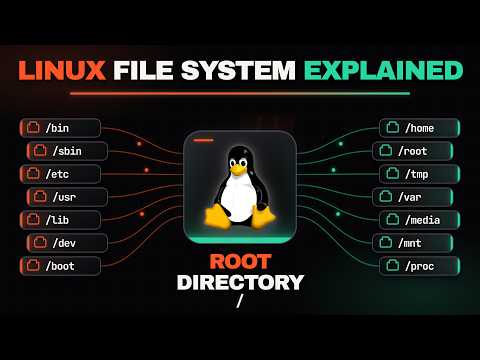
LINUX isn't Hard Once You Understand This (File Directories)
- 25 Aug, 2026
This guide breaks down the Linux file system into a simple, beginner-friendly structure. It explains how Linux organizes all files and disks starting from a single root directory (/) instead of trad
Linux Turns 25 years old today. Live long and prosper.
- 25 Aug, 2016
!linux(http://www.mysphere.com.br/wp-content/uploads/2016/08/linux.png) Linux will turn 25 years old on August 25, the day Linus Torvalds sent out his fateful message asking for help(https://groups.google.com/forum/%21msg/comp.os.minix/dlNtH7RRrGA/SwRavCzVE7gJ) with a new operating system. “I’m doing a (free) operating system (just a hobby, won’t be big and professional like gnu) for 386(486) AT clones. This has been brewing since april, and is starting to get ready. I’d like any feedback on things people like/dislike in minix, as my OS resembles it somewhat (same physical layout of the file-system (due to practical reasons) among other things),” he wrote in the comp.os.minix message board.
Linux Turns 25 years old today. Live long and prosper.Read More
Microsoft Takes .NET Open Source And Cross-Platform
- 12 Nov, 2014
For more than 12 years now, the .NET framework(http://www.microsoft.com/net) has been the programming model for developers who want to build apps for Windows. But in its efforts to take many of its developer tools cross-platform, Microsoft today announced that it plans to take .NET to both the Mac and Linux soon and that it is open-sourcing most of the full server-side .NET core stack (not client-side .NET), starting with the next version. Full article here(http://techcrunch.com/2014/11/12/microsoft-takes-net-open-source-and-cross-platform/)
Microsoft Takes .NET Open Source And Cross-PlatformRead MoreNext-generation Linux file systems: NiLFS(2) and exofs
- 04 Nov, 2009
From developerworks Linux® continues to innovate in the area of file systems. It supports the largest variety of file systems of any operating system. It also provides cutting-edge file system technology. Two new file systems that are making their way into Linux include the NiLFS(2) log-structured file system and the exofs object-based storage system. Discover the purpose behind these two new file systems and the advantages that they bring. See the full article here(http://platao.plansis.com.br/blogkenio.nsf/dx/Linux%C3%82%C2%AE%20continues%20to%20innovate%20in%20the%20area%20of%20file%20systems.%20It%20supports%20the%20largest%20variety%20of%20file%20systems%20of%20any%20operating%20syst
Next-generation Linux file systems: NiLFS(2) and exofsRead MoreNode-red. & NGINX on Centos 8
- 11 Jun, 2020
I am creating a server (Centos 8) to develop a system that will use an application using REACT as a front end to show data from different sensors.I will use NGINX as a webserver and Node-red as a back end.In this first post I describe how to install NGINX. Install nginx package using the yum command on CentOS 8: sudo yum update sudo yum install nginx Update firewall settings and open TCP port 80 and 443. Run: sudo firewall-cmd --permanent --zone=public --add-service=https --add-service=http sudo firewall-cmd --reload Enable nginx service by running systemctl command so that it starts at server boot time: sudo systemctl enable nginx start the service, run: sudo systemctl start nginx
Node-red. & NGINX on Centos 8Read Moreoc command fails due to missing glibc library
- 13 Dec, 2024
Yesterday i was helping a customer to deploy his OpenShift 4.16.x cluster. The first step was the bastion host preparation. This includes the setup of the OCP CLI. We do the default instalation of the CLI on top of RHEL 8.x but after the installation we got the following error: oc version oc: /lib64/libc.so.6: version GLIBC2.33' not found (required by oc) oc: /lib64/libc.so.6: version GLIBC2.34' not found (required by oc) oc: /lib64/libc.so.6: version GLIBC2.32' not found (required by oc) We tried to compile the new GLIBC .but without success. The solution: Download the CLI version compiled for RHEL 8. Link here(https://access.redhat.com/bounce/?externalURL=https%3A%2F%2Fmirror.opensh
oc command fails due to missing glibc libraryRead MoreOld Hardware? New Live with Linux
- 29 Sep, 2009
This article(http://www.ibm.com/developerworks/linux/library/l-recycle-hardware/index.html) on IBM DeveloperWorks show us a simple aproach on How to get old hardware and recycle it and save money.
Old Hardware? New Live with LinuxRead MoreOpenMediaVault error when try to mount a shared folder
- 30 Dec, 2024
I follow the instructions to create and share a folder on OMV but i can't access the shared folder using my MAC or Linux Manchines. On the Mac i got the error : The operation can't be completed because the original item for "foder name" can't be found. When i try to mount the shared folder on a Linux machine i got Permission Denied. I discovered that only the first user created during the initial setup can access the shared folders. I opened a terminal session and ssh to the omv machine. The permissions for the disks are shown bellow: !(https://www.mysphere.com.br/wp-content/uploads/2024/12/image.png) The failed disk have the permission drwx----- The only way i found was to change the
OpenMediaVault error when try to mount a shared folderRead More
Openshift-install CLI Tool – Crash – Unable to decode instructions
- 10 May, 2022
We started a CP4D installation on AWS, but without using AWS ROSA. We create a new cluster from scratch. In our lab everything worked perfectly but when the client went to do its installation the Openshift CLI displayed the following error message: assertion failed \inst.has.value(): failed to decode instruction: 0x0 After much analysis, we discovered that the client's Administrator was using a MacBook Pro M1 laptop. We found the solution at this link https://veducate.co.uk/
Openshift-install CLI Tool – Crash – Unable to decode instructionsRead MorePortal Fix Pack 6.0.1.7 error on linux
- 14 Dec, 2010
The error message bellow appears when the owner of the file wpsconfig.sh is different from the owner of the Fix Pack 6.0.1.7 files
Error ( 2 ): IOException creating RunTime(): /opt/ibm/WebSphere/PortalServer/config/WPSconfig.sh: cannot execute
Error 112 -- Return code (888) differs from the expected code (0).
To solve the problem change the owner of the WPSconfig.sh to match the owner of the Fix Pack files.
Red Hat introduces new no-cost RHEL option
- 20 Jan, 2021
On December 8, 2020, Red Hat announced a major change to the enterprise Linux ecosystem(https://www.redhat.com/en/blog/centos-stream-building-innovative-future-enterprise-linux): Red Hat will begin shifting our work from CentOS Linux to CentOS Stream on December 31, 2021. We and the CentOS Project governing board believe that CentOS Stream represents the best way to further drive Linux innovation. It will give everyone in the broader ecosystem community, including open source developers, hardware and software creators, individual contributors, and systems administrators, a closer connection to the development of the world’s leading enterprise Linux platform. Now you can have a 100% RHEL no-
Red Hat introduces new no-cost RHEL optionRead MoreResize VM disk with KVM
- 16 Nov, 2021
Today i will install Code Ready. You can install Openshift on your laptop. See this link(https://developers.redhat.com/products/codeready-containers/overview?onebox=crc) . My RHEL 8.4 VM has a small disk and first i need to resize the disk and then install CodeReady Using this commands i change from 20 GB to 50GB disk First you need to locate the vm disk with the command sudo virsh domblklist rhel8-1 the output was: Target Source ------------------------------------------------------- vda /var/lib/libvirt/images/rhel8-2-clone.qcow2 sda - To resize the disk the VM must be not running and must not have a snapshot. Just type this command and add 30GB sudo qemu-img resize /var/lib/lib
Resize VM disk with KVMRead Morersync is faster than scp to copy files between machines
- 31 Dec, 2024
rsync is generally faster than scp for copying files, especially when transferring a large amount of data or syncing directories. Here's why: 1. Incremental Transfers - rsync: Only transfers the parts of files that have changed, rather than the entire file. This makes subsequent transfers much faster. - scp: Always transfers the entire file, even if only a small part of it has changed. 2. Compression - rsync: Supports compression during the transfer (using the -z option), which reduces the amount of data sent over the network. - scp: Also supports compression (using the -C option), but it doesn't have the same efficiency in skipping unchanged data. 3. Resume Support - rsync: Can
rsync is faster than scp to copy files between machinesRead MoreSecure Nginx server with LetsEncrypt
- 12 Jun, 2020
You need A Fully Qualified Domain Name (FQDN) pointing to a dedicated IP address of the webserver. This needs to be configured by your DNS administrator or provider. 1 - Install Certbot in Centos 8 sudo curl -O https://dl.eff.org/certbot-auto chmod 0755 /usr/local/bin/certbot-auto 2 - Configure Nginx server\name on nginx.conf Edit nginx.conf an change the variable server\name to the same FQDN of your server for example: server\name www.mysphere.com.br; 3 - Run the certbot command: Execute sudo /usr/local/bin/certbot-auto --nginx and follow the instructions Test if your Nginx server using https://
Secure Nginx server with LetsEncryptRead MoreSetup Atom Text Editor on Ubuntu 14.04
- 12 Aug, 2016
My MacBook died yesterday. I am waiting the repair. Now working with my Ubuntu laptop. Some applications must be installed. Atom was very easy. Open a terminal window and run the following: sudo add-apt-repository ppa:webupd8team/atom sudo apt-get update sudo apt-get install atom
Setup Atom Text Editor on Ubuntu 14.04Read MoreSetup command line tools to work with IBM Cloudant
- 06 May, 2018
Command line tools are always welcome. Today i need to setup my MAC to work with IBM Cloudant Install curl on your MAC if you haven't done it yet. 1 - You need to setup the Cloudant DB using your IBM Cloud account. 2 - Go to service credentials and get your username, password and hostname Sample: "username": "xxxx-xxx-xxx-bluemix", "password": "yourcloudantpassword", "host": "xxxx-xxx-xxx-bluemix.cloudant.com" 3 - Test the connection curl –v –u xxxx-xxx-xxx-bluemix 'https://xxxx-xxx-xxx-bluemix.cloudant.com' The command will prompt for the password: yourcloudantpassword You will see a lot off lines but pay attention on the line Authorization: Basic. This will be used to setup acur
Setup command line tools to work with IBM CloudantRead MoreSetup Nginx reverse proxy for Node-red
- 20 Oct, 2020
I setup Node-red to use HTTPS and everything works fine. All HTTPS requests go to default port of Node-red. Today i need to setup a communication with a client that not support HTTPS, just HTTP. The solution i found was to setup Nginx as reverse proxy. Nginx receives the HTTP requests and then forward them to Node-red. On my Nginx server i just add the following lines server { listen 80; location /reddata { proxy\pass https://:port/reddata; } }
Setup Nginx reverse proxy for Node-redRead MoreSetup ntfs-3g on Centos 6.x
- 06 Feb, 2013
Centos 6.x by default does not mount ntf´s disks. You need ntfs-3g How to wge http://rpms.famillecollet.com/enterprise/remi-release-6.rpm(http://rpms.famillecollet.com/enterprise/remi-release-6.rpm) sudo rpm -Uvh remi-release-6.rpm epel-release-6.rpm yum --enablerepo epel install ntfs-3g t http://dl.fedoraproject.org/pub/epel/6/x8664/epel-release-6-8.noarch.rpm(http://dl.fedoraproject.org/pub/epel/6/x8664/epel-release-6-8.noarch.rpm) wget http://rpms.famillecollet.com/enterprise/remi-release-6.rpm(http://rpms.famillecollet.com/enterprise/remi-release-6.rpm) sudo rpm -Uvh remi-release-6.rpm epel-release-6.rpm yum --enablerepo epel install ntfs-3g
Setup ntfs-3g on Centos 6.xRead MoreSetup OpenVPN Centos 6.3
- 25 Mar, 2013
I found a lot of documentation and this is my setup
install the necessary packages
yum install gcc rpm-build autoconf.noarch zlib-devel pam-devel lzo lzo-devel openssl-devel automake imake pkgconfig gcc-c++ libcrypto.so.6
install openvpn
yum install openvpn
Copy the files
cp -r /usr/share/doc/openvpn-2.1.3/easy-rsa/ /etc/openvpn/
Create the certificate.
You’ll be asked to fill the field data, you can empty that with click enter repeatedly, but the one
you have to fill is the “Common Name� field.
cd /etc/openvpn/easy-rsa/2.0
source ./vars
./vars
./clean-all
Build Key Server
./build-key-server server
Build Diffie Hellman
./build-dh
Create the server.conf
Setup Oracle Java jre 1.7 on Centos 6.3
- 06 Feb, 2013
Download the rpm file from java.com
Install using the rpm command
rpm -Uvh jre-7u13-linux-x64.rpm
Use alternatives to config
\ alternatives --config java
There are 3 programs which provide 'java'.
Selection Command
-----------------------------------------------
\ 1 /usr/java/latest/jre/bin/java
+ 2 /usr/java/jre1.7.0\13/bin/java
3 /usr/java/jdk1.7.0\13/jre/bin/java
Enter to keep the current selection+, or type selection number:
Select the java you want to use in my case 2
Test using the command java -version
java -version
java version "1.7.0\13"
Java(TM) SE Runtime Environment (build 1.7.0\13-b20)
Java HotSpot(TM)
Solved - Second Monitor on my Ubuntu 12.10
- 28 Feb, 2013
Is there a lot of complaints about using second monitor with Ubuntu 12.10 When i setup Ubuntu, all monitors was detected and works perfectly. After some restarts , things was not working anymore. I try several commands but this one works from this topic(http://askubuntu.com/questions/217900/dual-monitors-dont-initialise-correctly-in-booting-12-10) The problem is, in my opinion, the lightDM is not great with multi-monitors. There is a good fix though. install disper sudo apt-get install disper then edit /etc/lightdm/lightdm.conf to have a display-setup-script=disper -s line example: SeatDefaults user-session=ubuntu greeter-session=unity-greeter display-setup-script=disper -s This
Solved - Second Monitor on my Ubuntu 12.10Read MoreSubscription error after create a vm from RHEL 8.4 template
- 08 Nov, 2021
After creating a VM using the template that was created using RHEL 8 I tried to register the new VM and the following error was shown: This system is registered to Red Hat Subscription Management, but is not receiving updates. You can use subscription-manager to assign subscriptions. Error: There are no enabled repositories in "/etc/yum.repos.d", "/etc/yum/repos.d", "/etc/distro.repos.d" The solution for me was to remove and add subscriptions again RHEL8: subscription-manager remove --all subscription-manager clean subscription-manager register --username --auto-attach dnf repolist or yum repolist
Subscription error after create a vm from RHEL 8.4 templateRead MoreSupport for Notes on Windows 7, Snow Leopard (Mac OS X 10.6), and RHEL 5.4
- 23 Jan, 2010
Support for Notes on Windows 7, Snow Leopard (Mac OS X 10.6), and RHEL 5.4 Windows 7, Snow Leopard (on Mac OS X 10.6.2), and Red Hat Enterprise Linux 5.4 Desktop certification testing has been completed for Notes 8.5.1 Fix Pack 1, available now. As part of this release, Notes 32-bit will be supported on Windows 7 64-bit. Download FP1 in this link(http://www-01.ibm.com/support/docview.wss?rs=899&uid=swg24025721&ca=blog)
Support for Notes on Windows 7, Snow Leopard (Mac OS X 10.6), and RHEL 5.4Read MoreThe Pencil Project for prototyping mobile applications
- 23 Jul, 2014
This is a cool tool. It is free and runs on Linux, Mac and Windows.
Pencil is built for the purpose of providing a free and open-source GUI prototyping tool that people can easily install and use to create mockups in popular desktop platforms.
Go to the Pencil Website(http://pencil.evolus.vn/) and look for more details and download options.
!Image:The Pencil Project for prototyping mobile applications(http://platao.plansis.com.br/blogkenio.nsf/dx/pencil.htm/content/M2?OpenElement)
The Revolution OS
- 12 Jan, 2016
I was researchingLinuxandits development.I found thelink to the videoRevolution OSthatshows howbeautifulisthe storybehindthe movementof free software andopen source. Theychanged the world.
The Revolution OSRead MoreUsing WGET to download software from IBM
- 18 Sep, 2014
A few months ago I heard that it was possible to download files from Passport advantage using wget on a linux terminal.
Never needed to test this until yesterday when I needed to upload 3 GB of files to a server (home office to datacenter) that had no possibility of using a browser to download from Passport Advantage.
What I did was the following:
1 - Log on passport advantage (using my laptop) and looked for the desired software
2 - I changed the download option for https
3 - When I started downloading the file I copied the URL
4 - The URL is complex like this one: (i changed some characteres)
https://serverfromibm/sdfdl/v2/fulfill/CITI7BP/Xa.2/Xb.ll8xxxxxxxxxxxxxxxxxx
WCT will not start on Linux x64
- 18 Dec, 2014
Today i setup an IBM HTTPServer on top of Red Hat 6 64bits . The wct.sh command doesn´t work.
!Image:WCT will not start on Linux x64(http://platao.plansis.com.br/blogkenio.nsf/dx/18122014150229KCAMZ5.htm/content/M2?OpenElement)
I found on the log some missing libs
To solve the problem:
yum install gtk2-engines.i686
yum install libXtst.i686
What i did to get more space on /tmp on linux.
- 01 Jan, 2016
Yesterday i was installing a TSM Server for our company. The db2 installer complain about the /tmp size. The installer need 2,5GB and my /tmp has only 2 GB. I create a "disk" using dd command with 4GB on a partition with lots of space. dd if=/dev/zero of=/usr/tmpDSK bs=1024k count=4096 mkfs -t ext3 /usr/tmpDSK file /usr/tmpDSK umount /tmp mount -o loop,exec,nosuid,rw /usr/tmpDSK /tmp After the db2 installation i umount the /tmp and mount it back using fstab -a
What i did to get more space on /tmp on linux.Read MoreXsp Initialization error - Could not load class or methods after upgrade from Domino 11.0 to 11.0.1 on Linux
- 18 Jun, 2020
Today i upgrade one server to Domino 11.0.1 from Domino 11.0 on linux. When the server starts the HTTP the console show the error bellow: \103028:000002-00007F2CD562E740\ 06/18/2020 10:40:45 AM JVM: Java Virtual Machine initialized. \103028:000002-00007F2CD562E740\ 06/18/2020 10:40:45 AM HTTP Server: Java Virtual Machine loaded \103028:000002-00007F2CD562E740\ 06/18/2020 10:40:50 AM HTTP JVM: java.lang.reflect.InvocationTargetException \103028:000002-00007F2CD562E740\ 06/18/2020 10:40:50 AM HTTP JVM: at sun.reflect.NativeMethodAccessorImpl.invoke0(Native Method) \103028:000002-00007F2CD562E740\ 06/18/2020 10:40:50 AM HTTP JVM: at sun.reflect.NativeMethodAccessorImpl.invoke(NativeMethodAcc
Xsp Initialization error - Could not load class or methods after upgrade from Domino 11.0 to 11.0.1 on LinuxRead More