Showing posts fromIot
AWS Lambda now supports container images as a packaging format
- 03 Dec, 2020
You can now package and deploy AWS Lambda(https://aws.amazon.com/lambda/) functions as a container image of up to 10 GB. This makes it easy to build Lambda based applications using familiar container tooling, workflows, and dependencies. Just like functions packaged as ZIP archives, functions deployed as container images will benefit from AWS Lambda’s operational simplicity, automatic scaling with sub-second startup times, high availability, and native integrations with 140 AWS services. More information here(https://aws.amazon.com/about-aws/whats-new/2020/12/aws-lambda-now-supports-container-images-as-a-packaging-format/)
AWS Lambda now supports container images as a packaging formatRead MoreConverting M4V to MP4 and WEBM with FFmpeg
- 05 Jun, 2019
This month i am creating a Course about AI & IoT (AI & IoT Fundamentals). The course are about AI and IoT in general but i will use IBM Watson APIs, IBM Watson IoT and off course Node-Red and Raspberry Pi to make the excersices. The course is 15 hours long (lots off video) plus the exercises. Using the Keynote to generate de videos is fine but when i export the video the only option is M4V type. To convert the videos i am usin FFmpeg. 1 - Install FFmpeg brew install ffmpeg 2 - Convert to mp4 using ffmpeg -i input.m4v out.mp4 3 - Convert to webm ffmpeg -i input.m4v output.webm
Converting M4V to MP4 and WEBM with FFmpegRead MoreDecoding Sensor Data
- 28 Feb, 2019
Every sensor has it's own kind off codification The message from the device is like this one: {"time": "1551285775", "deviceType": "deviceType", "device": "xyzabcd", "duplicate": "false", "snr": "30.00", "rssi": "-128.00", "avgSnr": "19.39", "station": "300C", "lat": "-20.0", "lng": "-44.0", "seqNumber": "497", "data": "1a24183c3801" } The measurement are encoded on data string, a sequence of 6 bytes. I read the sensor manual and the temperature are usin the last 4 bytes To get the temperature value i wrote the following: var dados = msg.payload.data //get the data value "1a24183c3801" var v1 = dados.substring(10,11)+dados.substring(11,12)+dados.substring(8,9)+dados.substring(
Decoding Sensor DataRead MoreDevice data and Interfaces
- 19 Nov, 2020
A device that has a temperature sensor in an office might report temperature in degrees Fahrenheit or in degrees Celsius. It is not efficient to configure applications to be able to consume data in all these formats. Instead, the data needs to be collected, transformed, and normalized to create a single logical model so that an application can interact with the different devices in the same way. The data management component of Platform Service includes a device twin(https://www.ibm.com/support/knowledgecenter/SSQP8H/iot/platform/GAinformationmanagement/gaimdevicetwin.html?view=kcdevicetwins) feature and an asset twin(https://www.ibm.com/support/knowledgecenter/SSQP8H/iot/platform/GAinforma
Device data and InterfacesRead MoreEncode / Decode string on MAC terminal
- 27 Feb, 2019
Today i am working on a batch operation registering several sensors on IBM Watson IoT. Using curl you need to encode de API KEY and API TOKEN It easy using the MAC terminal console To encode just type on terminal: echo -n 'user:password' | base64 the result is ---> dXNlcjpwYXNzd29yZA== To decode just type: echo 'dXNlcjpwYXNzd29yZA==' | base64 -D the result is ---> user:password
Encode / Decode string on MAC terminalRead MoreIBM Cloud Error: 502 Bad Gateway: Registered endpoint failed to handle the request
- 26 Feb, 2019
I setup the connection to cloudant service to store historical data of my IoT devices. When i click "done" an pop up window appears asking to authorize the connection to Cloudant Service. I confirm to authorize and i get the message 502 Bad Gateway: Registered endpoint failed to handle the request. and i can't store iot device data on cloudant. I tried several times. I search a lot about this error message with no luck . To solve the problem erase all IBM cookies from you browser and restart it.
IBM Cloud Error: 502 Bad Gateway: Registered endpoint failed to handle the requestRead MoreIBM Watson IoT Rules
- 15 Jul, 2019
Rules are key elements for an IoT solution. Using rules you can trigger an action or send an alert any kind of notification. IBM update his platform and now you can create rules using a graphical interface. The key part of a rule is the expression that will be evaluate to true or false. The expression language are built using JSONata. JSONata is a lightweight query and transformation language for JSON data. The point is that IBM are using JSONata v1.4x. and the current version of JSONata is v1.6.5. The versions have lots of difference. Yesterday i was writing a rule to get the hour for an event. If you are using v1.6.5 you can use the function $fromMilllis with picture. $fromMillis(151006
IBM Watson IoT RulesRead MoreImporting packages in Jupyter notebooks and avoid ImportError
- 16 Oct, 2020
“ImportError: No module named tensorflow” but you know you installed it? Sometimes you can import packages from the console, but not from the Jupyter notebook? !pip install tensorflow sometimes just does not work? Googling about similar issues made me realise people are suggesting the thing that won’t work most of the time. If you are installing packages by running !conda install tensorflow or if you want to use pip !pip install tensorflow you are using very fragile commands (if run in notebook) and that’s the reason packages you installed can’t be imported. It is not fine this time Instead, use these commands: import sys !conda install --yes --prefix {sys.prefix} tensorflow or
Importing packages in Jupyter notebooks and avoid ImportErrorRead MoreIoT Knife Sharpening
- 04 Sep, 2020
Sharpening a knife is a skill that everyone who enjoys cooking needs to have. I have several stones for sharpening my knives. In addition to having the correct stones one of the most difficult things is to maintain the angle between the knife and the stone during the sharpening process. There are many videos and even YouTube channels on the subject. A video that caught my attention is below. It shows how to create and use an electronic device to maintain the sharpness angle.
IoT Knife SharpeningRead MoreNode-RED 1.0.0-beta.2 released
- 25 May, 2019
This is the first public beta release of Node-RED 1.0. The changes in this release are mostly focused on the editor - and there are some significant changes in there. More info here(https://discourse.nodered.org/t/node-red-1-0-0-beta-2-released/11504) Installing the beta If you want to try out the beta, you will need specify node-red@next when you use npm to update. Without the @next you'll still get 0.20.x. So on a Pi you'd do: hljs coffeescript sudo npm install -g --unsafe-perm node-red@next
Node-RED 1.0.0-beta.2 releasedRead MoreNode-Red 1.0 Released
- 30 Sep, 2019
Node-Red 1.0 released today. Some new features: Asynchronous message passing This release changes the message passing between nodes to be always asynchronous rather than it being sometimes asynchronous and sometimes synchronous depending on the implementation of individual nodes. Node Send API Nodes now have a new API available for how they handle messages in the runtime. This API allows them to tell the runtime when they have finished with a message. This will help the runtime to track nodes as they flow through the system - enabling future features such as automatic timeouts of nodes. To go along with this change, we’ve introduced a new Complete node. This node can be targeted at
Node-Red 1.0 ReleasedRead MoreNode-Red application does not start on IBM Cloud - Never change the App Name!
- 04 Sep, 2019
One of my apps does not start after a restart. I changed several things on the Node-Red app and i think the restart will be a good idea. On the logs view there was no good messages to see what is happening with Node-Red So i start the terminal and go to use IBM cloud CLI to get the app log just logon and type ibmcloud cf logs \appname\ > log.txt I saw the following messages \CELL/0\ OUT Cell a64da35a-93fb-4f76-abd8-219869380b84 creating container for instance 6b30e79e-2853-4199-4c3e-1cc0 2019-09-04T13:54:47.36-0300 \CELL/0\ OUT Cell a64da35a-93fb-4f76-abd8-219869380b84 successfully created container for instance 6b30e79e-2853-4199-4c3e-1cc0 2019-09-04T13:54:55.45-0300 \CELL/0\ OUT Start
Node-Red application does not start on IBM Cloud - Never change the App Name!Read MoreNode-red. & NGINX on Centos 8
- 11 Jun, 2020
I am creating a server (Centos 8) to develop a system that will use an application using REACT as a front end to show data from different sensors.I will use NGINX as a webserver and Node-red as a back end.In this first post I describe how to install NGINX. Install nginx package using the yum command on CentOS 8: sudo yum update sudo yum install nginx Update firewall settings and open TCP port 80 and 443. Run: sudo firewall-cmd --permanent --zone=public --add-service=https --add-service=http sudo firewall-cmd --reload Enable nginx service by running systemctl command so that it starts at server boot time: sudo systemctl enable nginx start the service, run: sudo systemctl start nginx
Node-red. & NGINX on Centos 8Read MoreProud to be an IBM Champion 2021
- 14 Jan, 2021
This history began in 2011 when the category IBM Champions for Social Business was created.At that time there were only 50. During the following years I was also nominated in other categories such as IBM Middleware, IBM Cloud and recently IBM Watson IoT.It is a journey of many years, a lot of learning and also knowledge sharing.!(http://www.mysphere.com.br/wp-content/uploads/2021/01/Screen-Shot-2021-01-14-at-13.57.14.png)
Proud to be an IBM Champion 2021Read More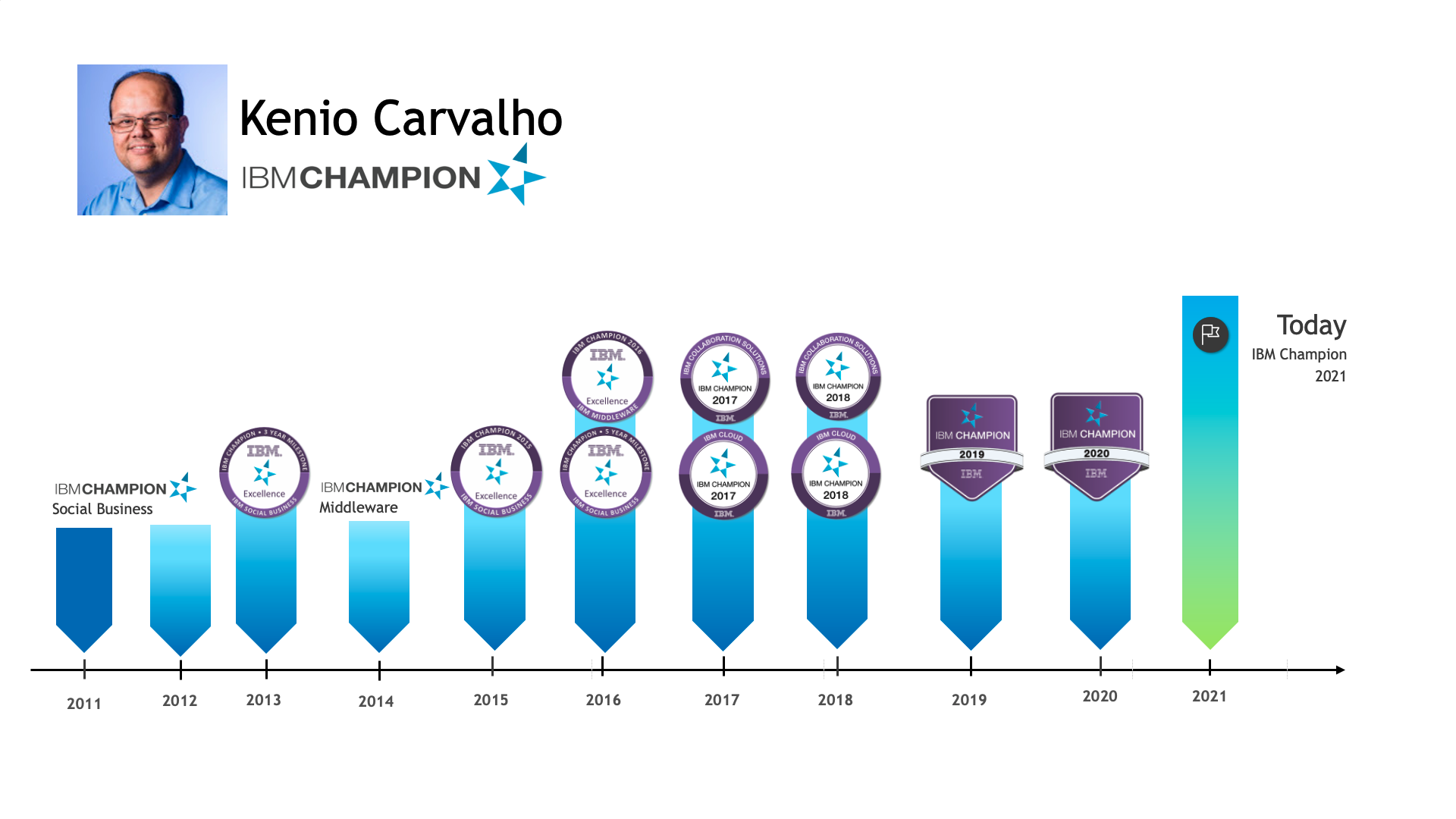
Secure Nginx server with LetsEncrypt
- 12 Jun, 2020
You need A Fully Qualified Domain Name (FQDN) pointing to a dedicated IP address of the webserver. This needs to be configured by your DNS administrator or provider. 1 - Install Certbot in Centos 8 sudo curl -O https://dl.eff.org/certbot-auto chmod 0755 /usr/local/bin/certbot-auto 2 - Configure Nginx server\name on nginx.conf Edit nginx.conf an change the variable server\name to the same FQDN of your server for example: server\name www.mysphere.com.br; 3 - Run the certbot command: Execute sudo /usr/local/bin/certbot-auto --nginx and follow the instructions Test if your Nginx server using https://
Secure Nginx server with LetsEncryptRead MoreSetup Nginx reverse proxy for Node-red
- 20 Oct, 2020
I setup Node-red to use HTTPS and everything works fine. All HTTPS requests go to default port of Node-red. Today i need to setup a communication with a client that not support HTTPS, just HTTP. The solution i found was to setup Nginx as reverse proxy. Nginx receives the HTTP requests and then forward them to Node-red. On my Nginx server i just add the following lines server { listen 80; location /reddata { proxy\pass https://:port/reddata; } }
Setup Nginx reverse proxy for Node-redRead MoreUsing Arduino Nano on MacBook Pro
- 01 Mar, 2019
Connect an Arduino Board to a computer is a easy task right? 99% yes. My Arduino Nano Board(https://www.eletrogate.com/nano-v3-0-cabo-usb-para-arduino) arrived last week and i only have time to play with this board on the last weekend. When i try to upload a program to the board i got the following: Arduino: 1.8.8 (Mac OS X), Board: "Arduino Nano, ATmega328P" Sketch uses 444 bytes (1%) of program storage space. Maximum is 30720 bytes. Global variables use 9 bytes (0%) of dynamic memory, leaving 2039 bytes for local variables. Maximum is 2048 bytes. avrdude: stk500\getsync() attempt 1 of 10: not in sync: resp=0x50 avrdude: stk500\getsync() attempt 2 of 10: not in sync: resp=0x72 avrdude:
Using Arduino Nano on MacBook ProRead MoreVCP Driver for macOS Big Sur 11.0.x not available yet
- 24 Nov, 2020
With new version of macOS released which is macOS Big Sur 11.0.x, the latest version of our VCP driver for Macintosh OSX (v5.3.5) now becomes incompatible. The reason for this is because of new driver model change on macOS which you can find more information from links below: https://developer.apple.com/documentation/macos-release-notes/macos-big-sur-11\0\1-release-notes https://developer.apple.com/support/kernel-extensions/ We currently are working to update our driver to fix this issue, although due to testing requirements, we do not expect the new version of driver to be available on our website for now. So please be up to date on our page for VCP drivers below for latest information r
VCP Driver for macOS Big Sur 11.0.x not available yetRead More