Showing posts fromMac
Error: podman-machine-default: VM already exists
- 05 Mar, 2023
This error appears today on my MAC using macOS 12.6 Monterey. I don't know the cause and . It was woking last time i used podman on this MAC. To solve the problem: podman machine rm podman-machine-default brew uninstall podman brew install podman podman machine init
Error: podman-machine-default: VM already existsRead MoreConverting M4V to MP4 and WEBM with FFmpeg
- 05 Jun, 2019
This month i am creating a Course about AI & IoT (AI & IoT Fundamentals). The course are about AI and IoT in general but i will use IBM Watson APIs, IBM Watson IoT and off course Node-Red and Raspberry Pi to make the excersices. The course is 15 hours long (lots off video) plus the exercises. Using the Keynote to generate de videos is fine but when i export the video the only option is M4V type. To convert the videos i am usin FFmpeg. 1 - Install FFmpeg brew install ffmpeg 2 - Convert to mp4 using ffmpeg -i input.m4v out.mp4 3 - Convert to webm ffmpeg -i input.m4v output.webm
Converting M4V to MP4 and WEBM with FFmpegRead MoreHow to Fix Error 513 When Unzipping Large Files on macOS
- 25 Mar, 2025
If you’ve ever tried to unzip a large file on macOS and encountered the mysterious "Error 513," you’re not alone. This pesky error can pop up unexpectedly, leaving you scratching your head and wondering why your file won’t extract properly. Recently, I ran into this issue myself while trying to decompress a massive archive using the built-in Archive Utility on macOS. After some trial and error, I found a reliable solution: the Keka application. Here’s a rundown of what Error 513 is, why it happens, and how Keka saved the day. What Is Error 513 on macOS? Error 513 typically occurs when macOS’s default Archive Utility struggles to handle certain zip files—particularly large ones or those wi
How to Fix Error 513 When Unzipping Large Files on macOSRead MoreHow to Install watch on macOS Sequoia
- 06 Feb, 2025
The watch command is a useful utility in Unix-like systems that allows you to execute a command periodically and display its output. However, macOS does not come with watch pre-installed. If you're running macOS Sequoia and want to use watch, follow the steps below to install it. Recently i switch my mabook to a new MacBook Pro M2 and try to use the command to watch some openshift logs and i got the following result: !(data:image/png;base64,iVBORw0KGgoAAAANSUhEUgAAA6gAAAC6CAYAAACjt2AlAAAAAXNSR0IArs4c6QAAAJBlWElmTU0AKgAAAAgABgEGAAMAAAABAAIAAAESAAMAAAABAAEAAAEaAAUAAAABAAAAVgEbAAUAAAABAAAAXgEoAAMAAAABAAIAAIdpAAQAAAABAAAAZgAAAAAAAACQAAAAAQAAAJAAAAABAAOgAQADAAAAAQABAACgAgAEAAAAAQAAA6igAwAEAAAAA
How to Install watch on macOS SequoiaRead MoreMacbook Pro 15 with several problems
- 05 Aug, 2019
Last week i got back my Macbook Pro 15 2016, after 10 days. The laptop go to service on an Apple Technical Assistance here in my city. My first Macbook Pro (Mid 2012) works for 5 years without issues. The first problem was the speakers. Sound was horrible. The problem is the same described on this link.(https://discussions.apple.com/thread/8014046) The second problem was the battery. With only 86 cycles a message about to service the battery appears. The third problem was staingate.(https://www.macrumors.com/2017/11/17/apple-extends-free-staingate-repairs/) Apple replace all parts of my Macbook. The service is ok until now. Lots of problems with this expensive machine. The quality i
Macbook Pro 15 with several problemsRead MoreOne Monitor Two Macbooks
- 26 Aug, 2021
!(http://www.mysphere.com.br/wp-content/uploads/2021/08/desk.jpg) I have on my desk now 2 MacBooks Pro a monitor, a keyboard and a magic mouse. For the two computers to share the monitor, keyboard and mouse I should buy a KVM but I don't want to have too many cables on the desk and also the cost of the KVM for the macbooks is too expensive for me in Brazil. I found an interesting solution which was to connect each macbook using HDMI adapters to the monitor and use a software to switch the keyboard and mouse between the computers. I'm testing Barrier(https://github.com/debauchee/barrier/releases) and so far everything is working fine. There is feature very cool : You can copy and paste f
One Monitor Two MacbooksRead More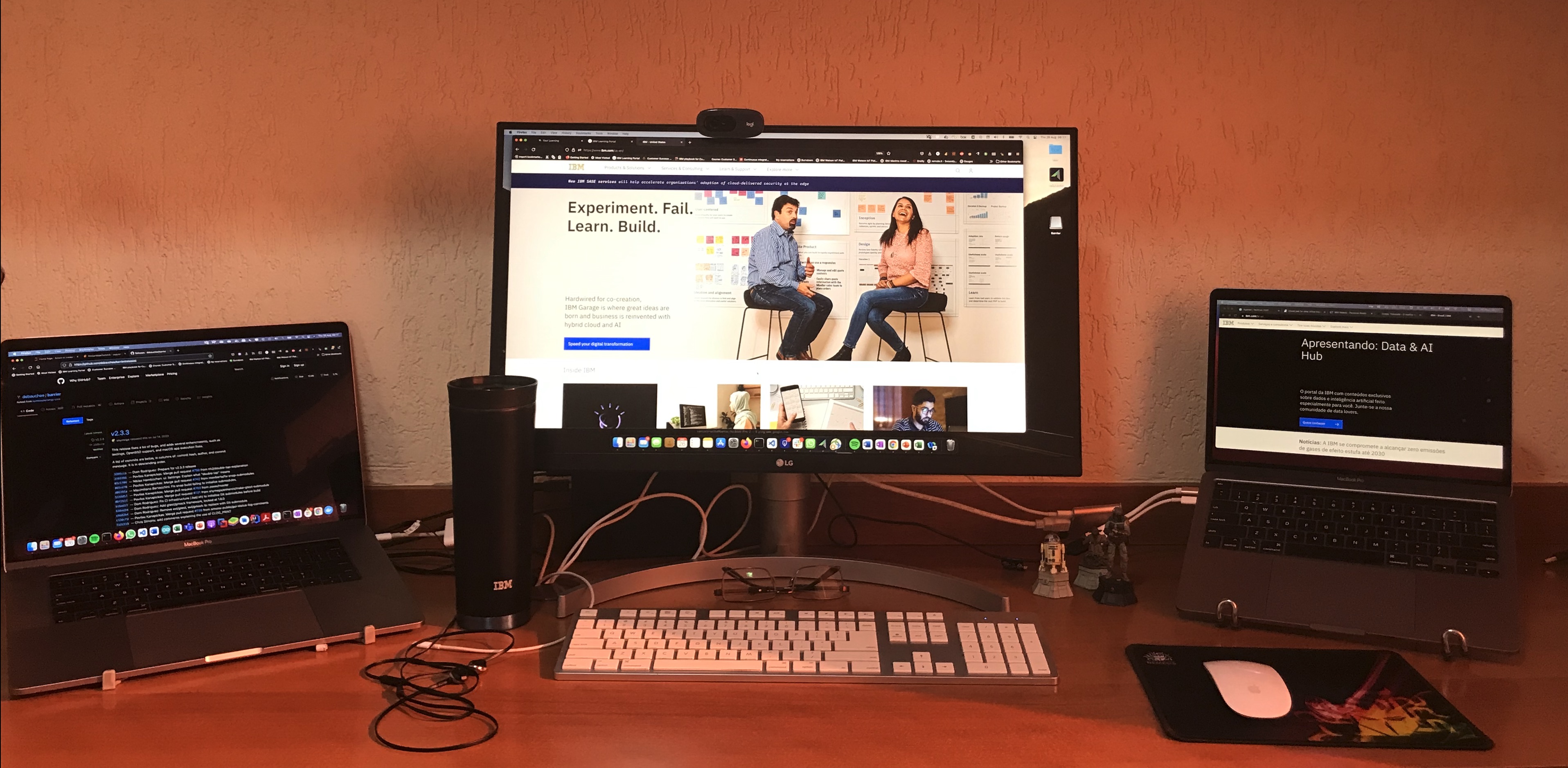
OneDrive is unable to access keychain
- 31 Jan, 2020
I have this problem today after i change my account on my macbook. The solution that worked for me was to delete the OneDrive Cached Credential key from the Keychain. The procedure was the following: 1. Launch Spotlight Search (shortcut: command + space), type keychain, and press return. This should launch the Keychain Access app. 1. Type OneDrive into the Keychain Access search box. This should show a short list of keys related to OneDrive. 1. Click on the key called " OneDrive Standalone Cached Credential" or some variant thereof. 1. Press the delete key (or use the menu item Edit > Delete) to delete the cached credential key. 1. Restart OneDrive. 1. Enter your user and password again.
OneDrive is unable to access keychainRead MorePython script to organize photos
- 03 Mar, 2025
"I have lots of photo files. Since 2006, when I purchased my first digital camera, the number of photos has grown quickly, and after getting an iPhone, the number of photos exploded. With the high number of photos, the number of backups grew as well. I decided to organize all backups and create folders using the format YYYY-MM from the metadata of the photo files." Bellow the python script. The script runs on macos: import os import shutil import datetime import logging import tkinter as tk from tkinter import filedialog from PIL import Image, ExifTags import pillowheif import piexif import struct Setup logging logging.basicConfig(level=logging.DEBUG, format="%(asctime)s - %(levelname
Python script to organize photosRead MoreRename several files on MAC using command line
- 05 Apr, 2018
Today i need to rename lots of files from .txt to .json. I type the following on the terminal window: for f in .txt; do mv "$f" "$(basename "$f" .txt).json" done
Rename several files on MAC using command lineRead MoreSecondary IP on MAC Book Wifi
- 22 Dec, 2017
I use many vm's in my day to day on my Mac. When I'm on clients and I have to use different networks of my other, always have to be changing the ip's of virtual servers and this is a big problem. A friend sent me the following tip : Place a secondary ip in your MAC that belongs to the same network of VM's. I don't find a easy way to put a secondary ip on my wifi connection. The only way i found was duplicating the wifi network and set up fixed ip in the same network of virtual machines . !(http://www.mysphere.com.br/wp-content/uploads/2017/12/Screen-Shot-2017-12-21-at-22.09.50.png) Now i can connect on any wifi network and my Mac access all vm's without changing the ip address
Secondary IP on MAC Book WifiRead More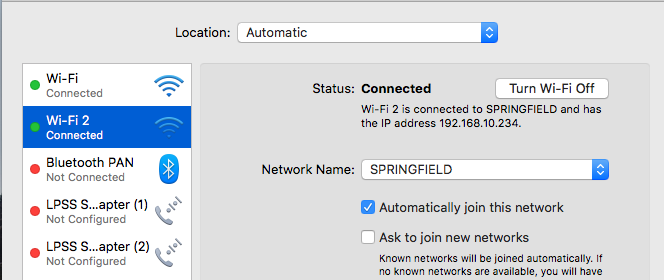
Setup command line tools to work with IBM Cloudant
- 06 May, 2018
Command line tools are always welcome. Today i need to setup my MAC to work with IBM Cloudant Install curl on your MAC if you haven't done it yet. 1 - You need to setup the Cloudant DB using your IBM Cloud account. 2 - Go to service credentials and get your username, password and hostname Sample: "username": "xxxx-xxx-xxx-bluemix", "password": "yourcloudantpassword", "host": "xxxx-xxx-xxx-bluemix.cloudant.com" 3 - Test the connection curl –v –u xxxx-xxx-xxx-bluemix 'https://xxxx-xxx-xxx-bluemix.cloudant.com' The command will prompt for the password: yourcloudantpassword You will see a lot off lines but pay attention on the line Authorization: Basic. This will be used to setup acur
Setup command line tools to work with IBM CloudantRead MoreSupportability Q&A about IBM Notes and OS X 10.10.x
- 18 Oct, 2014
This technote(http://www-01.ibm.com/support/docview.wss?uid=swg21682510) contains questions and answers pertaining to installing and running IBM Notes on Apple's OS X 10.10.x Yosemite. You only need to download Notes 9.0.1, as mentioned, if you will install a fresh yosemite. I upgraded my Mavericks yesterday and only need to install the legacy Apple java. My Notes was on the FP2 level.
Supportability Q&A about IBM Notes and OS X 10.10.xRead MoreSupportability Q&A about IBM Notes and OS X 10.10.x
- 25 Aug, 2014
IBM published a TN(http://www-01.ibm.com/support/docview.wss?uid=swg21682510) about Notes and the upcoming Apple's OS X 10.10 Yosemite
Supportability Q&A about IBM Notes and OS X 10.10.xRead MoreTraveler with iOS 6
- 14 Sep, 2012
Today IBM publish this FAQ(http://www-01.ibm.com/support/docview.wss?uid=swg21610736) about iOS 6 support with traveler Apple iOS 6 Support: For 8.5.3.x: Please apply Traveler 8.5.3.3 IF1 or later For 8.5.3 UP1: Please apply Traveler 8.5.3 UP1 IF1 or later
Traveler with iOS 6Read MoreX Window and MAC
- 24 Sep, 2014
I am using my MAC book as principal machine (i was a Windows user). Every day i need a ssh connection with servers to do admin tasks. On windows i use Mobaxterm the best tool i used to do things using ssh. My favorite feature is X Window to use graphical interfaces via x11 forward. There is no Mobaxterm for Mac, so i installed XQuartz http://xquartz.macosforge.org/landing/(http://xquartz.macosforge.org/landing/). To use the X Window start your connection (after setup XQuartz) using ssh -X user@server
X Window and MACRead More