“WebSphere Liberty is the next generation application server. Liberty and Eclipse make a great local development environment for developing Java EE applications. To develop Java EE applications to deploy to Liberty, you’re going to need a Liberty development environment. You’ll also need an integrated development environment (IDE) for editing your code. While any Java EE IDE will work, the Eclipse IDE is one of the best, if for no other reason than because IBM has developed plugins for Eclipse for developing Liberty applications and for working with Bluemix.”
MySphere Posts
Since 1997 i work with Notes/Domino. In that time i receive every quarter a set of CD’s with the Lotus KB on it.
Things have changed for the better, LNN was launched and i was able to replicate the LotusKB on daily basis, no more CD’s, no more delays.
I start to work with WebSphere, Portal and other IBM products in 2005 and the support is only from “google” and the software manuals were called Infocenters.
IBM changed again, in my opinion, not for the best, several manuals are only on wikis.
A few years ago IBM changed again to the Knowledge Center. I think it is a better version of the old Infocenter.
Today i was reading some iformation about Watson and a alert show a message “On May 29 the Knowledge Center will change for a new version….”
More information here -> https://www-304.ibm.com/connections/blogs/techcontent/date/201605?lang=en_us
Go to the new version (beta) -> https://www.ibm.com/support/knowledgecenter/beta
This technote provides information on common issues affecting users who have upgraded to IBM Verse 9.4 for Android.
I found today two documents (presentations) from IBM that contain:
Daily Administration and Monitoring activities of Notes Traveler Server
Quick Information about different kinds of Notes Traveler logs
Understanding Notes Traveler logs (SystemDump & UserDump)
Demonstration on log analysis to resolve Traveler issues
References
Links :
http://www-01.ibm.com/support/docview.wss?uid=swg21969304&aid=1
http://www-01.ibm.com/support/docview.wss?uid=swg21971556&aid=1
I use the cmd + M keyboard shortcut every time i need to create a new memo on my IBM Notes. Yesterday this keyboard stopped working.
I looked at the status bar while pressing cmd +m and saw he message :
“You must first add your mail file mail/kcarvalho.nsf to the workspace”.

But my mail box icon was on the workspace.
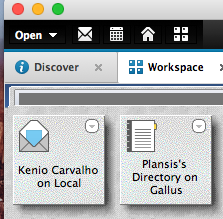
The solution:
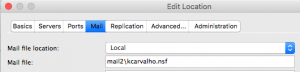
Yesterday i moved my mail box from mail folder to mail2 folder and add the icon to the workspace, but the location was not updated.
Change the location to mail2\kcarvalho.nsf the keyboard shortcut works fine again 🙂
Flash’s death has been slow and painful, and now Google is planning to deal it another blow. Google has detailed plans to start blocking most Flash content with Chrome, with the change targeted toward the end of this year.
Under its current vision, nearly every website would have Flash content blocked by default. Visitors would still be able to enable Flash content on a site-by-site basis, but they would have to specifically choose to do so. Chrome would display a prompt offering to enable Flash; if chosen, Chrome would remember to run Flash on that site for all future visits.
See the full article here
This specification describes a method for surfacing customer experience digital data on a web or other digital resource as a JavaScript Object which can be used for communicating this data to digital analytics and reporting servers.
https://www.w3.org/2013/12/ceddl-201312.pdf
You can use the NOTES.INI setting LOGSTATUSBAR=1 to enable logging of status bar messages to the local log file, LOG.NSF. To view the logged messages, open the file, LOG.NSF, and then click the Miscellaneous Events view. Status bar messages are appended with “Status Msg.”
To write the status bar messages to an external file, use the NOTES.INI setting Debug_Outfile=<path to file> with the NOTES.INI setting LOGSTATUSBAR=1. For example:
LOGSTATUSBAR=1
Debug_Outfile=c:\temp\StatusBarLogging.txt
The Liberty profile has support for java 8 for some time. If you want java 8 on WebSphere 8.5.5 full profile you must apply the fix pack 9 first.
Installing the optional Java 7.0 or Java 7.1 or 8 does not imply that profiles can take advantage of this new version of Java. The managesdk command has to be used to switch Java or the WAS Admin Console. wsadmin can also be used.
Instructions on how to use the managesdk can be read on this IBM TN
See the SDK version for each WAS version on this link
I try several times to setup Forms Expericence Builder (8.5 and 8.6) on top of Portal Cluster (2 nodes) using the Installation Manager (IIM)
I got the following error during the ear deployment.
WASX7015E: Exception running command: “source “/opt/ibm/WebSphere/wp_profile/ConfigEngine/config/work/was/curJaclScript.jacl””; exception information:
com.ibm.bsf.BSFException: error while eval’ing Jacl expression:
java.lang.IllegalArgumentException: WASX7122E: Expected “-” not found.
-appname “”Forms Experience Builder”” -cluster PortalCluster -MapResRefToEJB { {“IBM Forms Experience Builder WAR 8.5.1.489” “” builder.war,WEB-INF/web.xml jdbc/BuilderDataSource “javax.sql.DataSource” “jdbc/IBM_FORMS_DATA_SOURCE” “” “”} {“IBM Forms Experience Builder WAR 8.5.1.489” “” builder.war,WEB-INF/web.xml mail/BuilderMailSession “javax.mail.Session” “mail/IBM_FORMS_MAIL_SESSION”}} -MapModulesToServers { {.* .* WebSphere:cell=dmgrCell01,cluster=PortalCluster}} -MapRolesToUsers { {“UseApplicationsUsers” No Yes {} {}} {“AdministrativeUsers” No No {adminportal} {}} {“EditApplicationsUsers” No Yes {} {}}} -usedefaultbindings -CtxRootForWebMod { {“IBM Forms Experience Builder WAR 8.5.1.489” builder.war,WEB-INF/web.xml /forms} {“IBM Forms Experience Builder Basic Auth WAR 8.5.1.489” builder-basic.war,WEB-INF/web.xml /forms-basic}}
I search a lot about the problem without success. I raise a PMR and the answer was:
“You cannot install FEB into a Portal server at this time, there are a few known issues with the IIM installer. If you want to install FEB into the same WAS as portal then you will need to deploy the .ear manually, the steps can be found in the Knowledge Center -> http://www.ibm.com/support/knowledgecenter/SS6KJL_8.6.0/FEB/in_deploying_was.dita”
Doing the manual steps i got FEB working with WebSphere Portal